Pepp Heroes: Relic Quest
อัปเดตเมื่อ
เวอร์ชันปัจจุบัน
1.2.48570
ให้บริการโดย

เวลาคุณเล่น Pepp Heroes: Relic Quest, คุณอาจรู้สึกว่ามือคุณอาจบังจอแล้วทำให้ไม่ได้เล่นแบบเต็มที่. เล่นแบบไร้ขีดจำกัดด้วยเม้าส์และคีย์บอร์ด. MEmu มีตัวเลือกหลายอย่างให้คุณใช้งานเกมที่คุณเล่นแบบที่คุณต้องการ. ดาวน์โหลดและเล่น Pepp Heroes: Relic Quest บน PC. เล่นนานแค่ไหนก็ได้, ไม่ต้องชาร์จแบตเตอรี่, หรือเจอคนโทรเข้ามาระหว่างเล่น. MEmu 9 เป็นตัวเลือกสำหรับการเล่น Pepp Heroes: Relic Quest บน PC. ทางทีมงานเราได้ปรับแต่งเกม, ปรับให้เล่นเกมบางเกมได้เหมือนเล่น Pepp Heroes: Relic Quest เป็นเกม PC เช่นเล็งด้วยเม้าส์หรือใช้คีย์บอร์ด. ระบบของเรายังทำให้คุณสามารถเปิดเล่นได้มากกว่า 2 เกมพร้อมๆกันในคอมของคุณ. และที่สำคัญที่สุด, ระบบโปรแกรมของเราสามารถทำให้คุณใช้ระบบของ PC ทำให้เกมลื่นเหมือนกับใช้โทรศัพท์รุ่นล่าสุด. เราไม่ได้ดูแลเรื่องการเล่นเกม, แต่เราดูแลถึงความสนุกสนานที่คุณได้จากการเล่นด้วย.
แสดงเพิ่มเติม
ดาวน์โหลด Pepp Heroes: Relic Quest บน PC ด้วย MEmu Android Emulator สนุกกับการเล่นบนหน้าจอขนาดใหญ่ Experience a vertical collectible RPG packed with stunning visuals and endless content!
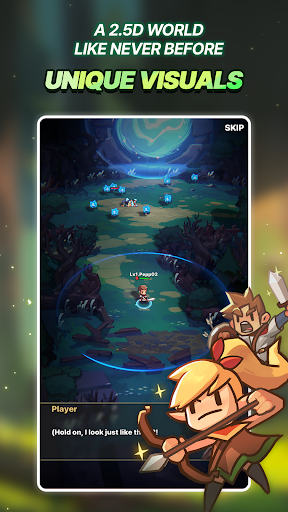
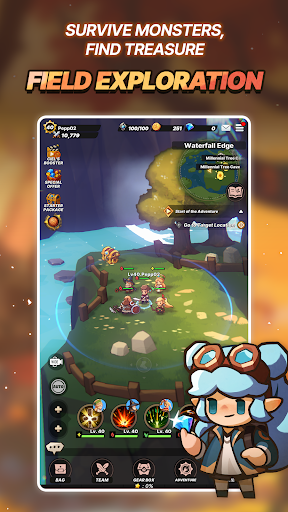
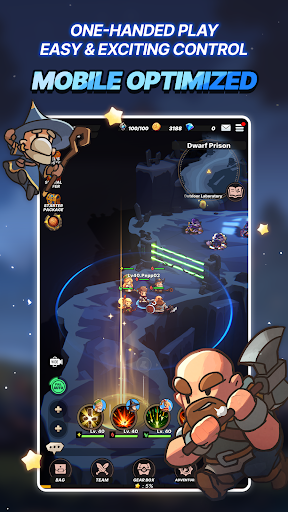
Experience a vertical collectible RPG packed with stunning visuals and endless content!
Unmatched rewards and a whole new world of 2.5D action await you.
《 Game Overview 》
[A Living 2.5D World]
Experience depth and space with rich 2.5D graphics.
Unique hero designs bring a vivid, one-of-a-kind look and feel.
[The Thrill of Manual Controls]
One-handed vertical play—easy to pick up, hard to put down!
Enjoy combat that’s optimized for mobile, but full of real control.
[Jobs, Classes & Squad Synergy]
Mix 8 Jobs and 4 Classes for explosive synergy.
Unlock new Jobs and combine Heroes to craft your perfect squad.
[Summon Legendary Heroes]
SSR Heroes bursting with personality, along with a diverse cast full of untapped potential!
Summon, strategize, and create your ultimate team.
[From Boss Raids to Thrilling PvP]
From cooperative Boss Raids with friends to a variety of PvP modes,
dive into endless gameplay experiences!
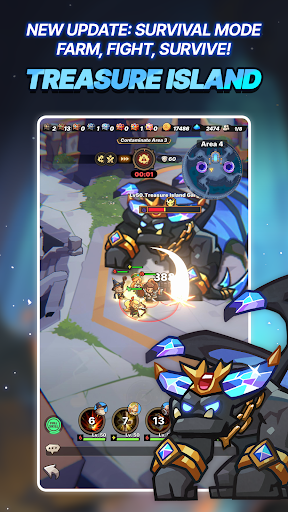
[Farm, Fight, Survive]
Enter a thrilling PvP survival mode set on a mysterious island.
Gather resources, outlast your rivals, and become the last one standing to claim special rewards.
[Accelerate Your Growth! Airship System]
Perfect your progression through Team Training!
Grow stronger with Team Training and facility upgrades.
***
[App Permissions]
We request access permissions to provide the following services when using this app:
1. (Optional) Storage (Photos/Media/Files): We request permission to use storage for downloading and storing game data.
- For Android 12 and below
2. (Optional) Notifications: We request permission to publish notifications related to the app's services.
※ Services can still be used without granting optional access permissions, excluding the functionalities associated with those permissions.
[How to Remove Permissions]
You can reset or remove permissions after allowing them as shown below.
1. Android 6.0 or above: Settings 》 Apps 》 Select App 》 Permissions 》 Allow or Remove Permissions
2. Android 6.0 or below: Upgrade the operating system to remove permissions or delete the app
※ If you are using Android 6.0 or below, we recommend that you upgrade to 6.0 or above as you can't change the optional permissions individually.
• Supported Languages: 한국어, English, 日本語, 简体中文, 繁體中文, Deutsch, Français, Español, ไทย
• This app is free-to-play and offers in-app purchases. Purchasing paid items may incur additional fees, and payment cancelation may not be available depending on the type of the item.
• Conditions regarding the usage of this game (contract termination/payment cancelation, etc.) can be viewed in the game or the Com2uS mobile game Terms of Service (available on the website, https://terms.withhive.com/terms/policy/view/M121/T1 ).
• Inquiries regarding the game can be submitted via Com2uS Customer Support 1:1 Inquiry ( http://m.withhive.com 》 Customer Support 》 1:1 Inquiry).
แสดงเพิ่มเติม

1. ดาวน์โหลดตัวติดตั้ง MEmu และสิ้นสุดการติดตั้ง

2. เริ่ม MEmu จากนั้นเปิด Google Play บนหน้าแรก

3. ค้นหา Pepp Heroes: Relic Quest ใน Google Play
Install
4. ดาวน์โหลดและติดตั้ง Pepp Heroes: Relic Quest
5. เมื่อติดตั้งเสร็จให้คลิกที่ไอคอนเพื่อเริ่มใช้งาน

6. สนุกกับการเล่น Pepp Heroes: Relic Quest บนพีซีด้วย MEmu
MEmu App Player เป็นอีมูเลเตอร์ Android ที่ดีที่สุดและผู้คนกว่า 50 ล้านคนเพลิดเพลินไปกับประสบการณ์การเล่นเกม Android ที่ยอดเยี่ยม เทคโนโลยีการจำลองเสมือนของ MEmu ช่วยให้คุณเล่นเกม Android หลายพันเกมได้อย่างราบรื่นบนพีซีของคุณแม้แต่เกมที่ต้องใช้กราฟิกมากที่สุด
จอใหญ่และกราฟฟิกสวยกว่า; เล่นได้นาน, ไม่ต้องใช้แบตเตอรี่โทรศัพท์หรือเน็ตโทรศัพท์.
ระบบปรับแต่งปุ่มคีย์บอร์ดและเม้าส์ตามที่คุณเลือก
เล่นมากกว่าหนึ่งเกมบน PC ในเวลาเดียวกันด้วยระบบหลายจอหรือ Multi-Instance manager.
Play Pepp Heroes: Relic Quest on PC by following steps: