Revenge of the Savage Planet
อัปเดตเมื่อ
เวอร์ชันปัจจุบัน
ให้บริการโดย

เวลาคุณเล่น Revenge of the Savage Planet, คุณอาจรู้สึกว่ามือคุณอาจบังจอแล้วทำให้ไม่ได้เล่นแบบเต็มที่. เล่นแบบไร้ขีดจำกัดด้วยเม้าส์และคีย์บอร์ด. MEmu มีตัวเลือกหลายอย่างให้คุณใช้งานเกมที่คุณเล่นแบบที่คุณต้องการ. ดาวน์โหลดและเล่น Revenge of the Savage Planet บน PC. เล่นนานแค่ไหนก็ได้, ไม่ต้องชาร์จแบตเตอรี่, หรือเจอคนโทรเข้ามาระหว่างเล่น. MEmu 9 เป็นตัวเลือกสำหรับการเล่น Revenge of the Savage Planet บน PC. ทางทีมงานเราได้ปรับแต่งเกม, ปรับให้เล่นเกมบางเกมได้เหมือนเล่น Revenge of the Savage Planet เป็นเกม PC เช่นเล็งด้วยเม้าส์หรือใช้คีย์บอร์ด. ระบบของเรายังทำให้คุณสามารถเปิดเล่นได้มากกว่า 2 เกมพร้อมๆกันในคอมของคุณ. และที่สำคัญที่สุด, ระบบโปรแกรมของเราสามารถทำให้คุณใช้ระบบของ PC ทำให้เกมลื่นเหมือนกับใช้โทรศัพท์รุ่นล่าสุด. เราไม่ได้ดูแลเรื่องการเล่นเกม, แต่เราดูแลถึงความสนุกสนานที่คุณได้จากการเล่นด้วย.
แสดงเพิ่มเติม
ดาวน์โหลด Revenge of the Savage Planet บน PC ด้วย MEmu Android Emulator สนุกกับการเล่นบนหน้าจอขนาดใหญ่ Revenge of the Savage Planet is a vibrant and satirical sci-fi action-adventure game that invites players to jump, shoot, and explore a series of colorful alien worlds filled with quirky creatures and hidden secrets.
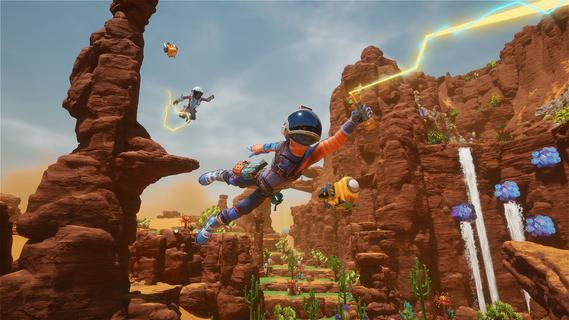
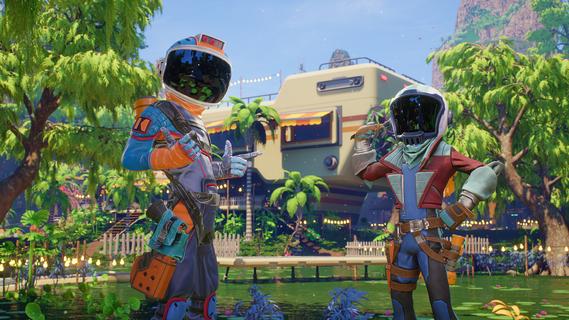
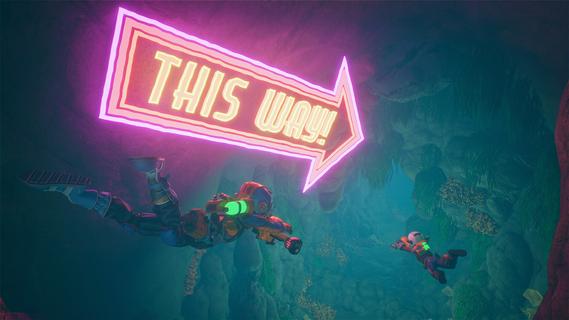
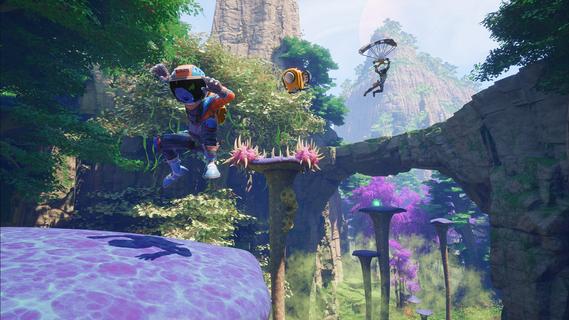
Revenge of the Savage Planet is a vibrant and satirical sci-fi action-adventure game that invites players to jump, shoot, and explore a series of colorful alien worlds filled with quirky creatures and hidden secrets. Developed as a sequel to the original Savage Planet, this installment elevates the experience with a fresh over-the-shoulder third-person perspective, adding more expressive character animations and a playful tone that embraces chaotic fun. Set across five distinct planets, each world offers unique environments inspired by a mix of retro aesthetics and modern gameplay design. One planet, for example, draws heavily from 90s arcade culture, featuring neon colors, vertical challenges, and bizarre modified creatures that create a nostalgic yet fresh atmosphere. The game encourages players to explore organically rather than relying on traditional objective markers, rewarding curiosity and experimentation with upgrades, collectibles, and environmental puzzles. Traversal in Revenge of the Savage Planet is dynamic and engaging. Players can sprint, double jump using a jetpack, slide, grind rails, and even glide with a paraglider to navigate the diverse terrain. The game’s signature goo gun adds a creative twist to both movement and combat: different types of goo have unique properties—green goo makes surfaces slippery, red goo acts like magma, and other variants allow players to manipulate the environment and enemies in inventive ways. For instance, coating terrain in goo can create makeshift slides or traps, while setting enemies ablaze adds a satisfying layer of emergent gameplay. Combat is fast-paced but not the sole focus; it blends smoothly with exploration and puzzle-solving. Players can scan enemies to identify weaknesses, stun and capture them for research, and unlock new gear and abilities at their home base. The arsenal includes laser guns, goo projectiles, and special items like a laser lasso, offering varied tactical options. The game’s humor and charm shine through in the quirky enemy designs, exaggerated animations, and lighthearted narrative that satirizes corporate greed and sci-fi tropes. Revenge of the Savage Planet supports both single-player and multiplayer modes, including online co-op with cross-play and local split-screen co-op. This flexibility allows friends to team up and tackle the challenges together, enhancing the fun and replayability. The developers emphasize a design philosophy that fosters discovery and experimentation, ensuring that each playthrough can reveal new surprises and interactions. Narratively, the game follows the player’s character as they seek revenge on a megacorporation that abandoned them on these hostile planets. Through a series of ironic and stylized video logs, players uncover the backstory and motivations behind the mission, adding depth to the otherwise lighthearted and comedic tone. Overall, Revenge of the Savage Planet stands out as a colorful, energetic, and inventive sci-fi adventure that combines classic platforming and shooting mechanics with a unique goo-based gameplay system. Its blend of humor, exploration, and cooperative play makes it a promising title for fans of action-adventure games looking for a fresh and entertaining experience in an alien world.
แสดงเพิ่มเติม

1. ดาวน์โหลดตัวติดตั้ง MEmu และสิ้นสุดการติดตั้ง

2. เริ่ม MEmu จากนั้นเปิด Google Play บนหน้าแรก

3. ค้นหา Revenge of the Savage Planet ใน Google Play
Install
4. ดาวน์โหลดและติดตั้ง Revenge of the Savage Planet
5. เมื่อติดตั้งเสร็จให้คลิกที่ไอคอนเพื่อเริ่มใช้งาน

6. สนุกกับการเล่น Revenge of the Savage Planet บนพีซีด้วย MEmu
MEmu App Player เป็นอีมูเลเตอร์ Android ที่ดีที่สุดและผู้คนกว่า 50 ล้านคนเพลิดเพลินไปกับประสบการณ์การเล่นเกม Android ที่ยอดเยี่ยม เทคโนโลยีการจำลองเสมือนของ MEmu ช่วยให้คุณเล่นเกม Android หลายพันเกมได้อย่างราบรื่นบนพีซีของคุณแม้แต่เกมที่ต้องใช้กราฟิกมากที่สุด
จอใหญ่และกราฟฟิกสวยกว่า; เล่นได้นาน, ไม่ต้องใช้แบตเตอรี่โทรศัพท์หรือเน็ตโทรศัพท์.
ระบบปรับแต่งปุ่มคีย์บอร์ดและเม้าส์ตามที่คุณเลือก
เล่นมากกว่าหนึ่งเกมบน PC ในเวลาเดียวกันด้วยระบบหลายจอหรือ Multi-Instance manager.
Play Revenge of the Savage Planet on PC by following steps: