AlgoLaser
อัปเดตเมื่อ
เวอร์ชันปัจจุบัน
1.0.8
ให้บริการโดย

เมื่อใช้ AlgoLaser บนโทรศัพท์ของคุณไม่ต้องกังวลกับการชาร์จไฟมากเกินไปปลดปล่อยตัวคุณเองจากหน้าจอขนาดเล็กและสนุกกับการใช้แอพนี้บนหน้าจอขนาดใหญ่ จากนี้ไปรับประสบการณ์เต็มหน้าจอของแอปพลิเคชันของคุณด้วยคีย์บอร์ดและเมาส์ MEmu มีคุณสมบัติที่น่าแปลกใจที่คุณคาดหวัง: การติดตั้งที่รวดเร็วและการตั้งค่าที่ง่ายควบคุมได้ง่ายไม่ จำกัด แบตเตอรี่ข้อมูลมือถือและการโทรที่รบกวน MEmu 9 ใหม่ล่าสุดเป็นตัวเลือกที่ดีที่สุดสำหรับการใช้ Meitu – โปรแกรมแก้ไขภาพแนวธรรมชาติ บนคอมพิวเตอร์ของคุณ ด้วยรหัสการดูดซึมของเราผู้จัดการหลายอินสแตนซ์ทำให้สามารถเปิดบัญชี 2 บัญชีขึ้นไปในเวลาเดียวกันได้ และที่สำคัญที่สุดเอ็นจิ้นจำลองพิเศษของเราสามารถปลดปล่อยศักยภาพของPCของคุณและทำให้ทุกอย่างราบรื่นและสนุกสนาน
แสดงเพิ่มเติม
สัมผัสประสบการณ์สุดยอดการใช้งาน AlgoLaser บนพีซีด้วย MEmu Play นี่คือโปรแกรมจำลอง Android ฟรีที่ทรงพลัง ให้คุณใช้งานแอป Android นับพันบนเดสก์ท็อป สนุกกับการเชื่อมต่อกับเพื่อนๆ และขัดเกลาผลงานของคุณอย่างมีประสิทธิภาพยิ่งขึ้น! Easy Set-up Laser Engraving App with Advanced Features.
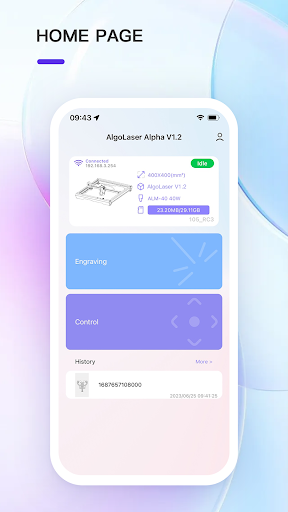
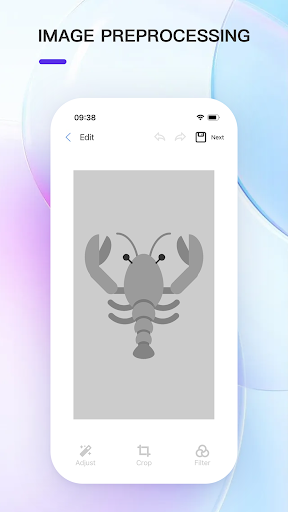
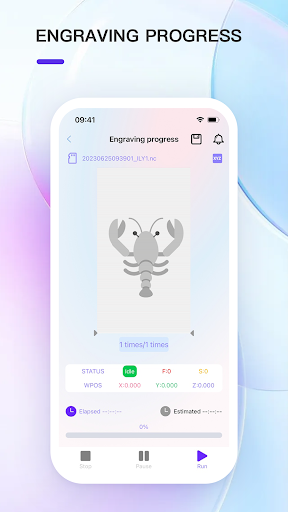
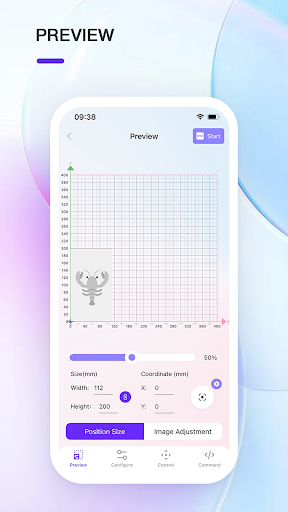
Easy Set-up Laser Engraving App with Advanced Features
Effortless Connectivity and Control
Four steps for connecting App and machine
Remote Control for Laser Module Movement
Adjustable Engraving Parameters and Size
One-Click Engraving Mode Switching (YRR/YRC)
Switch between Professional/Beginner mode to cater to different user groups
Customization Made Easy
Direct Image Import for Hassle-Free Engraving
Extensive Font Selection for Personalized Engravings
Built-In Drawing Tools for Unique Designs
Template Library for Enhanced Designs
Ready-to-Use Templates for QR Codes
Barcodes
Business Cards
Puzzles
Streamlined Workflow and Efficiency
Historical Memory Mode, Easy Batch Customization of Products
Selection of Engraving Parameters for Over 120 Specific Materials
Others
Support for .gcode, .nc, .gc, .txt, .g, .ngc, .cnc, .tap files
Live Machine Status Monitoring and Alerts
Unlock the potential of laser engraving with our advanced features that simplify the process and unleash your creativity. From effortless connectivity to real-time monitoring, our comprehensive solution offers a seamless and efficient engraving experience. With optimal performance and compatibility, you can push the boundaries of your creativity and achieve exceptional results. Join our vibrant community and embark on a journey of innovation and inspiration.
For any inquiries or further information, our dedicated support team is ready to assist you.
Stay connected with us:
Instagram: @algo.laser
Facebook: @Algolaserofficial
Twitter: @algolaser
Tiktok: @algolaserofficial
แสดงเพิ่มเติม

1. ดาวน์โหลดตัวติดตั้ง MEmu และสิ้นสุดการติดตั้ง

2. เริ่ม MEmu จากนั้นเปิด Google Play บนหน้าแรก

3. ค้นหา AlgoLaser ใน Google Play
Install
4. ดาวน์โหลดและติดตั้ง AlgoLaser
5. เมื่อติดตั้งเสร็จให้คลิกที่ไอคอนเพื่อเริ่มใช้งาน

6. ใช้ MEmu เพื่อสัมผัสประสบการณ์ AlgoLaser บนคอมพิวเตอร์ของคุณ
MEmu Play คือโปรแกรมจำลอง Android ที่ดีที่สุด มีผู้ใช้มากกว่า 50 ล้านคน มอบประสบการณ์การใช้งานแอป Android ขั้นสุดยอดให้กับคุณ เทคโนโลยีจำลองเสมือนของ MEmu ช่วยให้คุณรันแอป Android หลายพันแอปบนคอมพิวเตอร์ได้อย่างราบรื่น แม้แอปที่กินทรัพยากรเครื่องสูงที่สุด
จอใหญ่และกราฟฟิกสวยกว่า; เล่นได้นาน, ไม่ต้องใช้แบตเตอรี่โทรศัพท์หรือเน็ตโทรศัพท์.
ระบบปรับแต่งปุ่มคีย์บอร์ดและเม้าส์ตามที่คุณเลือก
เล่นมากกว่าหนึ่งเกมบน PC ในเวลาเดียวกันด้วยระบบหลายจอหรือ Multi-Instance manager.
Use AlgoLaser on PC by following steps: