
Uncover - Bookish App
อัปเดตเมื่อ
เวอร์ชันปัจจุบัน
1.30.0
ให้บริการโดย

เมื่อใช้ Uncover - Bookish App บนโทรศัพท์ของคุณไม่ต้องกังวลกับการชาร์จไฟมากเกินไปปลดปล่อยตัวคุณเองจากหน้าจอขนาดเล็กและสนุกกับการใช้แอพนี้บนหน้าจอขนาดใหญ่ จากนี้ไปรับประสบการณ์เต็มหน้าจอของแอปพลิเคชันของคุณด้วยคีย์บอร์ดและเมาส์ MEmu มีคุณสมบัติที่น่าแปลกใจที่คุณคาดหวัง: การติดตั้งที่รวดเร็วและการตั้งค่าที่ง่ายควบคุมได้ง่ายไม่ จำกัด แบตเตอรี่ข้อมูลมือถือและการโทรที่รบกวน MEmu 9 ใหม่ล่าสุดเป็นตัวเลือกที่ดีที่สุดสำหรับการใช้ Meitu – โปรแกรมแก้ไขภาพแนวธรรมชาติ บนคอมพิวเตอร์ของคุณ ด้วยรหัสการดูดซึมของเราผู้จัดการหลายอินสแตนซ์ทำให้สามารถเปิดบัญชี 2 บัญชีขึ้นไปในเวลาเดียวกันได้ และที่สำคัญที่สุดเอ็นจิ้นจำลองพิเศษของเราสามารถปลดปล่อยศักยภาพของPCของคุณและทำให้ทุกอย่างราบรื่นและสนุกสนาน
แสดงเพิ่มเติม
ดาวน์โหลด Uncover - Bookish App บน PC ด้วย MEmu Android Emulator สนุกกับการเล่นบนหน้าจอขนาดใหญ่ Uncover is a cozy, stress-free app designed to help you track your reading, discover new books, and share beautiful, fun, bookish templates—all without the hassle of complicated stats or charts.

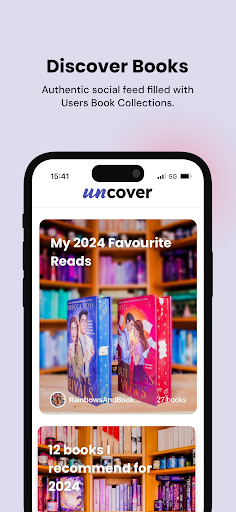
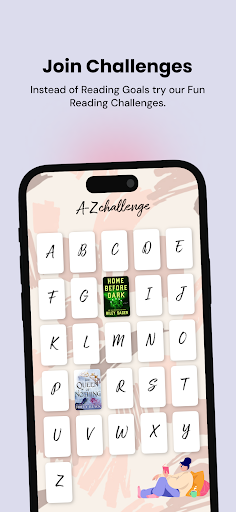
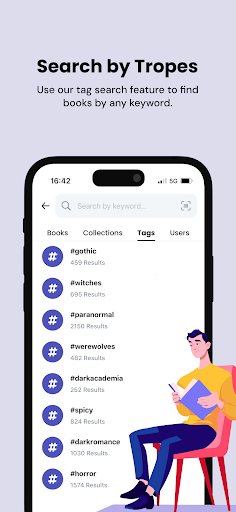
Uncover is a cozy, stress-free app designed to help you track your reading, discover new books, and share beautiful, fun, bookish templates—all without the hassle of complicated stats or charts. Whether you’re a casual reader, a bookstagrammer, or moodreader Uncover is your go-to space to celebrate books in a visual, authentic way.
Key Features:
- Track Your Reading Effortlessly: Log books you’re currently reading, finished or want to read, and let Uncover do the rest. Enjoy fun, automatic templates like "Currently Reading," monthly wrap-ups, and challenge updates—no manual editing needed. It’s bookish fun, wrapped for you.
- Create Personalized Book Collections: Organize your books into custom collections and personalize them with photos that reflect your style. There are no limits to how you curate your virtual library!
- Join Fun, Pressure-Free Challenges: Dive into yearly and seasonal reading challenges for inspiration—not obligation. Explore new genres, themes, and tropes, let our challenges help you pick your next read when you’re unsure of what to start next. From our popular A-Z Challenge & Romance Trope Bingo to the seasonal Spooky, Halloween Challenge.
- Discover Books Through Tags: Find your next read by exploring tags like #EnemiesToLovers, #HistoricalFantasy, or #Vampires. Whether you’re in the mood for Hockey Romance one day and something creepy the next, our flexible search lets you explore books that fit your changing moods.
- React to Books with Fun & Fair Ratings: Ditch the star ratings! Use our 5-heart reaction system and quirky emojis to express how you feel about a book—whether it’s "Not My Cup of Tea" or „I’m obsessed!"
- Explore the Social Feed: Discover books in a fun, scrollable feed of collections. Whether it’s someone’s TBR, favorites or genre/theme-specific reads, the social feed is always buzzing with new books to discover.
- Connect with the Reading Community: Follow other readers and interact with their collections. Leave comments and share your thoughts about books.
Additional Features:
- Barcode Scanner: Quickly find books for your collections by scanning barcodes—no typing necessary.
- Guest Mode: Browse Uncover without needing to sign up. Check out features and collections before creating an account.
Uncover is all about simplicity and visual enjoyment. For readers who value the aesthetics and community side of books, Uncover offers a space to track, share, and discover—without the pressure of numbers and goals. Celebrate your reading journey at your own pace, with templates that make it easy to share your progress with friends.
*DISCLAIMER* Uncover is a book tracking application. It does not allow you to read ebooks or listen to audiobooks.
แสดงเพิ่มเติม

1. ดาวน์โหลดตัวติดตั้ง MEmu และสิ้นสุดการติดตั้ง

2. เริ่ม MEmu จากนั้นเปิด Google Play บนหน้าแรก

3. ค้นหา Uncover - Bookish App ใน Google Play
Install
4. ดาวน์โหลดและติดตั้ง Uncover - Bookish App
5. เมื่อติดตั้งเสร็จให้คลิกที่ไอคอนเพื่อเริ่มใช้งาน

6. ใช้ MEmu เพื่อสัมผัสประสบการณ์ Uncover - Bookish App บนคอมพิวเตอร์ของคุณ
MEmu Play คือโปรแกรมจำลอง Android ที่ดีที่สุด มีผู้ใช้มากกว่า 50 ล้านคน มอบประสบการณ์การใช้งานแอป Android ขั้นสุดยอดให้กับคุณ เทคโนโลยีจำลองเสมือนของ MEmu ช่วยให้คุณรันแอป Android หลายพันแอปบนคอมพิวเตอร์ได้อย่างราบรื่น แม้แอปที่กินทรัพยากรเครื่องสูงที่สุด
จอใหญ่และกราฟฟิกสวยกว่า; เล่นได้นาน, ไม่ต้องใช้แบตเตอรี่โทรศัพท์หรือเน็ตโทรศัพท์.
ระบบปรับแต่งปุ่มคีย์บอร์ดและเม้าส์ตามที่คุณเลือก
เล่นมากกว่าหนึ่งเกมบน PC ในเวลาเดียวกันด้วยระบบหลายจอหรือ Multi-Instance manager.
Use Uncover - Bookish App on PC by following steps: