Monster Hunter Outlanders
อัปเดตเมื่อ
เวอร์ชันปัจจุบัน
ให้บริการโดย

เวลาคุณเล่น Monster Hunter Outlanders, คุณอาจรู้สึกว่ามือคุณอาจบังจอแล้วทำให้ไม่ได้เล่นแบบเต็มที่. เล่นแบบไร้ขีดจำกัดด้วยเม้าส์และคีย์บอร์ด. MEmu มีตัวเลือกหลายอย่างให้คุณใช้งานเกมที่คุณเล่นแบบที่คุณต้องการ. ดาวน์โหลดและเล่น Monster Hunter Outlanders บน PC. เล่นนานแค่ไหนก็ได้, ไม่ต้องชาร์จแบตเตอรี่, หรือเจอคนโทรเข้ามาระหว่างเล่น. MEmu 9 เป็นตัวเลือกสำหรับการเล่น Monster Hunter Outlanders บน PC. ทางทีมงานเราได้ปรับแต่งเกม, ปรับให้เล่นเกมบางเกมได้เหมือนเล่น Monster Hunter Outlanders เป็นเกม PC เช่นเล็งด้วยเม้าส์หรือใช้คีย์บอร์ด. ระบบของเรายังทำให้คุณสามารถเปิดเล่นได้มากกว่า 2 เกมพร้อมๆกันในคอมของคุณ. และที่สำคัญที่สุด, ระบบโปรแกรมของเราสามารถทำให้คุณใช้ระบบของ PC ทำให้เกมลื่นเหมือนกับใช้โทรศัพท์รุ่นล่าสุด. เราไม่ได้ดูแลเรื่องการเล่นเกม, แต่เราดูแลถึงความสนุกสนานที่คุณได้จากการเล่นด้วย.
แสดงเพิ่มเติม
ดาวน์โหลด Monster Hunter Outlanders บน PC ด้วย MEmu Android Emulator สนุกกับการเล่นบนหน้าจอขนาดใหญ่ Monster Hunter Outlanders คือเกมแอ็กชันการล่าและสำรวจในซีรีส์ Monster Hunter สำหรับมือถือ ได้รับลิขสิทธิ์อย่างเป็นทางการจาก CAPCOM พัฒนาโดย TiMi Studio Group และจัดจำหน่ายโดย Garena เกมภาคนี้ยังคงรักษาอาวุธคลาสสิกและประสบการณ์การล่าอันเป็นเอกลักษณ์ของซีรีส์เอาไว้ พร้อมนำเสนอโลกใบใหม่ เหล่า Adventurers Buddies และมอนสเตอร์ใหม่ที่สร้างขึ้นมาสำหรับเกมภาคนี้โดยเฉพาะ.
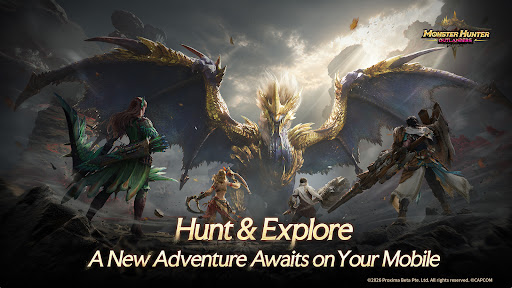
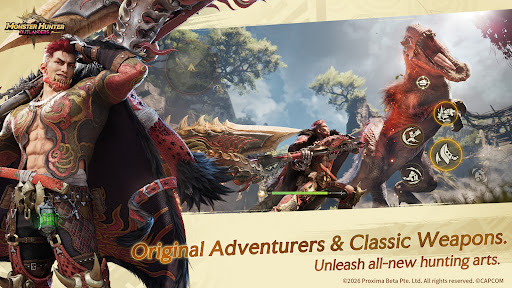
Monster Hunter Outlanders คือเกมแอ็กชันการล่าและสำรวจในซีรีส์ Monster Hunter สำหรับมือถือ ได้รับลิขสิทธิ์อย่างเป็นทางการจาก CAPCOM พัฒนาโดย TiMi Studio Group และจัดจำหน่ายโดย Garena เกมภาคนี้ยังคงรักษาอาวุธคลาสสิกและประสบการณ์การล่าอันเป็นเอกลักษณ์ของซีรีส์เอาไว้ พร้อมนำเสนอโลกใบใหม่ เหล่า Adventurers Buddies และมอนสเตอร์ใหม่ที่สร้างขึ้นมาสำหรับเกมภาคนี้โดยเฉพาะ
ออกล่าและสำรวจในโลกแห่ง Aesoland
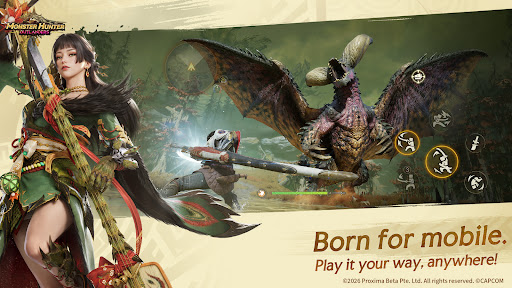
การผจญภัยครั้งใหม่รอคุณอยู่บนโทรศัพท์มือถือ! เกมได้รับการออกแบบมาเพื่อการเล่นบนมือถือโดยเฉพาะ พร้อมระบบควบคุมที่ใช้งานสะดวก ให้คุณเข้าสู่การล่าได้ทันที!
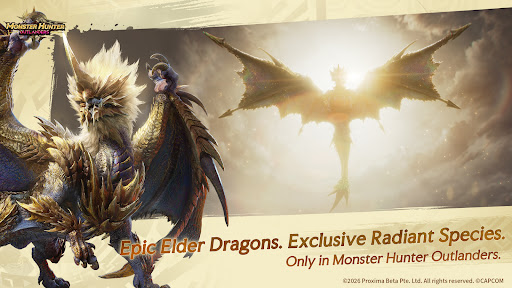
Elder Dragons สุดยิ่งใหญ่และมอนสเตอร์สายพันธุ์ Radiant ที่มีเฉพาะใน Monster Hunter Outlanders
Ruger Aidal: Elder Dragons ปรากฏกายลงมาราวกับดวงอาทิตย์ที่กำลังลุกโชน ท่ามกลางแสงเรืองรองอันเจิดจ้า!
มอนสเตอร์สายพันธุ์ Radiant ถือกำเนิดขึ้นจากสภาพแวดล้อมที่เปลี่ยนแปลงอยู่ตลอดเวลา พร้อมนำพาการผจญภัยและความท้าทายรูปแบบใหม่มาให้คุณ!
ไม่มีภารกิจไหนยากเกินไป รวมทีมได้ทุกเมื่อ!
สำรวจพื้นที่กว้างใหญ่เพียงลำพัง หรือชวนเพื่อนมารวมทีมได้ง่าย ๆ เพียงแตะครั้งเดียว จัดตั้งทีมล่า 4 คน ไม่ว่าจะเวลาไหนหรือสถานที่ใด ขอเพียงมีเพื่อนร่วมทางอยู่เคียงข้าง ก็ไม่มีมอนสเตอร์ตัวไหนน่ากลัวเกินกว่าจะเผชิญหน้ากับมัน!
Adventurers และอาวุธคลาสสิก
ปลดปล่อยศิลปะแห่งการล่ารูปแบบใหม่
พบกับอาวุธสุดคลาสสิกทั้ง 7 ประเภท ได้แก่ Great Sword, Long Sword, Dual Blades, Hammer, Lance, Heavy Bowgun, และ Bow อาวุธแต่ละประเภทจะผสานเข้ากับ Adventurers แต่ละคนอย่างมีเอกลักษณ์ ยังคงเสน่ห์ของประสบการณ์การล่าแบบดั้งเดิม พร้อมปลดล็อกท่าต่อเนื่องรูปแบบใหม่!
พบกับ Buddies หน้าใหม่
Palico, Rutaco, และ Trillan— Buddies ทั้งสามที่มีบุคลิกโดดเด่นแตกต่างกัน—จะยืนเคียงข้างคุณในการต่อสู้ พร้อมเติมสีสันให้การผจญภัยผ่านอีเวนต์และกิจกรรมมากมาย
เกิดมาเพื่อการเล่นบนมือถือ
สัมผัสอาวุธคลาสสิกและรูปแบบการล่าที่ถ่ายทอดจากซีรีส์ได้อย่างเต็มรูปแบบ พร้อมการปรับแต่งอย่างละเอียดเพื่อมือถือ มอบประสบการณ์การเล่นที่ลื่นไหลและอิสระยิ่งขึ้น—ออกล่าได้ทุกที่ ทุกเวลา!
ลงทะเบียนล่วงหน้าได้แล้ววันนี้ แล้วออกล่าให้สนุกสุดมันส์!
ติดตามเราได้ที่
เว็บไซต์ทางการ: https://mho.garena.com
Facebook: https://www.facebook.com/MonsterhunteroutlandersTH
Instagram: https://www.instagram.com/mho_thailand
Youtube: https://www.youtube.com/@MHO_TH
Discord: https://discord.gg/y4euVgYJnd
แสดงเพิ่มเติม

1. ดาวน์โหลดตัวติดตั้ง MEmu และสิ้นสุดการติดตั้ง

2. เริ่ม MEmu จากนั้นเปิด Google Play บนหน้าแรก

3. ค้นหา Monster Hunter Outlanders ใน Google Play
Install
4. ดาวน์โหลดและติดตั้ง Monster Hunter Outlanders
5. เมื่อติดตั้งเสร็จให้คลิกที่ไอคอนเพื่อเริ่มใช้งาน

6. สนุกกับการเล่น Monster Hunter Outlanders บนพีซีด้วย MEmu
MEmu App Player เป็นอีมูเลเตอร์ Android ที่ดีที่สุดและผู้คนกว่า 50 ล้านคนเพลิดเพลินไปกับประสบการณ์การเล่นเกม Android ที่ยอดเยี่ยม เทคโนโลยีการจำลองเสมือนของ MEmu ช่วยให้คุณเล่นเกม Android หลายพันเกมได้อย่างราบรื่นบนพีซีของคุณแม้แต่เกมที่ต้องใช้กราฟิกมากที่สุด
จอใหญ่และกราฟฟิกสวยกว่า; เล่นได้นาน, ไม่ต้องใช้แบตเตอรี่โทรศัพท์หรือเน็ตโทรศัพท์.
ระบบปรับแต่งปุ่มคีย์บอร์ดและเม้าส์ตามที่คุณเลือก
เล่นมากกว่าหนึ่งเกมบน PC ในเวลาเดียวกันด้วยระบบหลายจอหรือ Multi-Instance manager.
Play Monster Hunter Outlanders on PC by following steps: