Kemono Teatime
Güncellendi
Mevcut Sürüm
Sunan

Kemono Teatime oynamak için bu kadar tutkuluyken, ellerin telefonunun küçük ekranıyla sınırlı kalmamalı.Bir profesyonel gibi oyna ve klavye ve fare ile oyununun tüm kontrolü sende olsun.MEmu sana beklediğin her şeyi sunuyor.PC'de Kemono Teatime indir ve oyna. İstediğin kadar oyna, artık pil sınırlamaları, mobil veri ve rahatsız edici çağrılar yok.Yepyeni MEmu 9, PC'de Kemono Teatime oynamak için en iyi seçim. Uzmanlığımızla hazırlanan zarif ön ayar tuş eşleme sistemi Kemono Teatime oyununu gerçek bir PC oyununa dönüştürüyor.MEmu çoklu örnek yöneticisi, aynı cihazda 2 veya daha fazla hesap oynamayı mümkün kılıyor.Ve en önemlisi, özel emülasyon motorumuz PC'nizin tüm potansiyelini ortaya çıkarıyor, her şeyi sorunsuz hale getiriyor.
Daha fazla göster
Kemono Teatime’i MEmu Android Emülatör ile PC’ye indirin. Büyük ekranda oynamanın keyfini çıkarın. Relax in the world of Kemono Teatime, where animal ears are a normal part of everyday life.
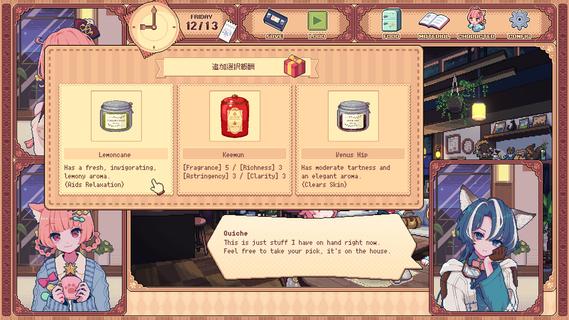
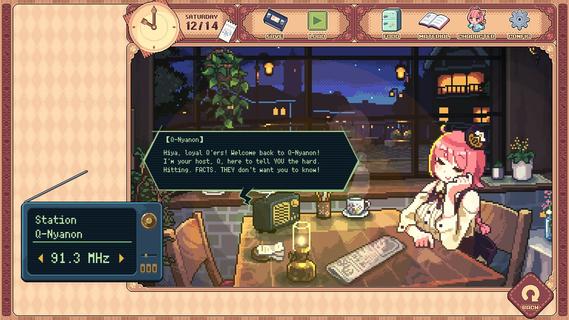
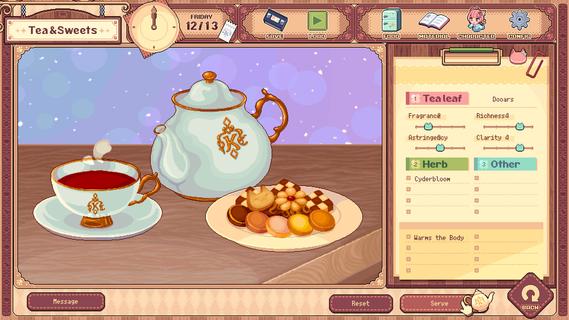
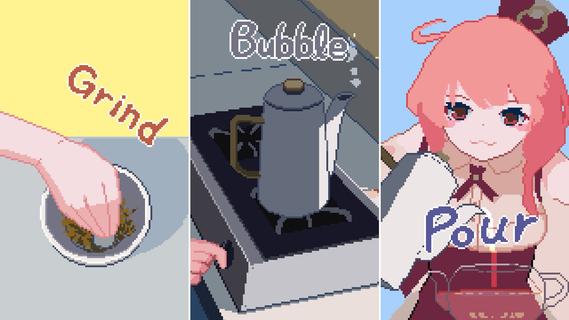
Relax in the world of Kemono Teatime, where animal ears are a normal part of everyday life. Here in Melodius, you can whip up whatever blends of tea you desire in your favorite cafe as you play through an adorable story. Come now and live out your bestest and cutest lifeâdown to the last drop. Though, you do know that once it's run out, that's it, right? It'd do you best to learn that all good things come to an end.Meet all the Kemomimis that come through the cafe and help them wind down, spend a cute and adorable time sipping on some tea, and come to terms with their ultimate fates."Welcome!"Come on in! Here, we strive to make the remainder of our customers' lives as enjoyable as possible, so we've curated a cute space for everyone to relax and find peace in. We also have a great range of tea blends and delicious desserts on offer, so please make yourself at home.Now, to get things started, how about a nice cup of tea blended just for you?"Here's one of our specialties!"Create your own unique teas with our stock of 9 black teas, 15 herbs, and secret ingredients. Get to know the customers and make them something that they'll love while you immerse yourself in the wonderful sounds of the tea-making process."Let your ears enjoy the cute atmosphere too!"De-stress with the cafe's ASMR, with all its sounds and effects recorded in binaural audio. The background music also changes with each customer, giving you unique experiences that come and go with each new soul you meet."All the staff and customers here are adorable Kemomimis!"All the cafe staff and customers (except me) have animal ears! Please savor each encounter and goodbye while you canâI'm sure you'll have a very special and unforgettable time here with all the people you meet.-TarteThe cafe's trusty manager and elder of two sisters. She's the resident tea-blending expert.-MacaronTarte's adorable little sister who is a patissiere and the face of the cafe.-QuicheA traveler who lodges at the cafe in exchange for some handy gifts.-The Kemomimi customersMeet a host of these cute and colorful characters at the cafe!"The cafe will be open for three weeks only!"You caught that, right? The shop's only running for a maximum of 21 days. What kind of people and stories will you get to know during this time? And is the cafe really shutting down after that? Why open up a limited-time cafe to begin with, anyway? The truth is up to you to uncover!"Come back again any time!"If you like what you see, please wishlist Kemono Teatime and we will deliver the latest updates to you. Until then, please sit back with a nice cup of tea and relax.
Daha fazla göster

1. MEmu yükleyicisini indirin ve kurulumu tamamlayın

2. MEmu'yu başlatın ve ana sayfada Google Play'i açın

3. Google Play'de Kemono Teatime arayın
Install
4. Kemono Teatime indirin ve yükleyin
5. Kurulum tamamlandığında başlamak için simgeye tıklayın

6. PC’de MEmu ile Kemono Teatime oyunun keyfini çıkarın
MEmu App Player, en iyi ücretsiz Android emülatörüdür ve 50 milyon insan zaten mükemmel Android oyun deneyimini yaşamaktadır. MEmu sanallaştırma teknolojisi, binlerce grafik oyunu hatta grafikte en yoğun olanları bile sorunsuz bir şekilde bilgisayarınızda oynamanızı sağlar.
Daha büyük ekranla daha iyi grafiklere sahip; Pil veya mobil veri sınırlaması olmaksızın uzun süre.
Keymapping klavye ve fare veya gamepad'in hassas kontrolü için destek verir.
Multi-Instance yöneticisi ile tek bir bilgisayarda aynı anda birden fazla oyun hesabı veya görev gerçekleşilebilir.
Play Kemono Teatime on PC by following steps: