
Kemono Teatime
Atualizada
Versão atual
Oferecido por

Com toda a sua paixão por jogar Kemono Teatime, não deixe os polegares te atrapalharem em uma pequena tela do seu celular. Jogue como um profissional e tenha controle total do seu jogo com teclado e mouse. O MEmu oferece todas as coisas que você está esperando. Baixe e jogue Kemono Teatime no PC. Jogue o tempo que quiser, sem mais limitações de bateria, dados móveis e aquelas ligações enquanto estiver jogando. O novíssimo MEmu 9 é a melhor escolha de jogar Kemono Teatime no PC. Com grandes novidades no sistema de mapeamento que faz Kemono Teatime um jogo de PC real. Nossa equipe melhorou o gerenciamento de várias instâncias do Android, reduzindo tempo de reprodução de 2 ou mais contas no mesmo dispositivo. O mais importante, nosso mecanimos de emulação exclusivo pode liberar todo o potencial do seu PC sem travamentos, rodando tudo liso. Nós nos preocupamos não apenas com você joga, mas com todo o processo de desfrutar de 100% do seu jogo favorito.
Mostre mais
Download do Kemono Teatime no PC com MEmu Android Emulador: Divirta-se jogando na tela grande. Relax in the world of Kemono Teatime, where animal ears are a normal part of everyday life.
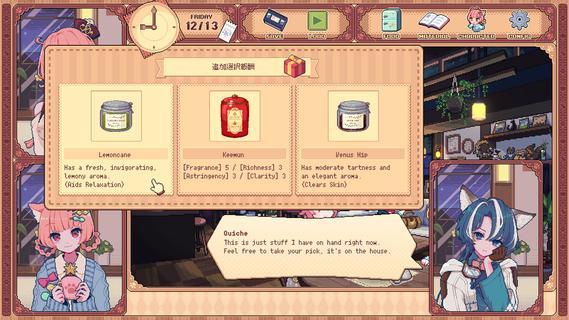
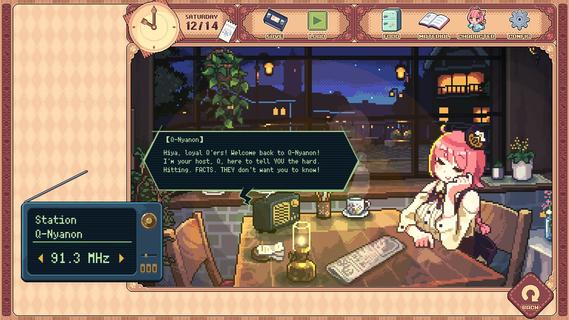
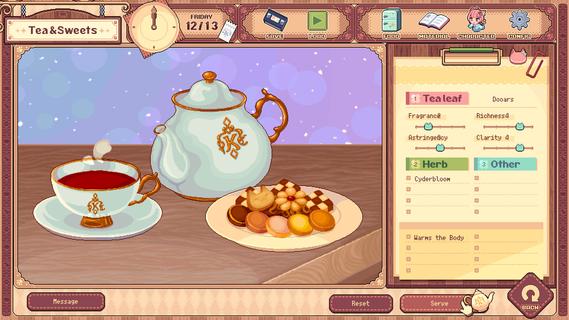

Relax in the world of Kemono Teatime, where animal ears are a normal part of everyday life. Here in Melodius, you can whip up whatever blends of tea you desire in your favorite cafe as you play through an adorable story. Come now and live out your bestest and cutest lifeâdown to the last drop. Though, you do know that once it's run out, that's it, right? It'd do you best to learn that all good things come to an end.Meet all the Kemomimis that come through the cafe and help them wind down, spend a cute and adorable time sipping on some tea, and come to terms with their ultimate fates."Welcome!"Come on in! Here, we strive to make the remainder of our customers' lives as enjoyable as possible, so we've curated a cute space for everyone to relax and find peace in. We also have a great range of tea blends and delicious desserts on offer, so please make yourself at home.Now, to get things started, how about a nice cup of tea blended just for you?"Here's one of our specialties!"Create your own unique teas with our stock of 9 black teas, 15 herbs, and secret ingredients. Get to know the customers and make them something that they'll love while you immerse yourself in the wonderful sounds of the tea-making process."Let your ears enjoy the cute atmosphere too!"De-stress with the cafe's ASMR, with all its sounds and effects recorded in binaural audio. The background music also changes with each customer, giving you unique experiences that come and go with each new soul you meet."All the staff and customers here are adorable Kemomimis!"All the cafe staff and customers (except me) have animal ears! Please savor each encounter and goodbye while you canâI'm sure you'll have a very special and unforgettable time here with all the people you meet.-TarteThe cafe's trusty manager and elder of two sisters. She's the resident tea-blending expert.-MacaronTarte's adorable little sister who is a patissiere and the face of the cafe.-QuicheA traveler who lodges at the cafe in exchange for some handy gifts.-The Kemomimi customersMeet a host of these cute and colorful characters at the cafe!"The cafe will be open for three weeks only!"You caught that, right? The shop's only running for a maximum of 21 days. What kind of people and stories will you get to know during this time? And is the cafe really shutting down after that? Why open up a limited-time cafe to begin with, anyway? The truth is up to you to uncover!"Come back again any time!"If you like what you see, please wishlist Kemono Teatime and we will deliver the latest updates to you. Until then, please sit back with a nice cup of tea and relax.
Mostre mais

1. Faça o download do instalador do MEmu e conclua a instalação

2. Inicie o MEmu e depois abra o Google Play na página inicial

3. Pesquise Kemono Teatime no Google Play
Install
4. Baixe e Instale Kemono Teatime
5. Na conclusão da instalação, clique no ícone para iniciar

6. Divirta-se jogando Kemono Teatime no PC com MEmu
O MEmu App Player é o melhor emulador de Android grátis e 50 milhões de pessoas já desfrutam de sua excelente experiência de jogos no Android. A tecnologia de virtualização do MEmu permite que você jogue milhares de jogos do Android sem problemas no seu PC, mesmo os com gráficos mais intensivos.
Tela maior com gráficos melhores; Longa duração e sem limitação de bateria ou dados móveis.
Suporte completo ao Mapaeamento de Teclas para controle preciso do teclado e mouse ou gamepad.
Várias contas de jogos ou tarefas em um único PC de uma só vez com o Gerenciador de várias instâncias.
Play Kemono Teatime on PC by following steps: