Starling Ascent
Güncellendi
Mevcut Sürüm
1.0.11
Sunan

Starling Ascent oynamak için bu kadar tutkuluyken, ellerin telefonunun küçük ekranıyla sınırlı kalmamalı.Bir profesyonel gibi oyna ve klavye ve fare ile oyununun tüm kontrolü sende olsun.MEmu sana beklediğin her şeyi sunuyor.PC'de Starling Ascent indir ve oyna. İstediğin kadar oyna, artık pil sınırlamaları, mobil veri ve rahatsız edici çağrılar yok.Yepyeni MEmu 9, PC'de Starling Ascent oynamak için en iyi seçim. Uzmanlığımızla hazırlanan zarif ön ayar tuş eşleme sistemi Starling Ascent oyununu gerçek bir PC oyununa dönüştürüyor.MEmu çoklu örnek yöneticisi, aynı cihazda 2 veya daha fazla hesap oynamayı mümkün kılıyor.Ve en önemlisi, özel emülasyon motorumuz PC'nizin tüm potansiyelini ortaya çıkarıyor, her şeyi sorunsuz hale getiriyor.
Daha fazla göster
Starling Ascent’i MEmu Android Emülatör ile PC’ye indirin. Büyük ekranda oynamanın keyfini çıkarın. Starling Ascent: Bring the light back.
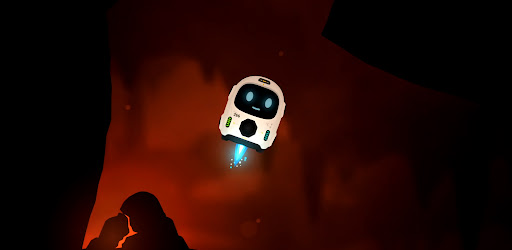

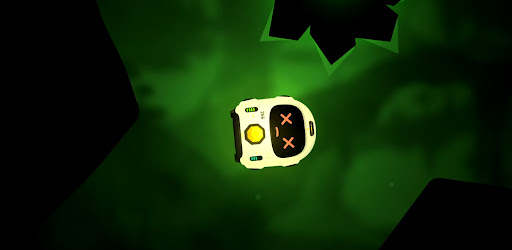

Starling Ascent: Bring the light back.
A whole civilisation went dark, power scattered into the caves far below. One small fail-safe robot was built to survive exactly this, and now he has one job: find the lost cores, carry them home, and climb back to a surface he has never seen.
Fly with super simple controls, nothing but rotate and thrust... use your momentum, angles and gravity pulling the whole time. It takes a few seconds to understand and hours to master.
Return Cores & Ascend Every level, a lost core is waiting somewhere in the cave. Find it, pick it up, then carry it to the docks and set it down clean. Do that and the way up opens. Be careful, Starling has limited health and fuel. You can find extra fuel in most of the longer levels and see if you can perfect every level with no damage against the clock!
Five worlds and one final ascent. You climb through five different layers, each with its own look, its own feel, and its own ways to kill you. Every world adds a new hazard to everything you've already learned and one careless touch of lava, spikes, or a laser is instant death. They glow bright, so you always see them coming. The only question is whether you can fly clean enough to get past. Then put all your skills to test in the final Ascent through the opening.
FS-266 (Starling) isn't alone on this mission. Volare is his weary AI companion riding shotgun for the climb: part guide, part narrator, part sarcastic friend. Starling was made for one job. Volare knows exactly what that means. By the time you reach the surface, so will you.
Bring the light back.
- Simple controls. Rotate and thrust, that's it. A few seconds to understand, hours to master.
- Momentum flight. Use your angles, your speed and the gravity pulling on you the whole time.
- Grab, carry, dock. Find the lost core, carry it to the docks, set it down clean to open the way up.
- Five worlds and a final ascent. Each layer has its own look, its own feel and its own ways to kill you.
- One-shot hazards. Lava, spikes and lasers are instant death, but they glow bright so you always see them coming.
- Mind your fuel. Thrust burns it, coasting is free. Find extra fuel in the longer caves and plan your route home.
- Perfect every level. Clear it with no damage and against the clock if you're good enough.
- Volare. Your weary AI companion for the climb: part guide, part narrator, part sarcastic friend.
Daha fazla göster

1. MEmu yükleyicisini indirin ve kurulumu tamamlayın

2. MEmu'yu başlatın ve ana sayfada Google Play'i açın

3. Google Play'de Starling Ascent arayın
Install
4. Starling Ascent indirin ve yükleyin
5. Kurulum tamamlandığında başlamak için simgeye tıklayın

6. PC’de MEmu ile Starling Ascent oyunun keyfini çıkarın
MEmu App Player, en iyi ücretsiz Android emülatörüdür ve 50 milyon insan zaten mükemmel Android oyun deneyimini yaşamaktadır. MEmu sanallaştırma teknolojisi, binlerce grafik oyunu hatta grafikte en yoğun olanları bile sorunsuz bir şekilde bilgisayarınızda oynamanızı sağlar.
Daha büyük ekranla daha iyi grafiklere sahip; Pil veya mobil veri sınırlaması olmaksızın uzun süre.
Keymapping klavye ve fare veya gamepad'in hassas kontrolü için destek verir.
Multi-Instance yöneticisi ile tek bir bilgisayarda aynı anda birden fazla oyun hesabı veya görev gerçekleşilebilir.
Play Starling Ascent on PC by following steps: