Starling Ascent
อัปเดตเมื่อ
เวอร์ชันปัจจุบัน
1.0.11
ให้บริการโดย

เวลาคุณเล่น Starling Ascent, คุณอาจรู้สึกว่ามือคุณอาจบังจอแล้วทำให้ไม่ได้เล่นแบบเต็มที่. เล่นแบบไร้ขีดจำกัดด้วยเม้าส์และคีย์บอร์ด. MEmu มีตัวเลือกหลายอย่างให้คุณใช้งานเกมที่คุณเล่นแบบที่คุณต้องการ. ดาวน์โหลดและเล่น Starling Ascent บน PC. เล่นนานแค่ไหนก็ได้, ไม่ต้องชาร์จแบตเตอรี่, หรือเจอคนโทรเข้ามาระหว่างเล่น. MEmu 9 เป็นตัวเลือกสำหรับการเล่น Starling Ascent บน PC. ทางทีมงานเราได้ปรับแต่งเกม, ปรับให้เล่นเกมบางเกมได้เหมือนเล่น Starling Ascent เป็นเกม PC เช่นเล็งด้วยเม้าส์หรือใช้คีย์บอร์ด. ระบบของเรายังทำให้คุณสามารถเปิดเล่นได้มากกว่า 2 เกมพร้อมๆกันในคอมของคุณ. และที่สำคัญที่สุด, ระบบโปรแกรมของเราสามารถทำให้คุณใช้ระบบของ PC ทำให้เกมลื่นเหมือนกับใช้โทรศัพท์รุ่นล่าสุด. เราไม่ได้ดูแลเรื่องการเล่นเกม, แต่เราดูแลถึงความสนุกสนานที่คุณได้จากการเล่นด้วย.
แสดงเพิ่มเติม
ดาวน์โหลด Starling Ascent บน PC ด้วย MEmu Android Emulator สนุกกับการเล่นบนหน้าจอขนาดใหญ่ Starling Ascent: Bring the light back.


Starling Ascent: Bring the light back.
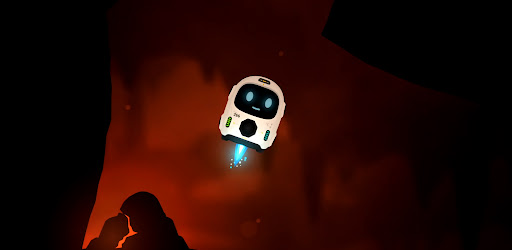
A whole civilisation went dark, power scattered into the caves far below. One small fail-safe robot was built to survive exactly this, and now he has one job: find the lost cores, carry them home, and climb back to a surface he has never seen.
Fly with super simple controls, nothing but rotate and thrust... use your momentum, angles and gravity pulling the whole time. It takes a few seconds to understand and hours to master.
Return Cores & Ascend Every level, a lost core is waiting somewhere in the cave. Find it, pick it up, then carry it to the docks and set it down clean. Do that and the way up opens. Be careful, Starling has limited health and fuel. You can find extra fuel in most of the longer levels and see if you can perfect every level with no damage against the clock!
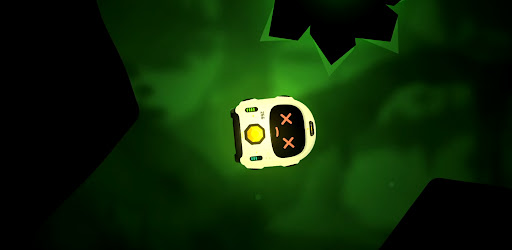
Five worlds and one final ascent. You climb through five different layers, each with its own look, its own feel, and its own ways to kill you. Every world adds a new hazard to everything you've already learned and one careless touch of lava, spikes, or a laser is instant death. They glow bright, so you always see them coming. The only question is whether you can fly clean enough to get past. Then put all your skills to test in the final Ascent through the opening.
FS-266 (Starling) isn't alone on this mission. Volare is his weary AI companion riding shotgun for the climb: part guide, part narrator, part sarcastic friend. Starling was made for one job. Volare knows exactly what that means. By the time you reach the surface, so will you.
Bring the light back.
- Simple controls. Rotate and thrust, that's it. A few seconds to understand, hours to master.
- Momentum flight. Use your angles, your speed and the gravity pulling on you the whole time.
- Grab, carry, dock. Find the lost core, carry it to the docks, set it down clean to open the way up.
- Five worlds and a final ascent. Each layer has its own look, its own feel and its own ways to kill you.
- One-shot hazards. Lava, spikes and lasers are instant death, but they glow bright so you always see them coming.
- Mind your fuel. Thrust burns it, coasting is free. Find extra fuel in the longer caves and plan your route home.
- Perfect every level. Clear it with no damage and against the clock if you're good enough.
- Volare. Your weary AI companion for the climb: part guide, part narrator, part sarcastic friend.
แสดงเพิ่มเติม

1. ดาวน์โหลดตัวติดตั้ง MEmu และสิ้นสุดการติดตั้ง

2. เริ่ม MEmu จากนั้นเปิด Google Play บนหน้าแรก

3. ค้นหา Starling Ascent ใน Google Play
Install
4. ดาวน์โหลดและติดตั้ง Starling Ascent
5. เมื่อติดตั้งเสร็จให้คลิกที่ไอคอนเพื่อเริ่มใช้งาน

6. สนุกกับการเล่น Starling Ascent บนพีซีด้วย MEmu
MEmu App Player เป็นอีมูเลเตอร์ Android ที่ดีที่สุดและผู้คนกว่า 50 ล้านคนเพลิดเพลินไปกับประสบการณ์การเล่นเกม Android ที่ยอดเยี่ยม เทคโนโลยีการจำลองเสมือนของ MEmu ช่วยให้คุณเล่นเกม Android หลายพันเกมได้อย่างราบรื่นบนพีซีของคุณแม้แต่เกมที่ต้องใช้กราฟิกมากที่สุด
จอใหญ่และกราฟฟิกสวยกว่า; เล่นได้นาน, ไม่ต้องใช้แบตเตอรี่โทรศัพท์หรือเน็ตโทรศัพท์.
ระบบปรับแต่งปุ่มคีย์บอร์ดและเม้าส์ตามที่คุณเลือก
เล่นมากกว่าหนึ่งเกมบน PC ในเวลาเดียวกันด้วยระบบหลายจอหรือ Multi-Instance manager.
Play Starling Ascent on PC by following steps: