Clash of Heroes - Marvel vs Capcom
Оновлено
Поточна версія
1.0.1-marvel
Постачальник

Перестаньте турбуватися про надмірні витрати, використовуючи ххх на своєму мобільному телефоні, звільніться від крихітного екрану і насолоджуйтеся використанням програми на набагато більшому дисплеї. Відтепер отримуйте повний екран свого додатка за допомогою клавіатури та миші. MEmu пропонує вам усі дивовижні функції, які ви очікували: швидка установка та просте налаштування, інтуїтивно зрозумілі елементи керування, більше обмежень від акумулятора, мобільних даних та тривожних дзвінків. Новий MEmu 9 - найкращий вибір використання Clash of Heroes - Marvel vs Capcom на вашому комп’ютері. За допомогою нашого поглинання менеджер із кількома примірниками одночасно дозволяє відкрити 2 або більше рахунків. І найголовніше, наш ексклюзивний емуляційний двигун може вивільнити весь потенціал вашого ПК, зробити все гладким і приємним.
Show more
Насолоджуйтесь чудовим досвідом Clash of Heroes - Marvel vs Capcom гри на ПК за допомогою програми MEMU App Player. Це потужний безкоштовний емулятор Android, який дозволяє вам грати в тисячі ігор Android. [X] Description - Clash of Heroes - Marvel vs CapcomPlayers select a team of characters from the Marvel and Capcom universes to engage in combat and attempt to knock out their opponents.
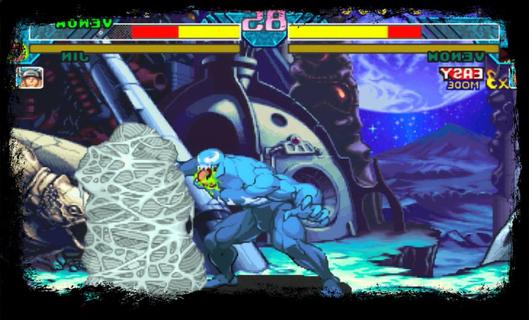
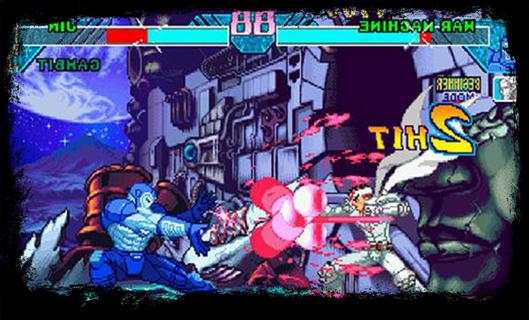
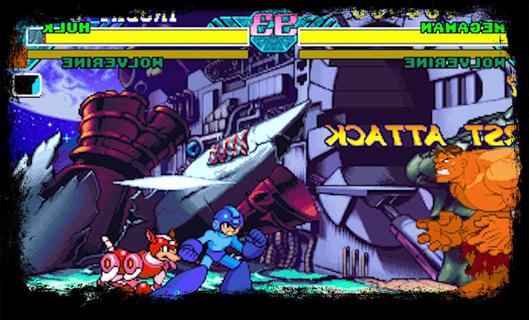
[X] Description - Clash of Heroes - Marvel vs CapcomPlayers select a team of characters from the Marvel and Capcom universes to engage in combat and attempt to knock out their opponents. In contrast to the series previous entry, Marvel Super Heroes, the game features characters from numerous Capcom video game franchises, rather than strictly Street characters. While the gameplay is largely identical to its predecessor, Clash of Super Heroes features two distinct changes: the removal of the traditional character assist system and the introduction of the "Variable Cross" attack.The Dreamcast version of the game was praised for its visuals, gameplay, and translation of the original arcade experience. Due to the PlayStation's limited RAM capacity, Capcom removed tag team battles in an attempt to preserve the game's speed and graphical integrity. Consequently, the PlayStation port received positive reviews, just not as much as the Dreamcast version. [X] Gameplay - Clash of Heroes - Marvel vs CapcomClash of Heroes - Marvel vs Capcom is the third entry in the Marvel vs Capcom series of 2D fighting games. The game utilizes similar tag team-based game mechanics to its predecessorBefore starting each match, the player selects a team of two fighters to compete in one-on-one combat. The player is free to swap between their characters at any point during battle. While one character fights, their teammate resting off-screen slowly regenerates their life gauge. The first team to exhaust their opponent's vitality wins the match; however, if the timer runs out before either team is knocked out, the player with the most remaining health is declared the winner.[X] Feature - Clash of Heroes - Marvel vs CapcomGame features two significant gameplay changes. The game removes the "Variable Assist" feature used in the previous installment, which allows the player to summon their offscreen teammate to perform a special attack, in favor of the "Guest Character/Special Partner" system. While similar in function, guest characters are randomly allocated to each player at the beginning of a match. They are also limited to a few uses per round. Clash of Heroes introduces a new technique called the "Variable Cross", also known as a "Duo Team Attack". When executing a Variable Cross, the player can attack their opponent with both characters simultaneously for a limited time. In addition, the player is given unlimited use of the "Hyper Combo Gauge", a colored meter towards the bottom of the screen which allows the player to perform several special techniques, allowing them to pull off multiple Hyper Combos, moves which deliver heavy damage to the opponent, in quick succession.
Show more

1. Download MEmu installer and finish the setup

2. Start MEmu then open Google Play on the desktop

3. Search Clash of Heroes - Marvel vs Capcom in Google Play
Install
4. Download and Install Clash of Heroes - Marvel vs Capcom
5. On install completion click the icon to start

6. Enjoy playing Clash of Heroes - Marvel vs Capcom on PC with MEmu
MEmu App Player є кращим безкоштовним емулятором Android, і 50 мільйонів людей вже користуються його чудовим ігровим досвідом Android. Технологія віртуалізації MEmu дає вам змогу відтворювати тисячі ігор Android на вашому комп'ютері, навіть найбільш насичених графікою.
Bigger screen with better graphics; Long duration, without limitation of battery or mobile data.
Full Keymapping support for precise control of keyboard and mouse or gamepad.
Multiple game accounts or tasks on single PC at one time with Multi-Instance manager.
Play Clash of Heroes - Marvel vs Capcom on PC by following steps: