Clash of Heroes - Marvel vs Capcom
อัปเดตเมื่อ
เวอร์ชันปัจจุบัน
1.0.1-marvel
ให้บริการโดย

เวลาคุณเล่น Clash of Heroes - Marvel vs Capcom, คุณอาจรู้สึกว่ามือคุณอาจบังจอแล้วทำให้ไม่ได้เล่นแบบเต็มที่. เล่นแบบไร้ขีดจำกัดด้วยเม้าส์และคีย์บอร์ด. MEmu มีตัวเลือกหลายอย่างให้คุณใช้งานเกมที่คุณเล่นแบบที่คุณต้องการ. ดาวน์โหลดและเล่น Clash of Heroes - Marvel vs Capcom บน PC. เล่นนานแค่ไหนก็ได้, ไม่ต้องชาร์จแบตเตอรี่, หรือเจอคนโทรเข้ามาระหว่างเล่น. MEmu 9 เป็นตัวเลือกสำหรับการเล่น Clash of Heroes - Marvel vs Capcom บน PC. ทางทีมงานเราได้ปรับแต่งเกม, ปรับให้เล่นเกมบางเกมได้เหมือนเล่น Clash of Heroes - Marvel vs Capcom เป็นเกม PC เช่นเล็งด้วยเม้าส์หรือใช้คีย์บอร์ด. ระบบของเรายังทำให้คุณสามารถเปิดเล่นได้มากกว่า 2 เกมพร้อมๆกันในคอมของคุณ. และที่สำคัญที่สุด, ระบบโปรแกรมของเราสามารถทำให้คุณใช้ระบบของ PC ทำให้เกมลื่นเหมือนกับใช้โทรศัพท์รุ่นล่าสุด. เราไม่ได้ดูแลเรื่องการเล่นเกม, แต่เราดูแลถึงความสนุกสนานที่คุณได้จากการเล่นด้วย.
แสดงเพิ่มเติม
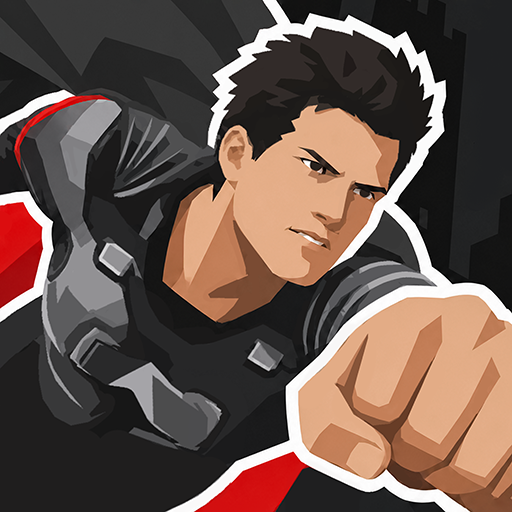
ดาวน์โหลด Clash of Heroes - Marvel vs Capcom บน PC ด้วย MEmu Android Emulator สนุกกับการเล่นบนหน้าจอขนาดใหญ่ [X] Description - Clash of Heroes - Marvel vs CapcomPlayers select a team of characters from the Marvel and Capcom universes to engage in combat and attempt to knock out their opponents.
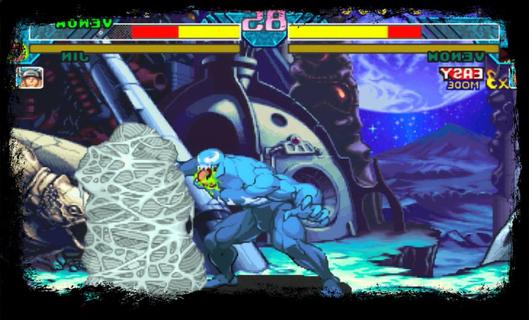
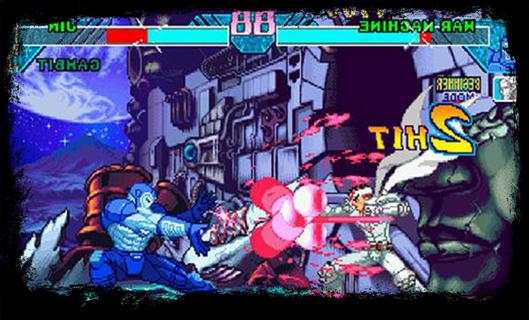
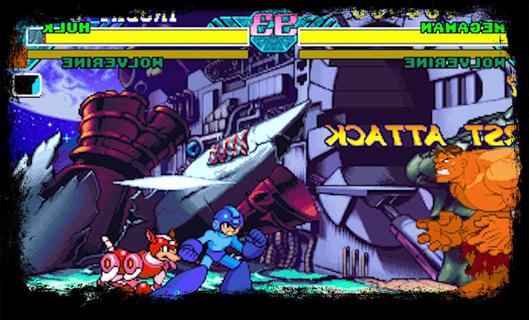
[X] Description - Clash of Heroes - Marvel vs CapcomPlayers select a team of characters from the Marvel and Capcom universes to engage in combat and attempt to knock out their opponents. In contrast to the series previous entry, Marvel Super Heroes, the game features characters from numerous Capcom video game franchises, rather than strictly Street characters. While the gameplay is largely identical to its predecessor, Clash of Super Heroes features two distinct changes: the removal of the traditional character assist system and the introduction of the "Variable Cross" attack.The Dreamcast version of the game was praised for its visuals, gameplay, and translation of the original arcade experience. Due to the PlayStation's limited RAM capacity, Capcom removed tag team battles in an attempt to preserve the game's speed and graphical integrity. Consequently, the PlayStation port received positive reviews, just not as much as the Dreamcast version. [X] Gameplay - Clash of Heroes - Marvel vs CapcomClash of Heroes - Marvel vs Capcom is the third entry in the Marvel vs Capcom series of 2D fighting games. The game utilizes similar tag team-based game mechanics to its predecessorBefore starting each match, the player selects a team of two fighters to compete in one-on-one combat. The player is free to swap between their characters at any point during battle. While one character fights, their teammate resting off-screen slowly regenerates their life gauge. The first team to exhaust their opponent's vitality wins the match; however, if the timer runs out before either team is knocked out, the player with the most remaining health is declared the winner.[X] Feature - Clash of Heroes - Marvel vs CapcomGame features two significant gameplay changes. The game removes the "Variable Assist" feature used in the previous installment, which allows the player to summon their offscreen teammate to perform a special attack, in favor of the "Guest Character/Special Partner" system. While similar in function, guest characters are randomly allocated to each player at the beginning of a match. They are also limited to a few uses per round. Clash of Heroes introduces a new technique called the "Variable Cross", also known as a "Duo Team Attack". When executing a Variable Cross, the player can attack their opponent with both characters simultaneously for a limited time. In addition, the player is given unlimited use of the "Hyper Combo Gauge", a colored meter towards the bottom of the screen which allows the player to perform several special techniques, allowing them to pull off multiple Hyper Combos, moves which deliver heavy damage to the opponent, in quick succession.
แสดงเพิ่มเติม

1. ดาวน์โหลดตัวติดตั้ง MEmu และสิ้นสุดการติดตั้ง

2. เริ่ม MEmu จากนั้นเปิด Google Play บนหน้าแรก

3. ค้นหา Clash of Heroes - Marvel vs Capcom ใน Google Play
Install
4. ดาวน์โหลดและติดตั้ง Clash of Heroes - Marvel vs Capcom
5. เมื่อติดตั้งเสร็จให้คลิกที่ไอคอนเพื่อเริ่มใช้งาน

6. สนุกกับการเล่น Clash of Heroes - Marvel vs Capcom บนพีซีด้วย MEmu
MEmu App Player เป็นอีมูเลเตอร์ Android ที่ดีที่สุดและผู้คนกว่า 50 ล้านคนเพลิดเพลินไปกับประสบการณ์การเล่นเกม Android ที่ยอดเยี่ยม เทคโนโลยีการจำลองเสมือนของ MEmu ช่วยให้คุณเล่นเกม Android หลายพันเกมได้อย่างราบรื่นบนพีซีของคุณแม้แต่เกมที่ต้องใช้กราฟิกมากที่สุด
จอใหญ่และกราฟฟิกสวยกว่า; เล่นได้นาน, ไม่ต้องใช้แบตเตอรี่โทรศัพท์หรือเน็ตโทรศัพท์.
ระบบปรับแต่งปุ่มคีย์บอร์ดและเม้าส์ตามที่คุณเลือก
เล่นมากกว่าหนึ่งเกมบน PC ในเวลาเดียวกันด้วยระบบหลายจอหรือ Multi-Instance manager.
Play Clash of Heroes - Marvel vs Capcom on PC by following steps:






















![[ไกด์เกม] CookieRun Classic แนะนำ 5 คุกกี้น่าปั้น น่าลงทุน ที่มือใหม่ห้ามพลาด! (เล่นบน PC ผ่าน MEmu ให้ลื่นสุด ๆ) PC](https://www.memuplay.com/blog/wp-content/uploads/2026/08/579c01ab-a953-45b3-8115-9b6279b7d6f9.png)