FlashGet Kids:parental control
تازہ کاری
موجودہ ورژن
1.4.0.5
پیشکش بذریعہ

اپنے موبائل فون پر FlashGet Kids:parental control کا استعمال کرتے وقت زیادہ چارج ہونے کی فکر نہ کریں، خود کو چھوٹی اسکرین سے آزاد کریں اور ایپ کو زیادہ بڑے ڈسپلے پر استعمال کرنے کا لطف اٹھائیں۔ اس کے بعد سے کی بورڈ اور ماؤس کے ساتھ اپنے ایپ کا فل اسکرین کا تجربہ حاصل کریں۔ MEmu آپ کو وہ تمام حیران کن خصوصیات پیش کرتا ہے جن کی آپ کو توقع کرتے ہیں: فوری انسٹال اور آسان سیٹ اپ، وجدانی کنٹرول، مزید بیٹری، موبائل ڈیٹا کی کوئی حد نہیں اور اب مزید پریشان کن کالز نہیں۔ نئے برانڈ کا MEmu 9 آپ کے کمپیوٹر پر FlashGet Kids:parental control استعمال کرنے کے لیے بہترین اختیار ہے۔ MEmu کثیر نظیری منیجر بیک وقت 2 یا اس سے زیادہ اکاؤنٹس کھولنا ممکن بناتا ہے۔ اور سب اہم بات، ہمارا خصوصی ایمولیشن انجن آپ کے پی سی کی پوری طاقت ریلیز کرتے ہوئے ہر چیز ہموار اور قابل تفریح بناتا ہے۔
مزید دکھائیں
Download FlashGet Kids:parental control on PC with MEmu Android Emulator. Enjoy playing on big screen. FlashGet Kids: والدین کا کنٹرول والدین کی دیکھ بھال کرنے، انہیں اپنے بچے کے موجودہ ٹھکانے سے باخبر رہنے، ڈیجیٹل روٹینز کی رہنمائی کرنے، اور فون کے استعمال کی اچھی عادات کو فروغ دیتے ہوئے طاقتور اور محفوظ خصوصیات جیسے کہ حقیقی وقت کی سرگرمی کا جائزہ، ایپ بلاک، اور مواد کی رہنمائی کے ذریعے بچوں کی حفاظت کو یقینی بنانے کے لیے ڈیزائن کیا گیا ہے۔.
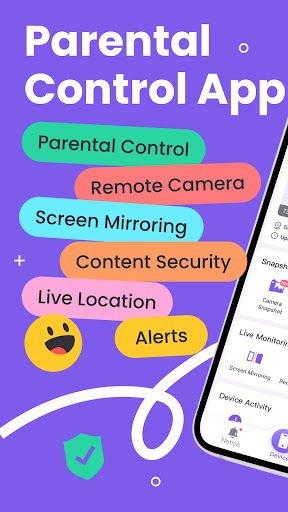
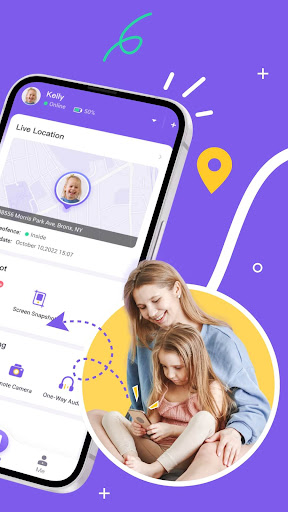
FlashGet Kids: والدین کا کنٹرول والدین کی دیکھ بھال کرنے، انہیں اپنے بچے کے موجودہ ٹھکانے سے باخبر رہنے، ڈیجیٹل روٹینز کی رہنمائی کرنے، اور فون کے استعمال کی اچھی عادات کو فروغ دیتے ہوئے طاقتور اور محفوظ خصوصیات جیسے کہ حقیقی وقت کی سرگرمی کا جائزہ، ایپ بلاک، اور مواد کی رہنمائی کے ذریعے بچوں کی حفاظت کو یقینی بنانے کے لیے ڈیزائن کیا گیا ہے۔
FlashGet Kids آپ کے بچوں کی حفاظت کیسے کرتا ہے؟
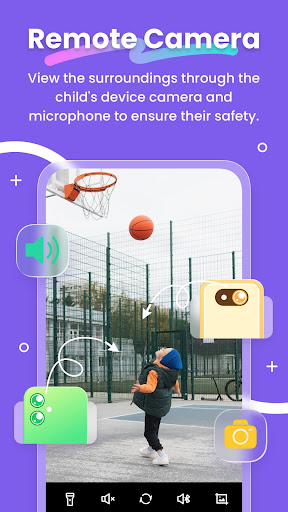
● کیمرہ سنیپ شاٹ / یک طرفہ آڈیو - والدین کو اپنے بچوں کے ارد گرد رونما ہونے والے ہنگامی واقعات کو حقیقی وقت میں پہچاننے اور سمجھنے میں مدد کرتا ہے، والدین کو کسی بھی وقت اپنے بچوں تک پہنچنے اور باخبر رہنے کے قابل بناتا ہے۔
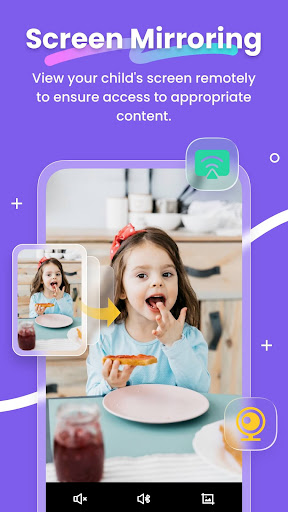
● اسکرین مررنگ - آپ کے بچے کی ہینڈ ہیلڈ اسکرین کو حقیقی وقت میں آپ کے فون پر پروجیکٹ کرتا ہے، جس سے آپ کو ان ایپس کو دیکھنے کی اجازت ملتی ہے جو آپ کا بچہ اسکول میں استعمال کرتا ہے اور ان کے استعمال کی فریکوئنسی، اسے ممکنہ طور پر خطرناک ایپس سے بچاتا ہے۔
● اسکرین اسنیپ شاٹ اور ریکارڈنگز - شیڈول شدہ ریکارڈ کو سپورٹ کرتی ہے۔ اس خصوصیت کے ذریعے، والدین بچے کے فون پر نامناسب تصاویر یا ویڈیوز کے ممکنہ نمائش کی نشاندہی کر سکتے ہیں، اور اپنے بچوں کو ان کی عمر کے مطابق مواد تک رسائی کے لیے رہنمائی کر سکتے ہیں۔
● بچوں کا ٹھکانہ - آپ اپنی مرضی کے مطابق محفوظ زون سیٹ کر سکتے ہیں اور جب وہ مخصوص علاقوں میں داخل ہوتے ہیں یا باہر نکلتے ہیں تو اطلاعات موصول کر سکتے ہیں، مستقل یقین دہانی فراہم کرتے ہیں۔
● Sync App Notifications - ریئل ٹائم سنکرونائزیشن آپ کو سوشل میڈیا ایپس پر اپنے بچے کی پیغام رسانی کی سرگرمیوں کے بارے میں باخبر رہنے میں مدد کرتی ہے، جس سے انہیں سائبر دھونس اور آن لائن گھوٹالوں سے دور رہنے میں مدد ملتی ہے۔
● سوشل ایپ اور مواد کی رہنمائی - ڈیجیٹل حفاظتی ٹولز کے ساتھ، والدین TikTok، YouTube، Snapchat، WhatsApp، Facebook، Instagram، اور Telegram جیسے سوشل میڈیا پلیٹ فارمز پر بچوں کے مواد کی نمائش کی رہنمائی کر سکتے ہیں، جبکہ نامناسب ویب سائٹس کو فلٹر کرنے کے لیے ویب مواد کو فلٹر کرنے میں بھی معاونت کر سکتے ہیں۔ والدین بچوں کو حساس سائٹس تک رسائی سے روکنے کے لیے براؤزنگ کے طریقوں کو اپنی مرضی کے مطابق بنا سکتے ہیں، ان کی عمر کے مطابق مواد کی طرف رہنمائی کرتے ہیں۔
● اسکرین کے وقت کی حدیں - اپنے بچے کے لیے ایک وقف شدہ شیڈول مرتب کریں، کلاس کے دوران انھیں مشغول ہونے سے روکنے کے لیے اس کے فون کے استعمال کے وقت کو محدود کریں۔
● ایپ کے قواعد - وقت کی پابندیوں کے ذریعے ایپس کے لیے حسب ضرورت استعمال کے اصول سیٹ کیے جا سکتے ہیں، جیسے کہ کچھ ایپس کے استعمال یا ان کی مدت کو محدود کرنا۔ والدین کو انتباہات موصول ہوں گے جب ان کا بچہ کوئی ایپلیکیشن انسٹال یا ڈیلیٹ کرنے کی کوشش کرے گا۔
● لائیو پینٹنگ - والدین اپنے بچے کے فون پر ہاتھ سے لکھے ہوئے ڈوڈل کا اشتراک کر سکتے ہیں، اپنے پیار کا اظہار کرتے ہوئے یا ان کے لیے منفرد "خفیہ سگنل" کا اشتراک کر سکتے ہیں، اپنے بچوں کے ساتھ جذباتی تعلق کو بڑھا سکتے ہیں۔
دیگر ڈیجیٹل گائیڈنس ایپس کے مقابلے میں، FlashGet Kids ایک فیملی بانڈ کی طرح ہے، جو والدین کو اپنے بچوں کو بہتر طریقے سے سمجھنے اور ڈیجیٹل ہینڈ ہیلڈ گیجٹ کے استعمال کی اچھی عادات پیدا کرنے میں ان کی مدد کرتا ہے۔
FlashGet Kids کو چالو کرنا آسان ہے:
اپنے فون پر FlashGet Kids انسٹال کریں۔
دعوتی لنک یا کوڈ کے ذریعے اپنے بچے کے فون سے جڑیں۔
اپنے اکاؤنٹ کو اپنے بچے کے فون سے لنک کریں۔
ذیل میں FlashGet Kids کی رازداری کی پالیسی اور شرائط ہیں۔
رازداری کی پالیسی: https://kids.flashget.com/privacy-policy/
سروس کی شرائط: https://kids.flashget.com/terms-of-service/
مدد اور سپورٹ:
اگر آپ کے کوئی سوالات ہیں، تو براہ کرم ہم سے ای میل کے ذریعے بلا جھجھک رابطہ کریں: help@flashget.com
مزید دکھائیں

1. MEmu انسٹالر ڈاؤن لوڈ کریں اور سیٹ اپ مکمل کریں

2. MEmu شروع کریں اسکے بعد ڈیسکٹاپ پر Google Play کھولیں

3. Google Play میں FlashGet Kids:parental control تلاش کریں
Install
4. FlashGet Kids:parental control ڈاؤن لوڈ کریں اور انسٹال کریں
5. انسٹال مکمل ہونے کے بعد سٹارٹ کرنے کے لیے آئیکن پر کلک کریں

6. MEmu کے ساتھ پی سی پر FlashGet Kids:parental control کھیلنے کا لطف لیں
MEmu پلے بہترین اینڈرائڈ ایمولیٹر ہے اور 100 ملین لوگ اس کے زبردست اینڈرائڈ گیمنگ تجربہ سے لطف اندوز ہو رہے ہیں۔ MEmu کی ورچولائزیشن ٹیکنالوجی آپ کو اپنے PC پر ہزاروں اینڈرائڈ گیمز یہاں تک کہ انتہائی گرافک والے گیمز باسہولت کھیلنے کی طاقت دیتی ہے۔
بہتر گرافکس کے ساتھ بڑی اسکرین؛ طویل دورانیہ، بیٹری یا لامحدود موبائل ڈیٹا کے بغیر۔
کی بورڈ اور ماؤس یا گیم پیڈ کے عین مطابق کنٹرول کے لیے کی میپنگ کا پورا سپورٹ۔
کثیر مثالی منیجر کے ساتھ بیک وقت ایک پی سی پر متعدد گیم اکاؤنٹس یا ٹاسکس۔
پی سی پر درج ذیل مراحل پر عمل کرتے ہوئے پر FlashGet Kids:parental control استعمال کریں: u003c/p>