MyInstants: Sound Button App
تازہ کاری
موجودہ ورژن
1.0.8
پیشکش بذریعہ

اپنے موبائل فون پر MyInstants: Sound Button App کا استعمال کرتے وقت زیادہ چارج ہونے کی فکر نہ کریں، خود کو چھوٹی اسکرین سے آزاد کریں اور ایپ کو زیادہ بڑے ڈسپلے پر استعمال کرنے کا لطف اٹھائیں۔ اس کے بعد سے کی بورڈ اور ماؤس کے ساتھ اپنے ایپ کا فل اسکرین کا تجربہ حاصل کریں۔ MEmu آپ کو وہ تمام حیران کن خصوصیات پیش کرتا ہے جن کی آپ کو توقع کرتے ہیں: فوری انسٹال اور آسان سیٹ اپ، وجدانی کنٹرول، مزید بیٹری، موبائل ڈیٹا کی کوئی حد نہیں اور اب مزید پریشان کن کالز نہیں۔ نئے برانڈ کا MEmu 9 آپ کے کمپیوٹر پر MyInstants: Sound Button App استعمال کرنے کے لیے بہترین اختیار ہے۔ MEmu کثیر نظیری منیجر بیک وقت 2 یا اس سے زیادہ اکاؤنٹس کھولنا ممکن بناتا ہے۔ اور سب اہم بات، ہمارا خصوصی ایمولیشن انجن آپ کے پی سی کی پوری طاقت ریلیز کرتے ہوئے ہر چیز ہموار اور قابل تفریح بناتا ہے۔
مزید دکھائیں
MEmu Play کے ساتھ PC پر MyInstants: Sound Button App استعمال کرنے کے شاندار تجربے سے لطف اٹھائیں۔ یہ ایک طاقتور مفت اینڈرائیڈ ایمولیٹر ہے جو آپ کو ان کے ڈیسک ٹاپ ورژن کے لیے ہزاروں اینڈرائیڈ ایپس فراہم کرتا ہے۔ دوستوں کے ساتھ جڑنے اور اعلی کارکردگی کے ساتھ اپنے کام کو چمکانے کا لطف اٹھائیں! MyInstants: Sound Button App is an app for sound buttons, meme sounds, prank audio clips, reaction audio, and sound effects.
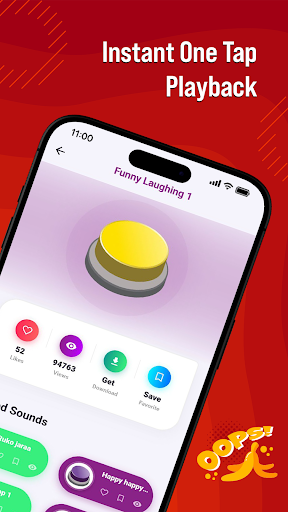
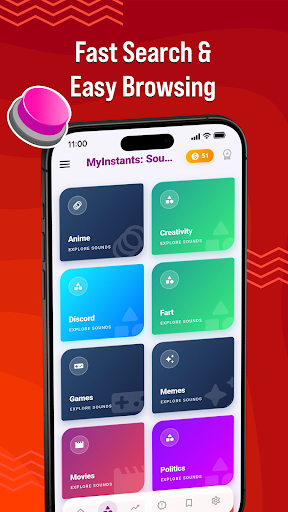
MyInstants: Sound Button App is an app for sound buttons, meme sounds, prank audio clips, reaction audio, and sound effects. Discover a collection of sound buttons with trending and entertaining sounds ready to play instantly anytime.
Whether you need a reaction sound for chats, a prank effect for friends, gaming audio for livestreams, or internet clips for entertainment, MyInstants gives you access to audio content in one easy-to-use sound button app.
What Is a Sound Button App?
A sound button app lets users play short audio clips by tapping interactive buttons. No waiting, no loading, and no complicated setup. Tap a button to hear meme sounds, reaction clips, gaming audio, funny effects, and internet sounds anytime.
With MyInstants, you can explore sound buttons including memes, gaming sounds, anime reactions, screams, alarms, notification sounds, movie quotes, internet classics, and more.
Why Users Use MyInstants
• Sound buttons
• Meme sounds and reaction clips
• Fast sound playback
• Prank sounds and audio effects
• Internet sounds and audio clips
• Soundboard audio
• Lightweight and easy-to-use app
• Save favorite sounds
• Share sounds with friends
• Updates with audio clips
• Collection of meme sound effects
• Entertainment for all ages
Sound Button Experience
MyInstants is designed for meme lovers, gamers, streamers, content creators, and anyone who enjoys internet humor and audio. The sound button library includes meme sounds, reactions, and audio clips from online communities.
Sounds include:
• Vine Boom
• Bruh Sound Effect
• Sad Violin
• Airhorn
• Funny Laugh Sounds
• Anime Reaction Audio
• Meme Fail Sounds
• Notification Sounds
• Funny Screams
• Gaming Victory Sounds
New sound buttons are added regularly so users can discover current audio trends.
Perfect for Every Situation
Gamers & Streamers
Use sound buttons during livestreams, gaming sessions, and online matches.
Chats & Group Conversations
Send reaction sounds, audio clips, and prank audio while chatting with friends and online groups.
Content Creators & Podcasters
Add sound effects and meme audio clips to videos, podcasts, reels, shorts, and social content.
Prank Lovers
Play alarms, notifications, scary sounds, screams, and prank audio clips for entertainment.
Explore Categories
• Sound Buttons
• Meme Sounds
• Funny Sound Effects
• Reaction Audio
• Gaming Sounds
• Internet Audio
• Anime Soundboard
• Notification Sounds
• Movie Quotes
• Prank Sounds
Simple and Easy to Use
MyInstants features a clean and user-friendly interface for browsing and playing sounds. Tap any sound button to hear the clip. Save favorites for quick access and share them with friends.
Fast & Updated
The app includes sound buttons, meme audio, reaction clips, and internet sounds from online communities and platforms.
Why Choose MyInstants?
MyInstants focuses on internet culture, reactions, and audio playback. The app is designed for simplicity, speed, and quick access to sounds and soundboards.
Whether users want to enjoy reactions, audio clips, or internet sounds, MyInstants provides sound buttons and soundboard audio in one app.
مزید دکھائیں

1. MEmu انسٹالر ڈاؤن لوڈ کریں اور سیٹ اپ مکمل کریں

2. MEmu شروع کریں اسکے بعد ڈیسکٹاپ پر Google Play کھولیں

3. Google Play میں MyInstants: Sound Button App تلاش کریں
Install
4. MyInstants: Sound Button App ڈاؤن لوڈ کریں اور انسٹال کریں
5. انسٹال مکمل ہونے کے بعد سٹارٹ کرنے کے لیے آئیکن پر کلک کریں

6. MEmu کے ساتھ پی سی پر MyInstants: Sound Button App کھیلنے کا لطف لیں
MEmu پلے بہترین اینڈرائڈ ایمولیٹر ہے اور 100 ملین لوگ اس کے زبردست اینڈرائڈ گیمنگ تجربہ سے لطف اندوز ہو رہے ہیں۔ MEmu کی ورچولائزیشن ٹیکنالوجی آپ کو اپنے PC پر ہزاروں اینڈرائڈ گیمز یہاں تک کہ انتہائی گرافک والے گیمز باسہولت کھیلنے کی طاقت دیتی ہے۔
بہتر گرافکس کے ساتھ بڑی اسکرین؛ طویل دورانیہ، بیٹری یا لامحدود موبائل ڈیٹا کے بغیر۔
کی بورڈ اور ماؤس یا گیم پیڈ کے عین مطابق کنٹرول کے لیے کی میپنگ کا پورا سپورٹ۔
کثیر مثالی منیجر کے ساتھ بیک وقت ایک پی سی پر متعدد گیم اکاؤنٹس یا ٹاسکس۔
پی سی پر درج ذیل مراحل پر عمل کرتے ہوئے پر MyInstants: Sound Button App استعمال کریں: u003c/p>