MyInstants: Sound Button App
更新日
現在のバージョン
1.0.8
提供元

スマートフォンは不要!パソコンと同じようにキーボードとマウスで操作できます。MEmu Playは、あなたが待ち望んでいたすべての楽しみをお届けします。バッテリー残量や小さな画面を気にすることなく、MyInstants: Sound Button Appをご利用ください。最新のMEmu 9は、MyInstants: Sound Button AppをPCで体験するのに最適です!完璧なキーマッピングシステムにより、PCのようなスムーズな操作性を実現します。マルチインスタンス機能により、複数のアプリケーションを同時に実行できます。独自の仮想化エンジンがPCのパフォーマンスを最大限に引き出します。アプリを使用するだけでなく、高品質な体験を得ることができます。
もっと見る
MEmu Playを使えば、PCでMyInstants: Sound Button Appを快適に楽しめます。何千ものAndroidアプリをデスクトップ版で利用できる、パワフルな無料Androidエミュレーターです。友達とつながり、より効率的に作品を磨き上げましょう! MyInstants: Sound Button App is an app for sound buttons, meme sounds, prank audio clips, reaction audio, and sound effects.
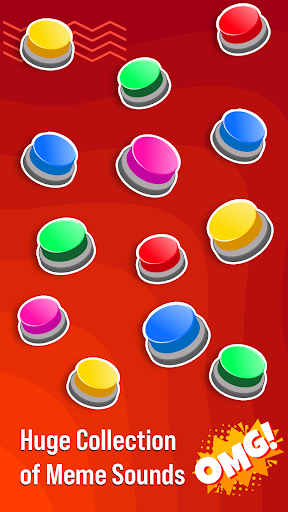
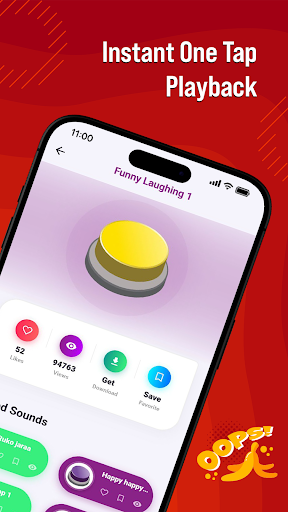
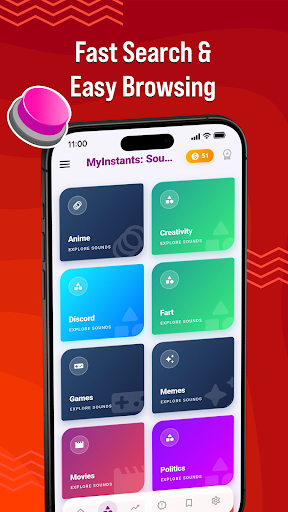
MyInstants: Sound Button App is an app for sound buttons, meme sounds, prank audio clips, reaction audio, and sound effects. Discover a collection of sound buttons with trending and entertaining sounds ready to play instantly anytime.
Whether you need a reaction sound for chats, a prank effect for friends, gaming audio for livestreams, or internet clips for entertainment, MyInstants gives you access to audio content in one easy-to-use sound button app.
What Is a Sound Button App?
A sound button app lets users play short audio clips by tapping interactive buttons. No waiting, no loading, and no complicated setup. Tap a button to hear meme sounds, reaction clips, gaming audio, funny effects, and internet sounds anytime.
With MyInstants, you can explore sound buttons including memes, gaming sounds, anime reactions, screams, alarms, notification sounds, movie quotes, internet classics, and more.
Why Users Use MyInstants
• Sound buttons
• Meme sounds and reaction clips
• Fast sound playback
• Prank sounds and audio effects
• Internet sounds and audio clips
• Soundboard audio
• Lightweight and easy-to-use app
• Save favorite sounds
• Share sounds with friends
• Updates with audio clips
• Collection of meme sound effects
• Entertainment for all ages
Sound Button Experience
MyInstants is designed for meme lovers, gamers, streamers, content creators, and anyone who enjoys internet humor and audio. The sound button library includes meme sounds, reactions, and audio clips from online communities.
Sounds include:
• Vine Boom
• Bruh Sound Effect
• Sad Violin
• Airhorn
• Funny Laugh Sounds
• Anime Reaction Audio
• Meme Fail Sounds
• Notification Sounds
• Funny Screams
• Gaming Victory Sounds
New sound buttons are added regularly so users can discover current audio trends.
Perfect for Every Situation
Gamers & Streamers
Use sound buttons during livestreams, gaming sessions, and online matches.
Chats & Group Conversations
Send reaction sounds, audio clips, and prank audio while chatting with friends and online groups.
Content Creators & Podcasters
Add sound effects and meme audio clips to videos, podcasts, reels, shorts, and social content.
Prank Lovers
Play alarms, notifications, scary sounds, screams, and prank audio clips for entertainment.
Explore Categories
• Sound Buttons
• Meme Sounds
• Funny Sound Effects
• Reaction Audio
• Gaming Sounds
• Internet Audio
• Anime Soundboard
• Notification Sounds
• Movie Quotes
• Prank Sounds
Simple and Easy to Use
MyInstants features a clean and user-friendly interface for browsing and playing sounds. Tap any sound button to hear the clip. Save favorites for quick access and share them with friends.
Fast & Updated
The app includes sound buttons, meme audio, reaction clips, and internet sounds from online communities and platforms.
Why Choose MyInstants?
MyInstants focuses on internet culture, reactions, and audio playback. The app is designed for simplicity, speed, and quick access to sounds and soundboards.
Whether users want to enjoy reactions, audio clips, or internet sounds, MyInstants provides sound buttons and soundboard audio in one app.
もっと見る

1. MEmuインストーラーをダウンロードしてセットアップを完了する

2. MEmuを起動し、デスクトップでのPlayストアを開く

3. PlayストアでMyInstants: Sound Button Appを検索する
Install
4. MyInstants: Sound Button Appをダウンロードしてインストールする
5. インストールが完了したら、アイコンをクリックしてスタート

6. MEmuを使ってパソコンでMyInstants: Sound Button Appを体験する
MEmu Playは現在、最高の無料Androidエミュレーターであり、5,000万人のユーザーが優れたAndroidアプリ体験を楽しんでいます。MEmuの仮想化テクノロジーにより、数千ものAndroidアプリをコンピューターでスムーズに実行できます。
大画面でより精細;無限の待機、電池とドラフィックの極限を超え
キーボード・マウス・コントローラーを全力でサポート、より快適
マルチインスタンスで複数のゲームを同時に実行
Use MyInstants: Sound Button App on PC by following steps: