MyInstants: Sound Button App
Bijgewerkt
Huidige Versie
1.0.8
Aangeboden door

Maak je geen zorgen meer over extra kosten bij het gebruik van MyInstants: Sound Button App op je mobiele telefoon, bevrijd jezelf van het kleine scherm en geniet van het gebruik van de app op een veel groter display. Vanaf nu, krijg een volledige schermervaring van je app met toetsenbord en muis. MEmu biedt je alle verrassende functies die je verwachtte: snelle installatie en eenvoudige configuratie, intuïtieve besturing, geen beperkingen meer van batterij, mobiele data en storende oproepen. De gloednieuwe MEmu 9 is de beste keuze voor het gebruik van MyInstants: Sound Button App op je computer. MEmu multi-instance manager maakt het mogelijk om tegelijkertijd 2 of meer accounts te openen. En het belangrijkste, onze exclusieve emulatiemotor kan het volledige potentieel van je PC benutten, waardoor alles soepel en plezierig wordt.
Meer tonen
Geniet van een fantastische ervaring met MyInstants: Sound Button App op je pc met MEmu Play. Het is een krachtige gratis Android-emulator die je duizenden Android-apps biedt voor de desktopversie. Geniet van contact met vrienden en verbeter je werk met hogere efficiëntie! MyInstants: Sound Button App is an app for sound buttons, meme sounds, prank audio clips, reaction audio, and sound effects.
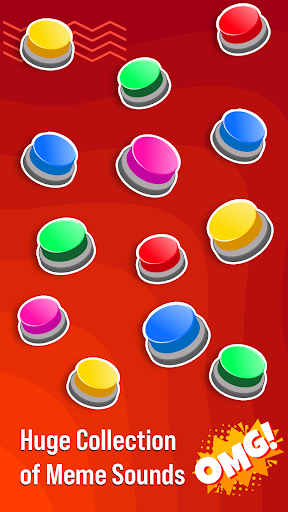
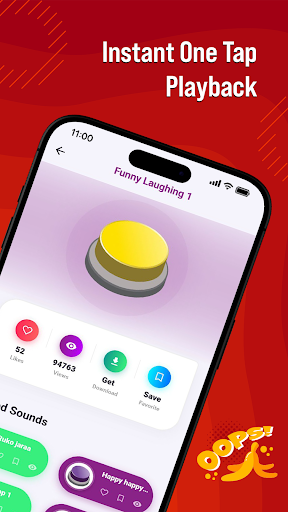
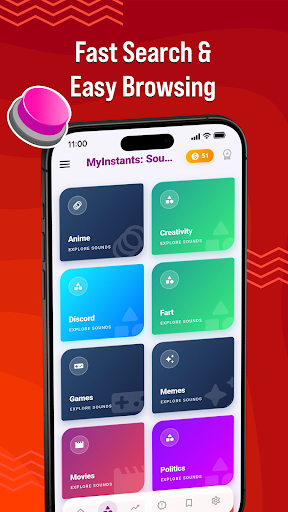
MyInstants: Sound Button App is an app for sound buttons, meme sounds, prank audio clips, reaction audio, and sound effects. Discover a collection of sound buttons with trending and entertaining sounds ready to play instantly anytime.
Whether you need a reaction sound for chats, a prank effect for friends, gaming audio for livestreams, or internet clips for entertainment, MyInstants gives you access to audio content in one easy-to-use sound button app.
What Is a Sound Button App?
A sound button app lets users play short audio clips by tapping interactive buttons. No waiting, no loading, and no complicated setup. Tap a button to hear meme sounds, reaction clips, gaming audio, funny effects, and internet sounds anytime.
With MyInstants, you can explore sound buttons including memes, gaming sounds, anime reactions, screams, alarms, notification sounds, movie quotes, internet classics, and more.
Why Users Use MyInstants
• Sound buttons
• Meme sounds and reaction clips
• Fast sound playback
• Prank sounds and audio effects
• Internet sounds and audio clips
• Soundboard audio
• Lightweight and easy-to-use app
• Save favorite sounds
• Share sounds with friends
• Updates with audio clips
• Collection of meme sound effects
• Entertainment for all ages
Sound Button Experience
MyInstants is designed for meme lovers, gamers, streamers, content creators, and anyone who enjoys internet humor and audio. The sound button library includes meme sounds, reactions, and audio clips from online communities.
Sounds include:
• Vine Boom
• Bruh Sound Effect
• Sad Violin
• Airhorn
• Funny Laugh Sounds
• Anime Reaction Audio
• Meme Fail Sounds
• Notification Sounds
• Funny Screams
• Gaming Victory Sounds
New sound buttons are added regularly so users can discover current audio trends.
Perfect for Every Situation
Gamers & Streamers
Use sound buttons during livestreams, gaming sessions, and online matches.
Chats & Group Conversations
Send reaction sounds, audio clips, and prank audio while chatting with friends and online groups.
Content Creators & Podcasters
Add sound effects and meme audio clips to videos, podcasts, reels, shorts, and social content.
Prank Lovers
Play alarms, notifications, scary sounds, screams, and prank audio clips for entertainment.
Explore Categories
• Sound Buttons
• Meme Sounds
• Funny Sound Effects
• Reaction Audio
• Gaming Sounds
• Internet Audio
• Anime Soundboard
• Notification Sounds
• Movie Quotes
• Prank Sounds
Simple and Easy to Use
MyInstants features a clean and user-friendly interface for browsing and playing sounds. Tap any sound button to hear the clip. Save favorites for quick access and share them with friends.
Fast & Updated
The app includes sound buttons, meme audio, reaction clips, and internet sounds from online communities and platforms.
Why Choose MyInstants?
MyInstants focuses on internet culture, reactions, and audio playback. The app is designed for simplicity, speed, and quick access to sounds and soundboards.
Whether users want to enjoy reactions, audio clips, or internet sounds, MyInstants provides sound buttons and soundboard audio in one app.
Meer tonen

1. Download de MEmu-installatie en voltooi de setup

2. Start MEmu en open vervolgens Google Play op het bureaublad

3. Zoek MyInstants: Sound Button App in Google Play
Install
4. Download en installeer MyInstants: Sound Button App
5. Klik op het icoon om te starten na het voltooien van de installatie

6. Ervaar MyInstants: Sound Button App op pc met MEmu
MEmu Play is de beste Android-emulator, met meer dan 100 miljoen gebruikers die genieten van de superieure Android-app-ervaring. Dankzij de virtualisatietechnologie van MEmu kun je duizenden Android-apps soepel op je computer draaien, zelfs de meest veeleisende.
Groter scherm met betere graphics; Lange duur, zonder beperking van batterij of mobiele data.
Volledige Keymapping-ondersteuning voor nauwkeurige besturing van toetsenbord en muis of gamepad.
Meerdere game-accounts of taken op één PC tegelijk met Multi-Instance manager.
Gebruik MyInstants: Sound Button App op PC door de volgende stappen te volgen: