2GIS: Offline map & navigation
Đã cập nhật
Phiên bản hiện tại
1735057807
Cung cấp bởi

Bạn không cần phải lo lắng về việc sạc quá mức khi sử dụng 2GIS: Offline map & navigation trên điện thoại của bạn, không phải sử dụng trên màn hình nhỏ bé và tận hưởng ứng dụng trên màn hình lớn hơn rất nhiều. Từ bây giờ, bạn hãy trải nghiệm ứng dụng của bạn toàn màn hình bằng bàn phím và chuột. MEmu cung cấp cho bạn tất cả các tính năng đáng ngạc nhiên mà bạn mong đợi: cài đặt nhanh, cài đặt dễ dàng, điều khiển trực quan, không còn giới hạn về pin, dữ liệu di động và các cuộc gọi làm phiền. MEmu 9 hoàn toàn mới là sự lựa chọn tốt nhất để sử dụng 2GIS: Offline map & navigation trên máy tính của bạn. Được mã hóa với sự hợp nhất của chúng tôi, trình quản lý multi-instance giúp mở 2 tài khoản trở lên cùng một lúc. Và điều quan trọng nhất là, công cụ mô phỏng độc quyền của chúng tôi có thể tận dụng hết toàn bộ tiềm năng trên PC của bạn, giúp mọi thứ vận hành trơn tru và thú vị.
Nhiều hơn
Tải 2GIS: Offline map & navigation trên PC với Trình giả lập Android MEmu. Tận hưởng trải nghiệm chơi game trên màn hình lớn 2GIS is a detailed map with GPS-navigation for car drivers and pedestrians, live traffic map, transit schedules, and a full city directory.
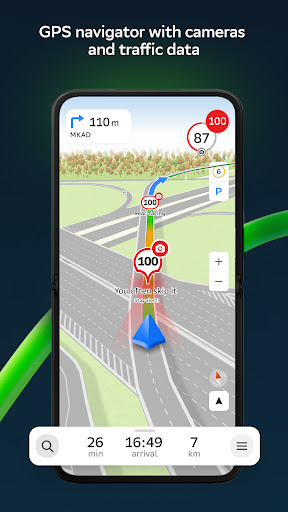
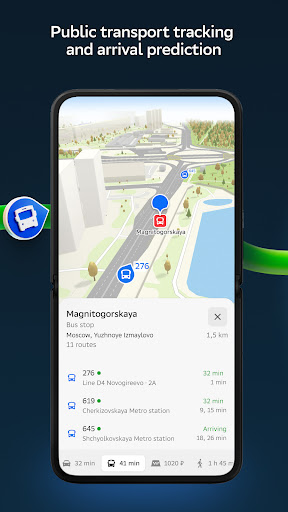

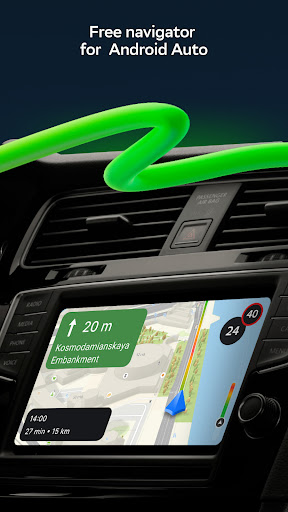
2GIS is a detailed map with GPS-navigation for car drivers and pedestrians, live traffic map, transit schedules, and a full city directory. Use it online or download the map to your device to never get lost without an internet connection.
With 2GIS’s maps and navigation, you will feel at home even in an unfamiliar place:
— easily find the address, company, phone number, working hours, goods or services;
— find out how to get there by car, bus, subway, or follow the navigator on foot;
— find an entrance to a building and a parking lot nearby.
Accurate maps. Locate districts, buildings, streets, bus stops, subway stations, gas stations, sports grounds, and other objects.
GPS-navigation. Considers real-time traffic jams, signs, speed cameras, toll and unpaved roads, builds routes between cities and through several points. There is also a free app for Android Auto.
Road events. Reports of accidents, blocked streets, and speed cameras, user comments — everything is right on the map.
Public transport. 2GIS knows the timetable and online routes of public transit.
Walking routes. Pedestrian navigation paves the way wherever you can go on foot. Works in the background, supports voice guidance.
Navigation for trucks. Cargo navigator gets directions for trucks considering the individual characteristics of vehicles and cargo.
Friends on the map. Now you can find your friends and kids on the map! 2GIS shows the real-time location of your friends. You decide who to add as friends and who will see your location. Manage your visibility in the settings.
Detailed directory. 2GIS shows addresses, entrances, and postal codes. 2GIS knows phone numbers, working hours, social networks, websites, and entrance locations. Users add photos of companies and write reviews.
Travel guide. Find out about the main attractions, places with Wi-Fi, and more on the map.
A 2GIS Notifications companion app for smart watches on Wear OS. A handy tool for navigating routes on foot, by bike or by public transport from the main 2GIS app: view the map, get manoeuver hints and get vibration alerts when approaching a turn or a destination bus stop. The companion starts automatically when you start navigation on your phone. Available for Wear OS 3.0 or later versions.
Everything you need: offline map, navigation, public transport, family locator, and Android Auto support — all in 2GIS.
Available maps:
Cities of the UAE:
Dubai, Sharjah, Abu Dhabi, Al Ain, Ajam, Ras Al Khaimah, Fujairah, Umm Al Quwain, Dibba Al Fujairah, Khor Fakkan, Kalba, Al Salamh, ect.
Cities of Russia:
Moscow, Saint Petersburg, Novosibirsk, Ekaterinburg, Krasnoyarsk, Chelyabinsk, Ufa, Omsk, Kazan, Perm, Nizhny Novgorod, Sheregesh, etc.
Cities of Belarus, Kazakhstan, Uzbekistan, Azerbaijan and Kyrgyzstan:
Minsk, Pavlodar, Semey, Aktau, Aktobe, Almaty, Nur-Sultan, Bishkek, Karaganda, Kokshetau, Kostanay, Osh, Baku, Tashkent, etc.
Support: dev@2gis.com
Nhiều hơn

1. Tải trình cài đặt MEmu và hoàn tất cài đặt

2. Khởi động MEmu, sau đó mở Google Play trên trang chủ

3. Tìm kiếm 2GIS: Offline map & navigation trong Google Play
Install
4. Tải và Cài Đặt 2GIS: Offline map & navigation
5. Khi cài đặt hoàn tất, nhấp vào biểu tượng để bắt đầu

6. Trải nghiệm 2GIS: Offline map & navigation trên PC của bạn bằng MEmu
MEmu Play là trình giả lập Android miễn phí tốt nhất, với 50 triệu người dùng trải nghiệm ứng dụng Android tuyệt vời. Công nghệ ảo hóa của MEmu cho phép bạn chạy mượt mà hàng ngàn ứng dụng Android trên máy tính, ngay cả những ứng dụng đòi hỏi cấu hình cao nhất.
Màn hình lớn hơn cùng với đồ hoạ tốt hơn; thời lượng dài, không giới hạn về pin hoặc dữ liệu di động
Hỗ trợ đầy đủ Keymapping cho việc kiểm soát chính xác bàn phím và chuột hoặc gamepad
Nhiều tài khoản trò chơi hoặc tác vụ cùng lúc trên một PC với Quản lý Đa năng
Use 2GIS: Offline map & navigation on PC by following steps: