2GIS: Offline map & navigation
Aktualisiert
Aktuelle Version
1735057807
Angeboten von

Machen Sie sich keine Sorgen mehr über überhöhte Gebühren, wenn Sie 2GIS: Offline map & navigation auf Ihrem Mobiltelefon verwenden, befreien Sie sich von dem winzigen Bildschirm und genießen Sie die Nutzung der App auf einem viel größeren Display. Von nun an können Sie Ihre App mit Tastatur und Maus im Vollbildmodus nutzen. MEmu bietet Ihnen all die überraschenden Funktionen, die Sie erwartet haben: schnelle Installation und einfache Einrichtung, intuitive Steuerung, keine Einschränkungen mehr durch Batterie, mobile Daten und störende Anrufe. Der brandneue MEmu 9 ist die beste Wahl für die Nutzung von 2GIS: Offline map & navigation auf Ihrem Computer. Mit unserer Absorption kodiert, ermöglicht der Multi-Instanz-Manager die Eröffnung von 2 oder mehr Konten zur gleichen Zeit. Und das Wichtigste, unsere exklusive Emulations-Engine kann das volle Potenzial Ihres PCs freisetzen und alles reibungslos und angenehm gestalten.
Mehr anzeigen
Laden Sie Play 2GIS: Offline map & navigation auf dem PC mit MEmu Android Emulator. Viel Spaß beim Spielen auf großmundieren. 2GIS is a detailed map with GPS-navigation for car drivers and pedestrians, live traffic map, transit schedules, and a full city directory.
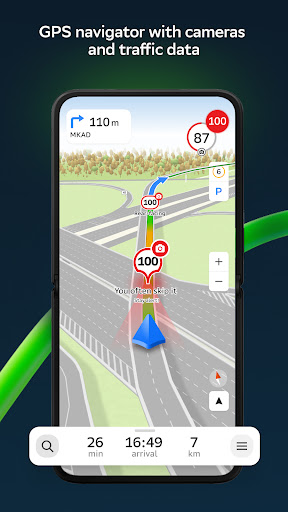
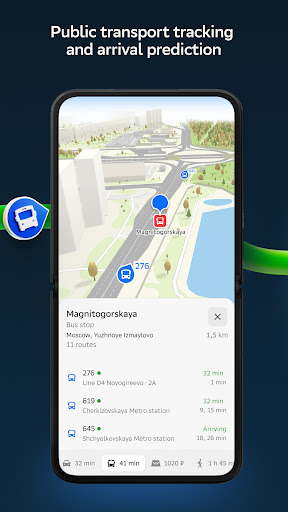
2GIS is a detailed map with GPS-navigation for car drivers and pedestrians, live traffic map, transit schedules, and a full city directory. Use it online or download the map to your device to never get lost without an internet connection.
With 2GIS’s maps and navigation, you will feel at home even in an unfamiliar place:
— easily find the address, company, phone number, working hours, goods or services;
— find out how to get there by car, bus, subway, or follow the navigator on foot;
— find an entrance to a building and a parking lot nearby.
Accurate maps. Locate districts, buildings, streets, bus stops, subway stations, gas stations, sports grounds, and other objects.
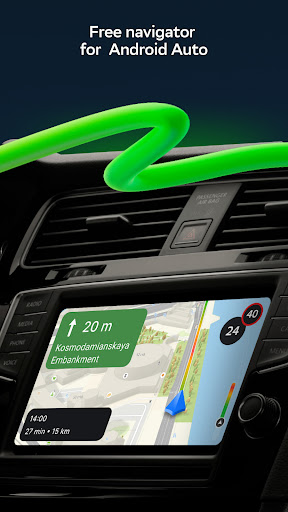
GPS-navigation. Considers real-time traffic jams, signs, speed cameras, toll and unpaved roads, builds routes between cities and through several points. There is also a free app for Android Auto.
Road events. Reports of accidents, blocked streets, and speed cameras, user comments — everything is right on the map.
Public transport. 2GIS knows the timetable and online routes of public transit.
Walking routes. Pedestrian navigation paves the way wherever you can go on foot. Works in the background, supports voice guidance.
Navigation for trucks. Cargo navigator gets directions for trucks considering the individual characteristics of vehicles and cargo.
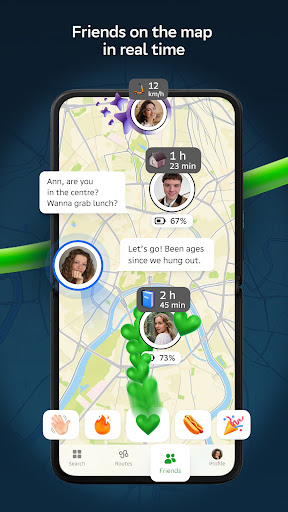
Friends on the map. Now you can find your friends and kids on the map! 2GIS shows the real-time location of your friends. You decide who to add as friends and who will see your location. Manage your visibility in the settings.
Detailed directory. 2GIS shows addresses, entrances, and postal codes. 2GIS knows phone numbers, working hours, social networks, websites, and entrance locations. Users add photos of companies and write reviews.
Travel guide. Find out about the main attractions, places with Wi-Fi, and more on the map.
A 2GIS Notifications companion app for smart watches on Wear OS. A handy tool for navigating routes on foot, by bike or by public transport from the main 2GIS app: view the map, get manoeuver hints and get vibration alerts when approaching a turn or a destination bus stop. The companion starts automatically when you start navigation on your phone. Available for Wear OS 3.0 or later versions.
Everything you need: offline map, navigation, public transport, family locator, and Android Auto support — all in 2GIS.
Available maps:
Cities of the UAE:
Dubai, Sharjah, Abu Dhabi, Al Ain, Ajam, Ras Al Khaimah, Fujairah, Umm Al Quwain, Dibba Al Fujairah, Khor Fakkan, Kalba, Al Salamh, ect.
Cities of Russia:
Moscow, Saint Petersburg, Novosibirsk, Ekaterinburg, Krasnoyarsk, Chelyabinsk, Ufa, Omsk, Kazan, Perm, Nizhny Novgorod, Sheregesh, etc.
Cities of Belarus, Kazakhstan, Uzbekistan, Azerbaijan and Kyrgyzstan:
Minsk, Pavlodar, Semey, Aktau, Aktobe, Almaty, Nur-Sultan, Bishkek, Karaganda, Kokshetau, Kostanay, Osh, Baku, Tashkent, etc.
Support: dev@2gis.com
Mehr anzeigen

1. Laden das MEmu-Installationsprogramm herunter und beenden die Installation

2. MEmu starten und Google Play auf der Homepage öffnen

3. Suchen 2GIS: Offline map & navigation in Google Play
Install
4. Herunterladen und Installieren 2GIS: Offline map & navigation
5. Klicken nach Abschluss der Installation auf das Symbol, um es zu starten

6. Verwenden Sie MEmu, um 2GIS: Offline map & navigation auf Ihrem PC zu nutzen
MEmu Play ist aktuell der beste kostenlose Android-Emulator und bietet 50 Millionen Nutzern ein überragendes Android-App-Erlebnis. Dank der Virtualisierungstechnologie von MEmu können Sie Tausende von Android-Apps problemlos auf Ihrem Computer nutzen, selbst solche mit hohen Grafikanforderungen.
BGrößeres Bild mit besserer Grafik; Keine unterbrechungen, keine sorgen um Akku
Komplette Tastenbelegung unterstützt mit Maus und Tastatur oder Controller
Mit dem „Multi-Instance-Manager“ können Sie mehrere Spielkonten oder Spiele gleichzeitig auf einem PC ausführen.
Use 2GIS: Offline map & navigation on PC by following steps: