2GIS: Offline map & navigation
Diupdate
Versi Saat Ini
1735057807
Ditawarkan Oleh

Hentilah khawatir tentang biaya berlebihan saat menggunakan 2GIS: Offline map & navigation di ponsel Anda, bebaskan diri Anda dari layar kecil dan nikmati menggunakan aplikasi pada tampilan yang lebih besar. Mulai sekarang, dapatkan pengalaman full-screen di aplikasi Anda dengan keyboard dan mouse. MEmu menyediakan semua fitur mengejutkan yang Anda harapkan: cepat menginstal dan mudah menggunakan, kontrol intuitif, tidak ada lagi batasan baterai, data seluler dan panggilan yang mengganggu. MEmu 9 yang baru adalah pilihan terbaik untuk menggunakan 2GIS: Offline map & navigation di komputer Anda. Bersandi dengan absorpsi kami, manajer multi-instance memungkinkan pembukaan 2 akun atau lebih pada saat yang bersamaan. Dan yang paling penting, mesin emulasi eksklusif kami dapat melepaskan potensi penuh PC Anda, menjadikan semuanya lancar dan menyenangkan.
Tampilkan Lebih banyak
Unduh 2GIS: Offline map & navigation di PC dengan Emulator Android MEmu. Nikmati permainan pada layar yang besar. 2GIS is a detailed map with GPS-navigation for car drivers and pedestrians, live traffic map, transit schedules, and a full city directory.
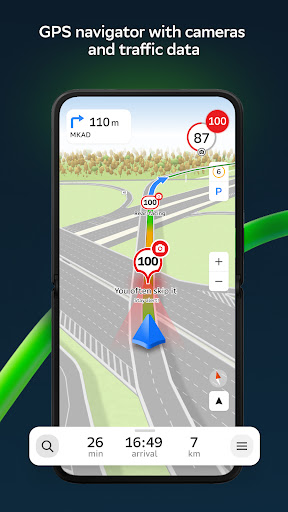
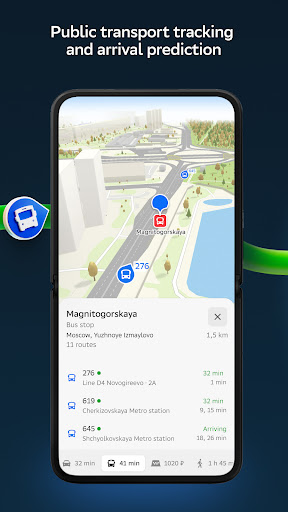
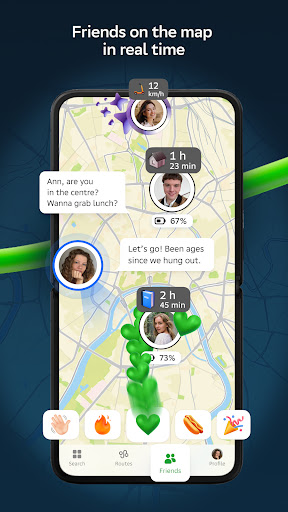
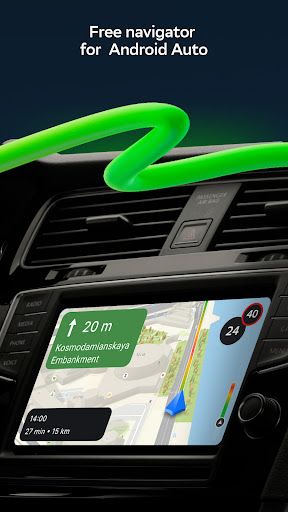
2GIS is a detailed map with GPS-navigation for car drivers and pedestrians, live traffic map, transit schedules, and a full city directory. Use it online or download the map to your device to never get lost without an internet connection.
With 2GIS’s maps and navigation, you will feel at home even in an unfamiliar place:
— easily find the address, company, phone number, working hours, goods or services;
— find out how to get there by car, bus, subway, or follow the navigator on foot;
— find an entrance to a building and a parking lot nearby.
Accurate maps. Locate districts, buildings, streets, bus stops, subway stations, gas stations, sports grounds, and other objects.
GPS-navigation. Considers real-time traffic jams, signs, speed cameras, toll and unpaved roads, builds routes between cities and through several points. There is also a free app for Android Auto.
Road events. Reports of accidents, blocked streets, and speed cameras, user comments — everything is right on the map.
Public transport. 2GIS knows the timetable and online routes of public transit.
Walking routes. Pedestrian navigation paves the way wherever you can go on foot. Works in the background, supports voice guidance.
Navigation for trucks. Cargo navigator gets directions for trucks considering the individual characteristics of vehicles and cargo.
Friends on the map. Now you can find your friends and kids on the map! 2GIS shows the real-time location of your friends. You decide who to add as friends and who will see your location. Manage your visibility in the settings.
Detailed directory. 2GIS shows addresses, entrances, and postal codes. 2GIS knows phone numbers, working hours, social networks, websites, and entrance locations. Users add photos of companies and write reviews.
Travel guide. Find out about the main attractions, places with Wi-Fi, and more on the map.
A 2GIS Notifications companion app for smart watches on Wear OS. A handy tool for navigating routes on foot, by bike or by public transport from the main 2GIS app: view the map, get manoeuver hints and get vibration alerts when approaching a turn or a destination bus stop. The companion starts automatically when you start navigation on your phone. Available for Wear OS 3.0 or later versions.
Everything you need: offline map, navigation, public transport, family locator, and Android Auto support — all in 2GIS.
Available maps:
Cities of the UAE:
Dubai, Sharjah, Abu Dhabi, Al Ain, Ajam, Ras Al Khaimah, Fujairah, Umm Al Quwain, Dibba Al Fujairah, Khor Fakkan, Kalba, Al Salamh, ect.
Cities of Russia:
Moscow, Saint Petersburg, Novosibirsk, Ekaterinburg, Krasnoyarsk, Chelyabinsk, Ufa, Omsk, Kazan, Perm, Nizhny Novgorod, Sheregesh, etc.
Cities of Belarus, Kazakhstan, Uzbekistan, Azerbaijan and Kyrgyzstan:
Minsk, Pavlodar, Semey, Aktau, Aktobe, Almaty, Nur-Sultan, Bishkek, Karaganda, Kokshetau, Kostanay, Osh, Baku, Tashkent, etc.
Support: dev@2gis.com
Tampilkan Lebih banyak

1. Unduh dan instal MEmu APP

2. Menjalankan MEmu lalu buka Google Play di halaman

3. Cari 2GIS: Offline map & navigation di Google Play
Install
4. Unduh dan instal 2GIS: Offline map & navigation
5. Setelah insatl APP selesai,klik ikon untuk mulai

6. Nikmati bermain 2GIS: Offline map & navigation di PC dengan MEmu
MEmu Play adalah emulator Android gratis terbaik dan 50 Juta orang sudah menikmati pengalaman luar biasa dalam Aplikasi Android. Teknologi virtualisasi MEmu memberi kekuasaan untuk memainkan ribuan Aplikasi Android dengan lancar di PC anda, bahkan Aplikasi dengan grafis yang paling tinggi.
Layar lebih besar dengan grafis yang lebih baik; durasi panjang, tanpa batasan baterai atau data seluler.
Didukung penuh oleh Pemetaan tombol yang lengkap untuk keakuratan kontrol keyboard dan mouse maupun gamepad.
Membuka beberapa akun game atau tugas di waktu yang sama hanya pada satu PC, dengan Multi-Instance manager.
Use 2GIS: Offline map & navigation on PC by following steps: