Muse from Meta
تم التحديث
الإصدار الحالي
8.0.0.21.168
تقديم

لا داعي للقلق بشأن الشحن الزائد عند استخدام Muse from Meta على هاتفك. تحرر من قيود الشاشة الصغيرة واستمتع به على شاشة أكبر باستخدام لوحة المفاتيح والفأرة. يوفر MEmu جميع الميزات الرائعة التي تتوقعها: تثبيت سريع، إعداد سهل، أدوات تحكم بديهية، ودون قيود على عمر البطارية، أو استخدام البيانات، أو المكالمات الواردة. يُعد MEmu 9 الجديد الخيار الأمثل لتجربة Muse from Meta على جهاز الكمبيوتر. بفضل تقنية التشفير الفريدة، يتيح لك مدير الحسابات المتعددة تشغيل حسابين أو أكثر في وقت واحد. والأهم من ذلك، أن محرك المحاكاة الفريد يستغل أداء جهاز الكمبيوتر بالكامل، مما يُحسّن تجربة التطبيق ويجعل كل شيء سلسًا للغاية.
أظهر المزيد
استمتع بتجربة رائعة لاستخدام Muse from Meta على جهاز الكمبيوتر مع MEmu Play. إنه محاكي أندرويد قوي ومجاني يوفر لك آلاف تطبيقات أندرويد لإصدار سطح المكتب. استمتع بالتواصل مع أصدقائك وحسّن عملك بكفاءة أعلى! Muse is your personal AI agent that gets things done, always working on what matters to you.
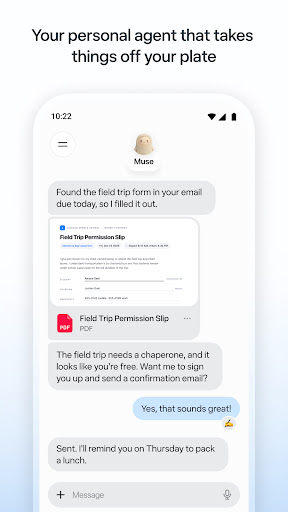
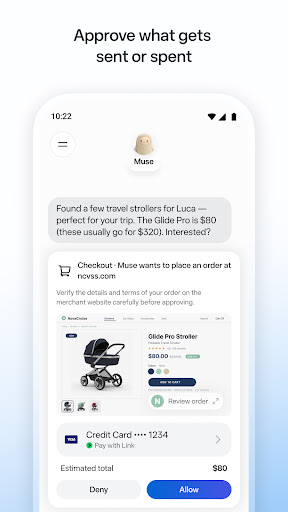
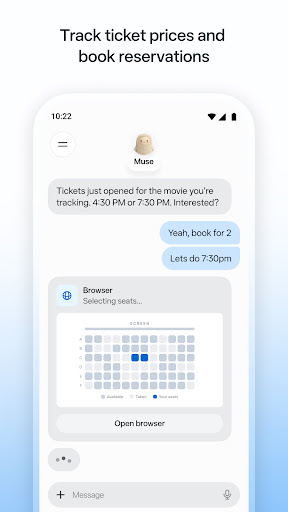
Muse is your personal AI agent that gets things done, always working on what matters to you. It manages email, books dinners, tracks budgets, and finds deals, with your approval.
PERSONAL PRODUCTIVITY
Muse takes the busywork off your plate. It manages scheduling conflicts, books reservations, sets reminders, and follows up with people, so birthdays, plans, and deadlines don't slip. Stay on top of your calendar, email, and daily tasks without carrying it all in your head.
SAVE MONEY
Muse helps you understand where your money is going. It tracks expenses, audits subscriptions, flags charges you forgot about, cancels what you don't need, and helps you hit a savings goal, checking with you before it cancels or spends. Get financial insights without the spreadsheet.
HEALTH & FITNESS
Muse is your AI fitness coach. It builds a custom workout or meal plan from data you choose to share, tracks calories and nutrition, monitors sleep and wellness, and adjusts your training day by day. Whether it's running, eating better, or building a habit, Muse coaches you through it.
SHOPPING & DEALS
Muse compares prices, tracks price drops, and alerts you the moment something you want goes on sale. AI-powered shopping that can actually buy on your behalf, with your OK.
CONNECT YOUR APPS
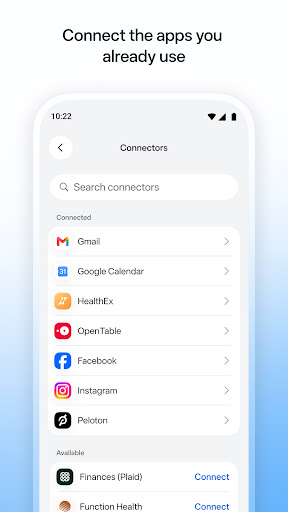
You decide what Muse can access. Link your email, calendar, Instagram, Facebook, health and fitness data, and finances. Approve actions before they happen. Muse gets smarter with every connection.
SHARE A TASK, START TO FINISH
Hand Muse a whole job and it sees it through: the research, the comparisons, the back-and-forth, the bookings. Sell your car for more, negotiate a bill down, or plan and book a whole trip. A better result than you'd have managed alone.
ALWAYS WORKING FOR YOU
Muse keeps things moving after you close the app. It monitors, follows up, and sends a notification when something needs your attention, so nothing falls through the cracks.
IN YOUR CONTROL
Approve actions before they happen. Muse keeps a full activity log, and lets you revoke any connector anytime.
UNIQUELY YOURS
Name it, shape how it talks, and make it your own.
SMART, BUT STILL LEARNING
Muse may be inaccurate or take unexpected actions, so check in to keep it on track and intervene as needed.
أظهر المزيد

1. قم بتنزيل برنامج MEmu واكمال تثبيته

2. قم بتشغيل برنامج MEmu وفتح Google Play على الصفحة الرئيسية

3. ابح Muse from Meta في Google Play
Install
4. تنزيل وتثبيت Muse from Meta
5. انقر على الرمز للتشغيل بعد اكتمال التثبيت

6. استخدم MEmu لتجربة Muse from Meta على جهاز الكمبيوتر الخاص بك.
تطبيق MEmuهو افضل محاكى اندرويد مجانى وبالفعل 50 مليون شخص يستمتعون حاليا بتجربه اللعب عليه. تمكّنك تقنية MEmu الافتراضية من تشغيل آلاف ألعاب Android بسلاسة على الكمبيوتر الشخصي ، حتى أكثرها استخدامًا للرسومات.
شاشة أكبر وجرافيك افضل ووقت أطول بدون حدود البطارية وباقة التليفون
لوحة مفاتيح كاملة تدعم تحكم كامل عن طريق لوحة المفاتيح و الفأره وجيم باد
عدة العاب وحسابات ومهمات علي جهاز الكمبيوتر في وقت معين عن طريق Memu متعدد النوافذ
Use Muse from Meta on PC by following steps: