Muse from Meta
Aktualisiert
Aktuelle Version
8.0.0.21.168
Angeboten von

Machen Sie sich keine Sorgen mehr über überhöhte Gebühren, wenn Sie Muse from Meta auf Ihrem Mobiltelefon verwenden, befreien Sie sich von dem winzigen Bildschirm und genießen Sie die Nutzung der App auf einem viel größeren Display. Von nun an können Sie Ihre App mit Tastatur und Maus im Vollbildmodus nutzen. MEmu bietet Ihnen all die überraschenden Funktionen, die Sie erwartet haben: schnelle Installation und einfache Einrichtung, intuitive Steuerung, keine Einschränkungen mehr durch Batterie, mobile Daten und störende Anrufe. Der brandneue MEmu 9 ist die beste Wahl für die Nutzung von Muse from Meta auf Ihrem Computer. Mit unserer Absorption kodiert, ermöglicht der Multi-Instanz-Manager die Eröffnung von 2 oder mehr Konten zur gleichen Zeit. Und das Wichtigste, unsere exklusive Emulations-Engine kann das volle Potenzial Ihres PCs freisetzen und alles reibungslos und angenehm gestalten.
Mehr anzeigen
Genieße Muse from Meta auf deinem PC mit MEmu Play in einer fantastischen Version. Dieser leistungsstarke, kostenlose Android-Emulator bietet dir Zugriff auf Tausende von Android-Apps für deinen Desktop. Bleib mit Freunden in Kontakt und arbeite effizienter! Muse is your personal AI agent that gets things done, always working on what matters to you.
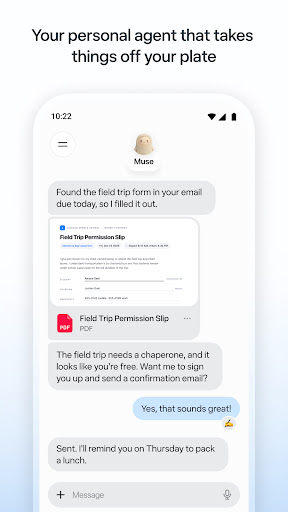
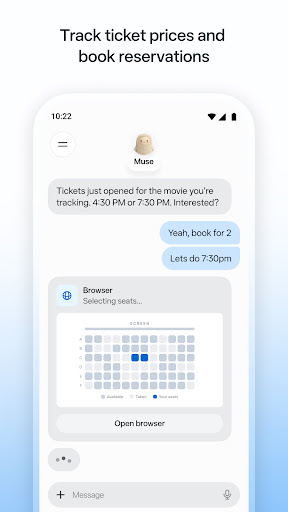
Muse is your personal AI agent that gets things done, always working on what matters to you. It manages email, books dinners, tracks budgets, and finds deals, with your approval.
PERSONAL PRODUCTIVITY
Muse takes the busywork off your plate. It manages scheduling conflicts, books reservations, sets reminders, and follows up with people, so birthdays, plans, and deadlines don't slip. Stay on top of your calendar, email, and daily tasks without carrying it all in your head.
SAVE MONEY
Muse helps you understand where your money is going. It tracks expenses, audits subscriptions, flags charges you forgot about, cancels what you don't need, and helps you hit a savings goal, checking with you before it cancels or spends. Get financial insights without the spreadsheet.
HEALTH & FITNESS
Muse is your AI fitness coach. It builds a custom workout or meal plan from data you choose to share, tracks calories and nutrition, monitors sleep and wellness, and adjusts your training day by day. Whether it's running, eating better, or building a habit, Muse coaches you through it.
SHOPPING & DEALS
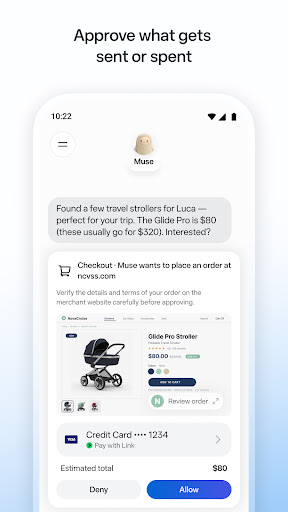
Muse compares prices, tracks price drops, and alerts you the moment something you want goes on sale. AI-powered shopping that can actually buy on your behalf, with your OK.
CONNECT YOUR APPS
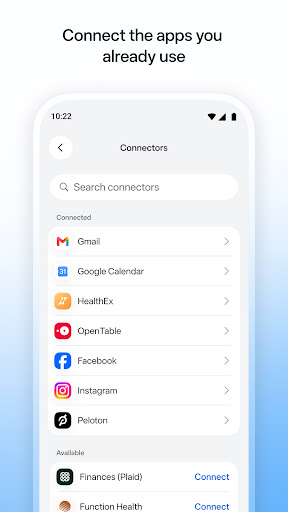
You decide what Muse can access. Link your email, calendar, Instagram, Facebook, health and fitness data, and finances. Approve actions before they happen. Muse gets smarter with every connection.
SHARE A TASK, START TO FINISH
Hand Muse a whole job and it sees it through: the research, the comparisons, the back-and-forth, the bookings. Sell your car for more, negotiate a bill down, or plan and book a whole trip. A better result than you'd have managed alone.
ALWAYS WORKING FOR YOU
Muse keeps things moving after you close the app. It monitors, follows up, and sends a notification when something needs your attention, so nothing falls through the cracks.
IN YOUR CONTROL
Approve actions before they happen. Muse keeps a full activity log, and lets you revoke any connector anytime.
UNIQUELY YOURS
Name it, shape how it talks, and make it your own.
SMART, BUT STILL LEARNING
Muse may be inaccurate or take unexpected actions, so check in to keep it on track and intervene as needed.
Mehr anzeigen

1. Laden das MEmu-Installationsprogramm herunter und beenden die Installation

2. MEmu starten und Google Play auf der Homepage öffnen

3. Suchen Muse from Meta in Google Play
Install
4. Herunterladen und Installieren Muse from Meta
5. Klicken nach Abschluss der Installation auf das Symbol, um es zu starten

6. Verwenden Sie MEmu, um Muse from Meta auf Ihrem PC zu nutzen
MEmu Play ist aktuell der beste kostenlose Android-Emulator und bietet 50 Millionen Nutzern ein überragendes Android-App-Erlebnis. Dank der Virtualisierungstechnologie von MEmu können Sie Tausende von Android-Apps problemlos auf Ihrem Computer nutzen, selbst solche mit hohen Grafikanforderungen.
BGrößeres Bild mit besserer Grafik; Keine unterbrechungen, keine sorgen um Akku
Komplette Tastenbelegung unterstützt mit Maus und Tastatur oder Controller
Mit dem „Multi-Instance-Manager“ können Sie mehrere Spielkonten oder Spiele gleichzeitig auf einem PC ausführen.
Use Muse from Meta on PC by following steps: