Muse from Meta
อัปเดตเมื่อ
เวอร์ชันปัจจุบัน
8.0.0.21.168
ให้บริการโดย

เมื่อใช้ Muse from Meta บนโทรศัพท์ของคุณไม่ต้องกังวลกับการชาร์จไฟมากเกินไปปลดปล่อยตัวคุณเองจากหน้าจอขนาดเล็กและสนุกกับการใช้แอพนี้บนหน้าจอขนาดใหญ่ จากนี้ไปรับประสบการณ์เต็มหน้าจอของแอปพลิเคชันของคุณด้วยคีย์บอร์ดและเมาส์ MEmu มีคุณสมบัติที่น่าแปลกใจที่คุณคาดหวัง: การติดตั้งที่รวดเร็วและการตั้งค่าที่ง่ายควบคุมได้ง่ายไม่ จำกัด แบตเตอรี่ข้อมูลมือถือและการโทรที่รบกวน MEmu 9 ใหม่ล่าสุดเป็นตัวเลือกที่ดีที่สุดสำหรับการใช้ Meitu – โปรแกรมแก้ไขภาพแนวธรรมชาติ บนคอมพิวเตอร์ของคุณ ด้วยรหัสการดูดซึมของเราผู้จัดการหลายอินสแตนซ์ทำให้สามารถเปิดบัญชี 2 บัญชีขึ้นไปในเวลาเดียวกันได้ และที่สำคัญที่สุดเอ็นจิ้นจำลองพิเศษของเราสามารถปลดปล่อยศักยภาพของPCของคุณและทำให้ทุกอย่างราบรื่นและสนุกสนาน
แสดงเพิ่มเติม
สัมผัสประสบการณ์สุดยอดการใช้งาน Muse from Meta บนพีซีด้วย MEmu Play นี่คือโปรแกรมจำลอง Android ฟรีที่ทรงพลัง ให้คุณใช้งานแอป Android นับพันบนเดสก์ท็อป สนุกกับการเชื่อมต่อกับเพื่อนๆ และขัดเกลาผลงานของคุณอย่างมีประสิทธิภาพยิ่งขึ้น! Muse is your personal AI agent that gets things done, always working on what matters to you.
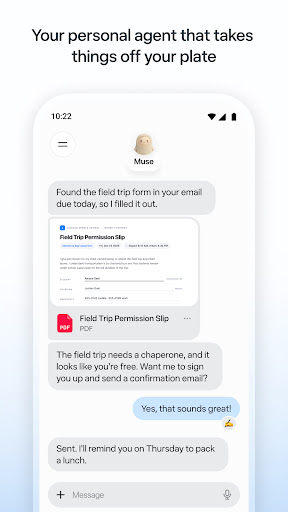
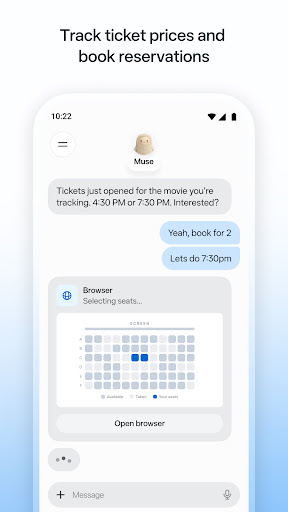
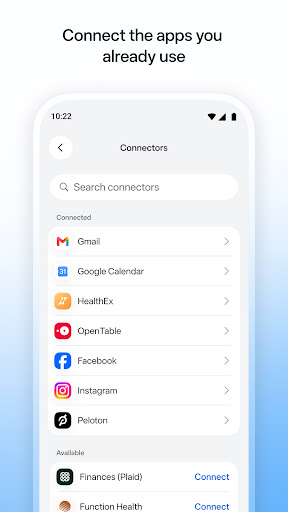
Muse is your personal AI agent that gets things done, always working on what matters to you. It manages email, books dinners, tracks budgets, and finds deals, with your approval.
PERSONAL PRODUCTIVITY
Muse takes the busywork off your plate. It manages scheduling conflicts, books reservations, sets reminders, and follows up with people, so birthdays, plans, and deadlines don't slip. Stay on top of your calendar, email, and daily tasks without carrying it all in your head.
SAVE MONEY
Muse helps you understand where your money is going. It tracks expenses, audits subscriptions, flags charges you forgot about, cancels what you don't need, and helps you hit a savings goal, checking with you before it cancels or spends. Get financial insights without the spreadsheet.
HEALTH & FITNESS
Muse is your AI fitness coach. It builds a custom workout or meal plan from data you choose to share, tracks calories and nutrition, monitors sleep and wellness, and adjusts your training day by day. Whether it's running, eating better, or building a habit, Muse coaches you through it.
SHOPPING & DEALS
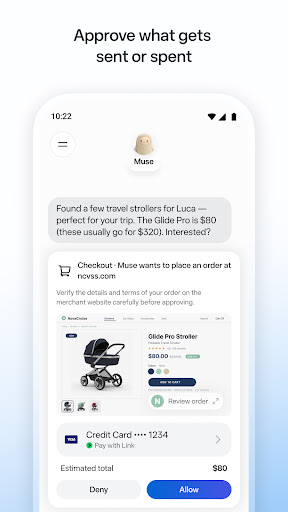
Muse compares prices, tracks price drops, and alerts you the moment something you want goes on sale. AI-powered shopping that can actually buy on your behalf, with your OK.
CONNECT YOUR APPS
You decide what Muse can access. Link your email, calendar, Instagram, Facebook, health and fitness data, and finances. Approve actions before they happen. Muse gets smarter with every connection.
SHARE A TASK, START TO FINISH
Hand Muse a whole job and it sees it through: the research, the comparisons, the back-and-forth, the bookings. Sell your car for more, negotiate a bill down, or plan and book a whole trip. A better result than you'd have managed alone.
ALWAYS WORKING FOR YOU
Muse keeps things moving after you close the app. It monitors, follows up, and sends a notification when something needs your attention, so nothing falls through the cracks.
IN YOUR CONTROL
Approve actions before they happen. Muse keeps a full activity log, and lets you revoke any connector anytime.
UNIQUELY YOURS
Name it, shape how it talks, and make it your own.
SMART, BUT STILL LEARNING
Muse may be inaccurate or take unexpected actions, so check in to keep it on track and intervene as needed.
แสดงเพิ่มเติม

1. ดาวน์โหลดตัวติดตั้ง MEmu และสิ้นสุดการติดตั้ง

2. เริ่ม MEmu จากนั้นเปิด Google Play บนหน้าแรก

3. ค้นหา Muse from Meta ใน Google Play
Install
4. ดาวน์โหลดและติดตั้ง Muse from Meta
5. เมื่อติดตั้งเสร็จให้คลิกที่ไอคอนเพื่อเริ่มใช้งาน

6. ใช้ MEmu เพื่อสัมผัสประสบการณ์ Muse from Meta บนคอมพิวเตอร์ของคุณ
MEmu Play คือโปรแกรมจำลอง Android ที่ดีที่สุด มีผู้ใช้มากกว่า 50 ล้านคน มอบประสบการณ์การใช้งานแอป Android ขั้นสุดยอดให้กับคุณ เทคโนโลยีจำลองเสมือนของ MEmu ช่วยให้คุณรันแอป Android หลายพันแอปบนคอมพิวเตอร์ได้อย่างราบรื่น แม้แอปที่กินทรัพยากรเครื่องสูงที่สุด
จอใหญ่และกราฟฟิกสวยกว่า; เล่นได้นาน, ไม่ต้องใช้แบตเตอรี่โทรศัพท์หรือเน็ตโทรศัพท์.
ระบบปรับแต่งปุ่มคีย์บอร์ดและเม้าส์ตามที่คุณเลือก
เล่นมากกว่าหนึ่งเกมบน PC ในเวลาเดียวกันด้วยระบบหลายจอหรือ Multi-Instance manager.
Use Muse from Meta on PC by following steps: