Muse from Meta
Diupdate
Versi Saat Ini
8.0.0.21.168
Ditawarkan Oleh

Hentilah khawatir tentang biaya berlebihan saat menggunakan Muse from Meta di ponsel Anda, bebaskan diri Anda dari layar kecil dan nikmati menggunakan aplikasi pada tampilan yang lebih besar. Mulai sekarang, dapatkan pengalaman full-screen di aplikasi Anda dengan keyboard dan mouse. MEmu menyediakan semua fitur mengejutkan yang Anda harapkan: cepat menginstal dan mudah menggunakan, kontrol intuitif, tidak ada lagi batasan baterai, data seluler dan panggilan yang mengganggu. MEmu 9 yang baru adalah pilihan terbaik untuk menggunakan Muse from Meta di komputer Anda. Bersandi dengan absorpsi kami, manajer multi-instance memungkinkan pembukaan 2 akun atau lebih pada saat yang bersamaan. Dan yang paling penting, mesin emulasi eksklusif kami dapat melepaskan potensi penuh PC Anda, menjadikan semuanya lancar dan menyenangkan.
Tampilkan Lebih banyak
Nikmati pengalaman luar biasa menggunakan Muse from Meta di PC dengan MEmu Play. Emulator Android gratis dan canggih ini menyediakan ribuan aplikasi Android untuk versi desktop. Nikmati koneksi yang lancar bersama teman dan tingkatkan pekerjaan Anda dengan efisiensi yang lebih tinggi! Muse is your personal AI agent that gets things done, always working on what matters to you.
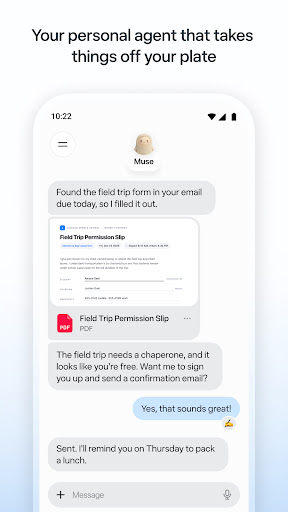
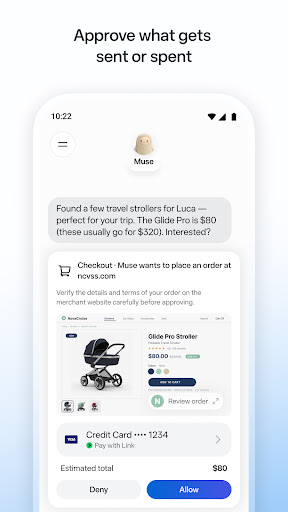
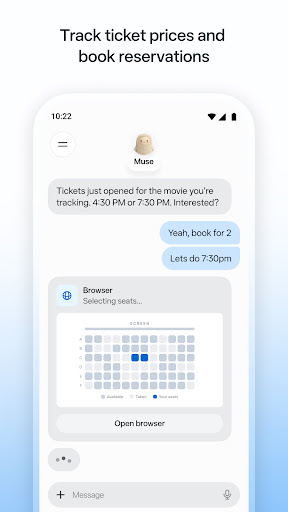
Muse is your personal AI agent that gets things done, always working on what matters to you. It manages email, books dinners, tracks budgets, and finds deals, with your approval.
PERSONAL PRODUCTIVITY
Muse takes the busywork off your plate. It manages scheduling conflicts, books reservations, sets reminders, and follows up with people, so birthdays, plans, and deadlines don't slip. Stay on top of your calendar, email, and daily tasks without carrying it all in your head.
SAVE MONEY
Muse helps you understand where your money is going. It tracks expenses, audits subscriptions, flags charges you forgot about, cancels what you don't need, and helps you hit a savings goal, checking with you before it cancels or spends. Get financial insights without the spreadsheet.
HEALTH & FITNESS
Muse is your AI fitness coach. It builds a custom workout or meal plan from data you choose to share, tracks calories and nutrition, monitors sleep and wellness, and adjusts your training day by day. Whether it's running, eating better, or building a habit, Muse coaches you through it.
SHOPPING & DEALS
Muse compares prices, tracks price drops, and alerts you the moment something you want goes on sale. AI-powered shopping that can actually buy on your behalf, with your OK.
CONNECT YOUR APPS
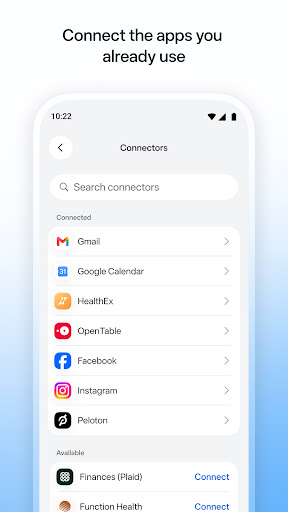
You decide what Muse can access. Link your email, calendar, Instagram, Facebook, health and fitness data, and finances. Approve actions before they happen. Muse gets smarter with every connection.
SHARE A TASK, START TO FINISH
Hand Muse a whole job and it sees it through: the research, the comparisons, the back-and-forth, the bookings. Sell your car for more, negotiate a bill down, or plan and book a whole trip. A better result than you'd have managed alone.
ALWAYS WORKING FOR YOU
Muse keeps things moving after you close the app. It monitors, follows up, and sends a notification when something needs your attention, so nothing falls through the cracks.
IN YOUR CONTROL
Approve actions before they happen. Muse keeps a full activity log, and lets you revoke any connector anytime.
UNIQUELY YOURS
Name it, shape how it talks, and make it your own.
SMART, BUT STILL LEARNING
Muse may be inaccurate or take unexpected actions, so check in to keep it on track and intervene as needed.
Tampilkan Lebih banyak

1. Unduh dan instal MEmu APP

2. Menjalankan MEmu lalu buka Google Play di halaman

3. Cari Muse from Meta di Google Play
Install
4. Unduh dan instal Muse from Meta
5. Setelah insatl APP selesai,klik ikon untuk mulai

6. Nikmati bermain Muse from Meta di PC dengan MEmu
MEmu Play adalah emulator Android gratis terbaik dan 50 Juta orang sudah menikmati pengalaman luar biasa dalam Aplikasi Android. Teknologi virtualisasi MEmu memberi kekuasaan untuk memainkan ribuan Aplikasi Android dengan lancar di PC anda, bahkan Aplikasi dengan grafis yang paling tinggi.
Layar lebih besar dengan grafis yang lebih baik; durasi panjang, tanpa batasan baterai atau data seluler.
Didukung penuh oleh Pemetaan tombol yang lengkap untuk keakuratan kontrol keyboard dan mouse maupun gamepad.
Membuka beberapa akun game atau tugas di waktu yang sama hanya pada satu PC, dengan Multi-Instance manager.
Use Muse from Meta on PC by following steps: