Muse from Meta
Güncellendi
Mevcut Sürüm
8.0.0.21.168
Sunan

Cep telefonunda Muse from Meta kullanırken fazla şarjlardan endişelenme, kendini küçük ekrandan kurtar ve uygulamayı çok daha büyük bir ekranda kullanmanın tadını çıkar. Şu andan itibaren, klavye ve fare ile uygulamayı tam ekran da kullanmayı dene. MEmu, beklediğin tüm şaşırtıcı özellikleri sunar: hızlı ve kolay kurulum, sezgisel kontroller, bunun dışında pil sınırı, mobil veri ve rahatsız edici aramalar artık yok. Yepyeni MEmu 9, bilgisayarında Muse from Meta kullanmanın en iyi seçimidir. Emilimimizle kodlanan çok örnekli yönetici, aynı anda 2 veya daha fazla hesap açmayı mümkün kılar. Ve en önemlisi, özel emülasyon motorumuz PC'nin tüm potansiyelini serbest bırakabilir, her şeyi pürüzsüz ve eğlenceli hale getirebilir.
Daha fazla göster
MEmu Play ile bilgisayarınızda Muse from Meta kullanmanın mükemmel deneyimini yaşayın. Masaüstü sürümleri için binlerce Android uygulaması sunan güçlü ve ücretsiz bir Android emülatörüdür. Arkadaşlarınızla bağlantı kurmanın ve çalışmalarınızı daha verimli bir şekilde geliştirmenin keyfini çıkarın! Muse is your personal AI agent that gets things done, always working on what matters to you.
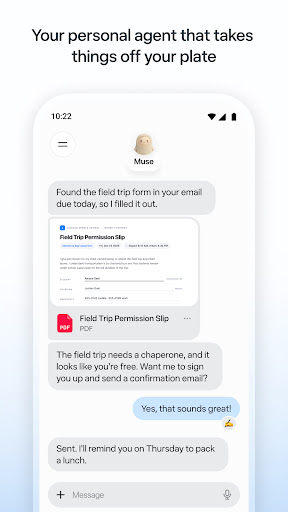
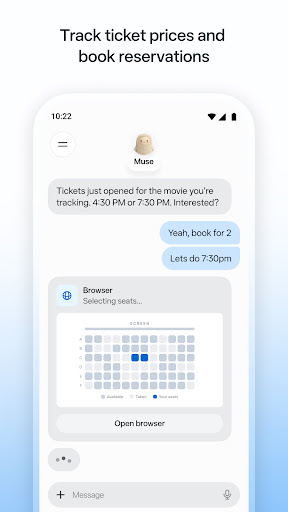
Muse is your personal AI agent that gets things done, always working on what matters to you. It manages email, books dinners, tracks budgets, and finds deals, with your approval.
PERSONAL PRODUCTIVITY
Muse takes the busywork off your plate. It manages scheduling conflicts, books reservations, sets reminders, and follows up with people, so birthdays, plans, and deadlines don't slip. Stay on top of your calendar, email, and daily tasks without carrying it all in your head.
SAVE MONEY
Muse helps you understand where your money is going. It tracks expenses, audits subscriptions, flags charges you forgot about, cancels what you don't need, and helps you hit a savings goal, checking with you before it cancels or spends. Get financial insights without the spreadsheet.
HEALTH & FITNESS
Muse is your AI fitness coach. It builds a custom workout or meal plan from data you choose to share, tracks calories and nutrition, monitors sleep and wellness, and adjusts your training day by day. Whether it's running, eating better, or building a habit, Muse coaches you through it.
SHOPPING & DEALS
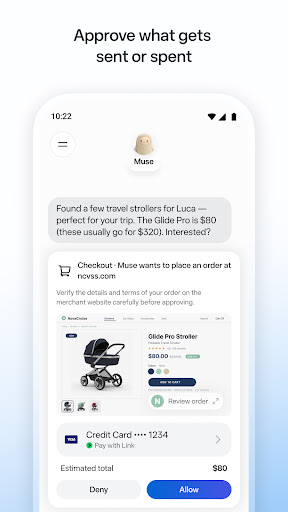
Muse compares prices, tracks price drops, and alerts you the moment something you want goes on sale. AI-powered shopping that can actually buy on your behalf, with your OK.
CONNECT YOUR APPS
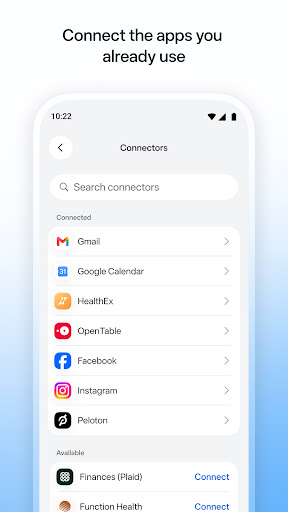
You decide what Muse can access. Link your email, calendar, Instagram, Facebook, health and fitness data, and finances. Approve actions before they happen. Muse gets smarter with every connection.
SHARE A TASK, START TO FINISH
Hand Muse a whole job and it sees it through: the research, the comparisons, the back-and-forth, the bookings. Sell your car for more, negotiate a bill down, or plan and book a whole trip. A better result than you'd have managed alone.
ALWAYS WORKING FOR YOU
Muse keeps things moving after you close the app. It monitors, follows up, and sends a notification when something needs your attention, so nothing falls through the cracks.
IN YOUR CONTROL
Approve actions before they happen. Muse keeps a full activity log, and lets you revoke any connector anytime.
UNIQUELY YOURS
Name it, shape how it talks, and make it your own.
SMART, BUT STILL LEARNING
Muse may be inaccurate or take unexpected actions, so check in to keep it on track and intervene as needed.
Daha fazla göster

1. MEmu yükleyicisini indirin ve kurulumu tamamlayın

2. MEmu'yu başlatın ve ana sayfada Google Play'i açın

3. Google Play'de Muse from Meta arayın
Install
4. Muse from Meta indirin ve yükleyin
5. Kurulum tamamlandığında başlamak için simgeye tıklayın

6. Muse from Meta'i PC'de için MEmu'yu kullanın
MEmu Play, 50 milyon kullanıcısıyla en iyi ücretsiz Android emülatörüdür ve en üst düzey Android uygulama deneyiminin keyfini çıkarır. MEmu'nun sanallaştırma teknolojisi, en zorlu uygulamalar da dahil olmak üzere binlerce uygulamayı bilgisayarınızda sorunsuz bir şekilde çalıştırmanızı sağlar.
Daha büyük ekranla daha iyi grafiklere sahip; Pil veya mobil veri sınırlaması olmaksızın uzun süre.
Keymapping klavye ve fare veya gamepad'in hassas kontrolü için destek verir.
Multi-Instance yöneticisi ile tek bir bilgisayarda aynı anda birden fazla oyun hesabı veya görev gerçekleşilebilir.
Use Muse from Meta on PC by following steps: