
RenderZ: FC Mobile 25 Database
تم التحديث
الإصدار الحالي
4.7.0
تقديم

لا داعي للقلق بشأن الشحن الزائد عند استخدام RenderZ: FC Mobile 25 Database على هاتفك. تحرر من قيود الشاشة الصغيرة واستمتع به على شاشة أكبر باستخدام لوحة المفاتيح والفأرة. يوفر MEmu جميع الميزات الرائعة التي تتوقعها: تثبيت سريع، إعداد سهل، أدوات تحكم بديهية، ودون قيود على عمر البطارية، أو استخدام البيانات، أو المكالمات الواردة. يُعد MEmu 9 الجديد الخيار الأمثل لتجربة RenderZ: FC Mobile 25 Database على جهاز الكمبيوتر. بفضل تقنية التشفير الفريدة، يتيح لك مدير الحسابات المتعددة تشغيل حسابين أو أكثر في وقت واحد. والأهم من ذلك، أن محرك المحاكاة الفريد يستغل أداء جهاز الكمبيوتر بالكامل، مما يُحسّن تجربة التطبيق ويجعل كل شيء سلسًا للغاية.
أظهر المزيد
قم بتنزيل RenderZ: FC Mobile 25 Database على الكمبيوتر بإستخدام جهاز مقلد أندروز MEmu.استمتع بمتعة اللعب على الشاشة الكبيرة. RenderZ: The Premier Companion App for FC Mobile 25.

RenderZ: The Premier Companion App for FC Mobile 25
Maximize your FC Mobile 25 experience with RenderZ, your essential companion database app packed with tools and features designed to supercharge your interaction with the game. RenderZ equips you with the resources needed to strategize, optimize, and enjoy FC Mobile 25 like never before.
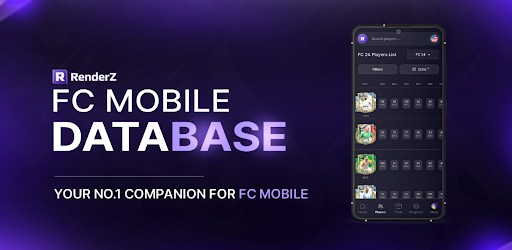
FC Mobile 25 Database
Access an extensive database with over 31,000 searchable football players from various leagues worldwide. Our advanced search system allows you to filter players by multiple criteria such as position, skills, club, or nationality, providing a tailored browsing experience that helps you find the perfect players for your team.
FC Mobile 25 Pack Opener
Kickstart your gameplay with our exciting Pack Opener feature. Each pack you open reveals new players where you can compete on a spot on the leaderboard and win monthly prizes.
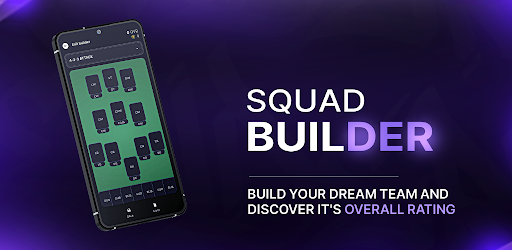
FC Mobile 25 Squadbuilder
Our intuitive SquadBuilder tool allows you to create, customize, and manage your dream team. Experiment with different formations, test player compatibilities, and refine your strategies to find the perfect lineup. Share your creations with the RenderZ community.
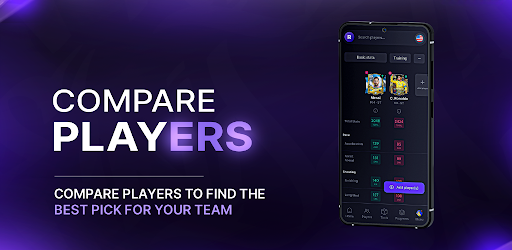
FC Mobile 25 Comparison Tool
Make informed decisions using our Compare feature, which allows you to evaluate players side-by-side. Assess their stats, growth potential, and suitability for your team, helping you to make strategic choices about acquisitions and lineup adjustments.
FC Mobile 25 Card Generator
Express your creativity with our Card Generator. Design your own player cards using a variety of templates, add custom stats, and personalize with unique images. These cards can be used in community contests or as a fun way to showcase your team spirit and player fandom.
FC Mobile 25 Updates
RenderZ is continuously updated to mirror the biggest FC Mobile 25 Games. With new players added, adjustments to stats, and seasonal events, the app stays fresh and relevant. Engage with time-limited events and enjoy updates that keep pace with live football activities.
FC Mobile 25 Community and Networking
Become part of a vibrant community of FC Mobile 25 fans and enthusiasts. Engage in discussions, share tips, participate in polls, and connect with fellow users. RenderZ fosters a collaborative environment where members can exchange ideas, strategies, and game plans.
Dedicated Support
Experience seamless gameplay with dedicated support from the RenderZ team. Our technical support is ready to assist with any issues, ensuring a smooth, uninterrupted experience as you explore all that FC Mobile 25 has to offer.
Note: Internet Connection Required
A stable internet connection is necessary to access all features, ensuring you receive the latest updates and can fully engage with the community and live game integrations.
Elevate your FC Mobile 25 experience with RenderZ — your ultimate tool for navigating, managing, and enjoying the game to its fullest potential. Whether you're strategizing for the next big match or just starting out, RenderZ is here to support every step of your journey.
أظهر المزيد

1. قم بتنزيل برنامج MEmu واكمال تثبيته

2. قم بتشغيل برنامج MEmu وفتح Google Play على الصفحة الرئيسية

3. ابح RenderZ: FC Mobile 25 Database في Google Play
Install
4. تنزيل وتثبيت RenderZ: FC Mobile 25 Database
5. انقر على الرمز للتشغيل بعد اكتمال التثبيت

6. استخدم MEmu لتجربة RenderZ: FC Mobile 25 Database على جهاز الكمبيوتر الخاص بك.
تطبيق MEmuهو افضل محاكى اندرويد مجانى وبالفعل 50 مليون شخص يستمتعون حاليا بتجربه اللعب عليه. تمكّنك تقنية MEmu الافتراضية من تشغيل آلاف ألعاب Android بسلاسة على الكمبيوتر الشخصي ، حتى أكثرها استخدامًا للرسومات.
شاشة أكبر وجرافيك افضل ووقت أطول بدون حدود البطارية وباقة التليفون
لوحة مفاتيح كاملة تدعم تحكم كامل عن طريق لوحة المفاتيح و الفأره وجيم باد
عدة العاب وحسابات ومهمات علي جهاز الكمبيوتر في وقت معين عن طريق Memu متعدد النوافذ
Use RenderZ: FC Mobile 25 Database on PC by following steps: