RenderZ: FC Mobile 25 Database
Atualizada
Versão atual
4.7.0
Oferecido por

Pare de se preocupar com sobrecargas ao usar RenderZ: FC Mobile 25 Database no seu celular, liberte-se da pequena tela e aproveite o uso do aplicativo numa tela muito maior. A partir de agora, obtenha uma experiência em tela cheia do seu aplicativo com teclado e mouse. O MEmu oferece-lhe todos os recursos surpreendentes que você esperava: instalação rápida e configuração fácil, controles intuitivos, sem mais limitações de bateria, dados móveis e chamadas perturbadoras. O novíssimo MEmu 9 é a melhor opção para usar RenderZ: FC Mobile 25 Database no seu computador. Codificado com a nossa absorção, o gerenciador de multi-instâncias possibilita a abertura de 2 ou mais contas ao mesmo tempo. E o mais importante, nosso mecanismo de emulação exclusivo pode liberar todo o potencial do seu PC, tornando tudo suave e agradável.
Mostre mais
Download do RenderZ: FC Mobile 25 Database no PC com MEmu Android Emulador: Divirta-se jogando na tela grande. RenderZ: The Premier Companion App for FC Mobile 25.
RenderZ: The Premier Companion App for FC Mobile 25
Maximize your FC Mobile 25 experience with RenderZ, your essential companion database app packed with tools and features designed to supercharge your interaction with the game. RenderZ equips you with the resources needed to strategize, optimize, and enjoy FC Mobile 25 like never before.
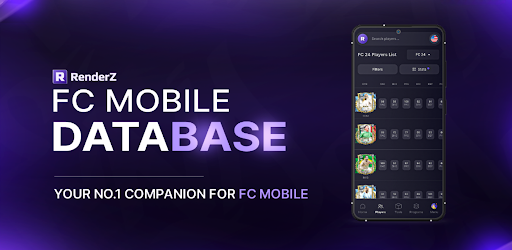
FC Mobile 25 Database
Access an extensive database with over 31,000 searchable football players from various leagues worldwide. Our advanced search system allows you to filter players by multiple criteria such as position, skills, club, or nationality, providing a tailored browsing experience that helps you find the perfect players for your team.
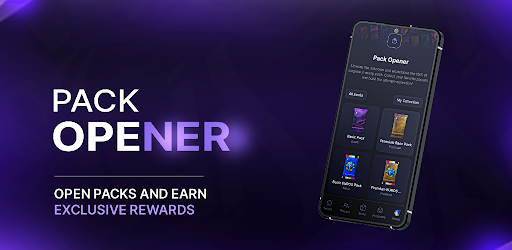
FC Mobile 25 Pack Opener
Kickstart your gameplay with our exciting Pack Opener feature. Each pack you open reveals new players where you can compete on a spot on the leaderboard and win monthly prizes.
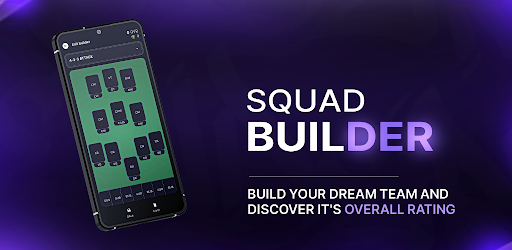
FC Mobile 25 Squadbuilder
Our intuitive SquadBuilder tool allows you to create, customize, and manage your dream team. Experiment with different formations, test player compatibilities, and refine your strategies to find the perfect lineup. Share your creations with the RenderZ community.
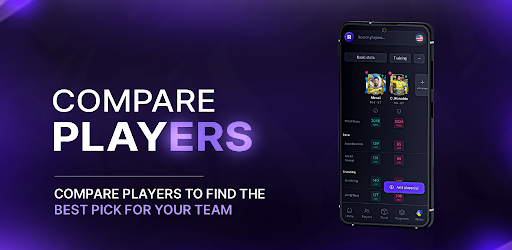
FC Mobile 25 Comparison Tool
Make informed decisions using our Compare feature, which allows you to evaluate players side-by-side. Assess their stats, growth potential, and suitability for your team, helping you to make strategic choices about acquisitions and lineup adjustments.
FC Mobile 25 Card Generator
Express your creativity with our Card Generator. Design your own player cards using a variety of templates, add custom stats, and personalize with unique images. These cards can be used in community contests or as a fun way to showcase your team spirit and player fandom.
FC Mobile 25 Updates
RenderZ is continuously updated to mirror the biggest FC Mobile 25 Games. With new players added, adjustments to stats, and seasonal events, the app stays fresh and relevant. Engage with time-limited events and enjoy updates that keep pace with live football activities.
FC Mobile 25 Community and Networking
Become part of a vibrant community of FC Mobile 25 fans and enthusiasts. Engage in discussions, share tips, participate in polls, and connect with fellow users. RenderZ fosters a collaborative environment where members can exchange ideas, strategies, and game plans.
Dedicated Support
Experience seamless gameplay with dedicated support from the RenderZ team. Our technical support is ready to assist with any issues, ensuring a smooth, uninterrupted experience as you explore all that FC Mobile 25 has to offer.
Note: Internet Connection Required
A stable internet connection is necessary to access all features, ensuring you receive the latest updates and can fully engage with the community and live game integrations.
Elevate your FC Mobile 25 experience with RenderZ — your ultimate tool for navigating, managing, and enjoying the game to its fullest potential. Whether you're strategizing for the next big match or just starting out, RenderZ is here to support every step of your journey.
Mostre mais

1. Faça o download do instalador do MEmu e conclua a instalação

2. Inicie o MEmu e depois abra o Google Play na página inicial

3. Pesquise RenderZ: FC Mobile 25 Database no Google Play
Install
4. Baixe e Instale RenderZ: FC Mobile 25 Database
5. Na conclusão da instalação, clique no ícone para iniciar

6. º Experimente o RenderZ: FC Mobile 25 Database no PC com o MEmu.
O MEmu Play é o melhor emulador Android gratuito, com 50 milhões de utilizadores a desfrutar da sua experiência superior com aplicações Android. A tecnologia de virtualização do MEmu permite-lhe executar milhares de aplicações Android sem problemas no seu computador, mesmo as mais exigentes.
Tela maior com gráficos melhores; Longa duração e sem limitação de bateria ou dados móveis.
Suporte completo ao Mapaeamento de Teclas para controle preciso do teclado e mouse ou gamepad.
Várias contas de jogos ou tarefas em um único PC de uma só vez com o Gerenciador de várias instâncias.
Use RenderZ: FC Mobile 25 Database on PC by following steps: