spacedesk - USB Display for PC
تم التحديث
الإصدار الحالي
2.1.15
تقديم

لا داعي للقلق بشأن الشحن الزائد عند استخدام spacedesk - USB Display for PC على هاتفك. تحرر من قيود الشاشة الصغيرة واستمتع به على شاشة أكبر باستخدام لوحة المفاتيح والفأرة. يوفر MEmu جميع الميزات الرائعة التي تتوقعها: تثبيت سريع، إعداد سهل، أدوات تحكم بديهية، ودون قيود على عمر البطارية، أو استخدام البيانات، أو المكالمات الواردة. يُعد MEmu 9 الجديد الخيار الأمثل لتجربة spacedesk - USB Display for PC على جهاز الكمبيوتر. بفضل تقنية التشفير الفريدة، يتيح لك مدير الحسابات المتعددة تشغيل حسابين أو أكثر في وقت واحد. والأهم من ذلك، أن محرك المحاكاة الفريد يستغل أداء جهاز الكمبيوتر بالكامل، مما يُحسّن تجربة التطبيق ويجعل كل شيء سلسًا للغاية.
أظهر المزيد
قم بتنزيل spacedesk - USB Display for PC على الكمبيوتر بإستخدام جهاز مقلد أندروز MEmu.استمتع بمتعة اللعب على الشاشة الكبيرة. Windows computer desktop extension, mirroring and remoting tool for WiFi, USB or LAN.
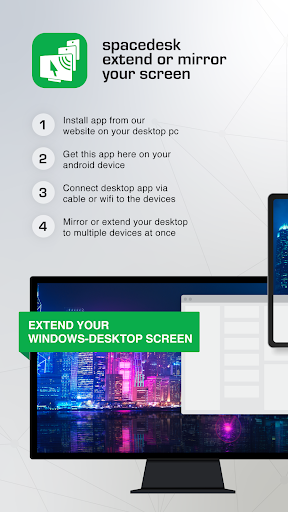
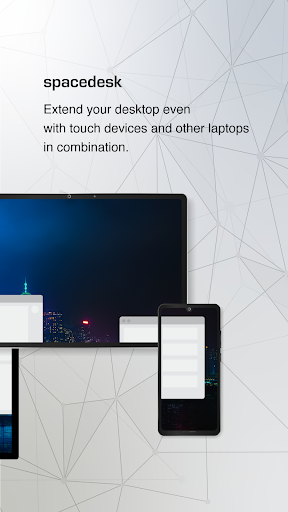
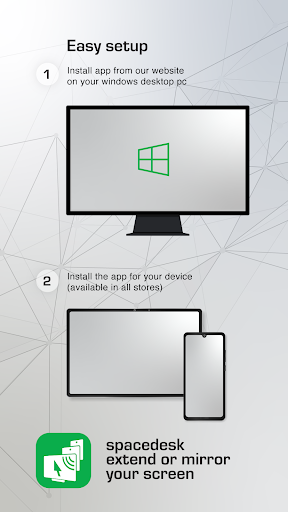
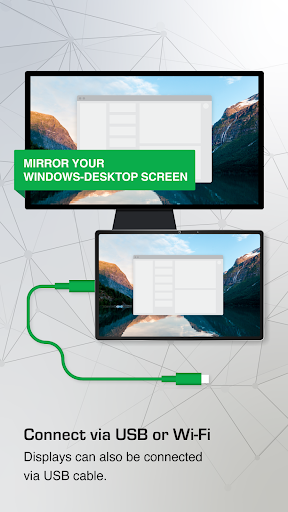
Windows computer desktop extension, mirroring and remoting tool for WiFi, USB or LAN. Supports applications like:
- Screen Cast (to television, tablet or smart phone)
- Desktop Remoting Viewer (over USB and Local Area Network)
- Drawing Tablet (drawing and painting with digitizer pen)
- Wireless Display Monitor (similar to Miracast, RDP, AirPlay and Sidecar)
- USB Display Monitor (similar to DisplayLink)
- Remote Access (over USB link, WiFi and LAN)
- Remote Control (wireless and wired)
- Screen Streaming (including audio)
- Screen Mirroring (over the air and via cable)
- Screen Cloning
- Extension Screen
- Windows Desktop Workspace Extension
- Windows Desktop Duplication (clone)
- Windows Desktop Streaming
- Personal Computer Desktop Presenter
- Virtual Monitor for Desktop PC
- Additional Display Monitor
- Second Display On The Go
- TV, mobile or tablet screen as Side by Side Display
- Alternative to Miracast, AirPlay and Sidecar
- Portable Multimonitor Laptop Screen for Travel
- Access main computer from mobile device
- Software KVM-Switch (Keyboard Video Mouse
- Software Display Hub
- Software Display Switch
- Projector Screen Viewer
- Input Console
- Input Terminal
- Tablet Input Device
- Windows Graphics Tablet App
- Windows Tablet as sketchbook for drawing artwork
- Creative Video Wall App
- Video Wall w. Any Angle Rotation
Instruction manual, documentation and detailed setup:
https://manual.spacedesk.net
Quick Guide:
1. Install spacedesk DRIVER software for Windows Primary PC.
Download from: https://www.spacedesk.net
2. Install this spacedesk Viewer app for Android.
3. Open this spacedesk Viewer app and connect to Windows Primary PC.
Connection: USB or LAN (Local Area Network).
LAN: Driver and Viewer must be on the same network
- via Mobile Hotspot
Note: Does NOT need internet connection!
The Windows Primary Machine running spacedesk Driver...
...supports Windows 11, Windows 10 or Windows 8.1. Apple Macs are not supported.
Dual monitor and multi monitor configurations are supported.
Needs spacedesk drivers installed. Download: https://www.spacedesk.net
The Secondary Machine or Device (Android network display client)...
...is an Android tablet, phone or device running the spacedesk Android app.
The wireless and wired cable connection...
...connects Windows Primary Machine to Secondary Machine or Device over USB, LAN (Local Area Network e.g. Ethernet) and/or WLAN (Wireless Local Area Network).
Local Area Network connection can be wired or over WiFi. TCP/IP network protocol is required.
More information on:
https://www.spacedesk.net
Instruction Manual: https://manual.spacedesk.net/
Support Forum: https://forum.spacedesk.ph
Facebook: https://www.facebook.com/pages/spacedesk/330909083726073
Youtube: https://www.youtube.com/watch?v=YkWZSwBD-XY
— LIGHTNING FAST —
To achieve unparalleled performance and display quality with zero lag, use cable connection over USB or Local Area Network. Try to circumvent WiFi and network routers. E.g. configure Windows PC or Android device as WiFi Access Point (Hotspot) and connect directly before connecting spacedesk. Please check chapter "Performance Tuning" in the instruction manual: https://manual.spacedesk.net
— REMOTE CONTROL INPUT AND OUTPUT PERIPHERAL ACCESSORIES —
- Touchscreen (multitouch and single touch
- Touchpad
- Mouse Pointer Control
- Keyboard
- Pressure Sensitive Stylus Pen
- Audio Speaker
— SETTINGS AND OPTIONS —
- Landscape View
- Portrait View
— SYSTEM SUPPORT —
Supported are Android versions 4.1+ and PCs with Windows 11, Windows 10 and Windows 8.1. Apple Macs are not supported.
أظهر المزيد

1. قم بتنزيل برنامج MEmu واكمال تثبيته

2. قم بتشغيل برنامج MEmu وفتح Google Play على الصفحة الرئيسية

3. ابح spacedesk - USB Display for PC في Google Play
Install
4. تنزيل وتثبيت spacedesk - USB Display for PC
5. انقر على الرمز للتشغيل بعد اكتمال التثبيت

6. استخدم MEmu لتجربة spacedesk - USB Display for PC على جهاز الكمبيوتر الخاص بك.
تطبيق MEmuهو افضل محاكى اندرويد مجانى وبالفعل 50 مليون شخص يستمتعون حاليا بتجربه اللعب عليه. تمكّنك تقنية MEmu الافتراضية من تشغيل آلاف ألعاب Android بسلاسة على الكمبيوتر الشخصي ، حتى أكثرها استخدامًا للرسومات.
شاشة أكبر وجرافيك افضل ووقت أطول بدون حدود البطارية وباقة التليفون
لوحة مفاتيح كاملة تدعم تحكم كامل عن طريق لوحة المفاتيح و الفأره وجيم باد
عدة العاب وحسابات ومهمات علي جهاز الكمبيوتر في وقت معين عن طريق Memu متعدد النوافذ
Use spacedesk - USB Display for PC on PC by following steps: