How to Solve No Internet Access
 |
|
If you cannot access internet in MEmu App Player, please try to narrow down:
- Check whether your computer can access internet. For example, open a website with Browser in Windows.
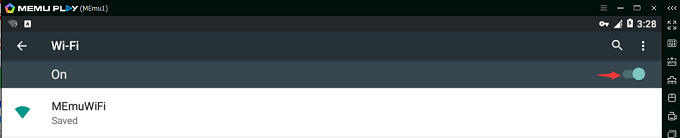
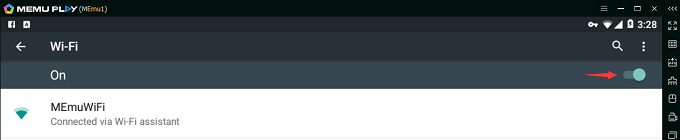
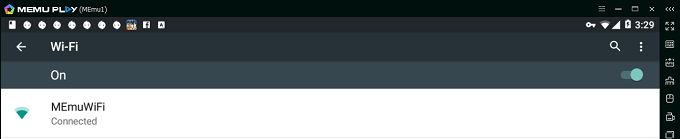
- Check the Wifi status of Android (MEmu). For example, Saved or Connected via Wi-Fi assistant are abnormal, just click the switch button to make sure it turns to Connected.
- Check whether it's server connection issue with a specific app in MEmu. For example, open a website with Browser in Android (MEmu). If accessible, it might be something wrong with the Google Play Store app. Please check the below useful posts.
- How to fix the no connection error with google play store
- How to fix the error 492 with google play store
- How to fix the issue of google play store showing blank
- How to fix the error retrieveing information from google server RH-01
- How to fix the error “Can’t establish a reliable data connection to the server”
- How to change Android DNS server
If you still can not solve it, please try with below methods:
- Change another device model and restart MEmu. (Recommended)
- Create a new MEmu instance with Multi-MEmu. (Recommeded)
- Reset local socket connect in Windows
- Run cmd.exe as admin
- Input “netsh winsock reset” and press Enter
- Reboot Computer
- Reinstall MEmu if all above don't work
> Back to MEmu 101, everything you need to know about MEmu <<
- Official Website: https://www.memuplay.com
- Official Twitter: https://twitter.com/MicrovirtMEmu
- Facebook Page: https://www.facebook.com/memuplayer
- MEmu User Group: https://www.facebook.com/groups/memuplayer
- Discord: https://discord.gg/gA4GWV9