How to Switch Graphics Card and Render Mode
 |
|
Check this blog if you have Intel Integrated Graphics and NVIDIA/AMD Discrete Graphics at the same time.
#AMD#
- Install "AMD Catalyst Control Center" if you don't have
- Right-click desktop and select "Configure Switchable Graphics"
- Click "Browse" to add "memu.exe" in "All Applications"
- Select "High Performance" if you want MEmu to use AMD Graphics
#NVIDIA#
- Install "NVIDIA Control Panel" if you don't have
- Click the "Manage 3D Settings" tab
- Select "NVIDIA Graphics" in "Global Settings" if you want to use it by default
- Or add "memu.exe" to "NVIDIA Graphics" in "Program Settings" if you want MEmu to use it only
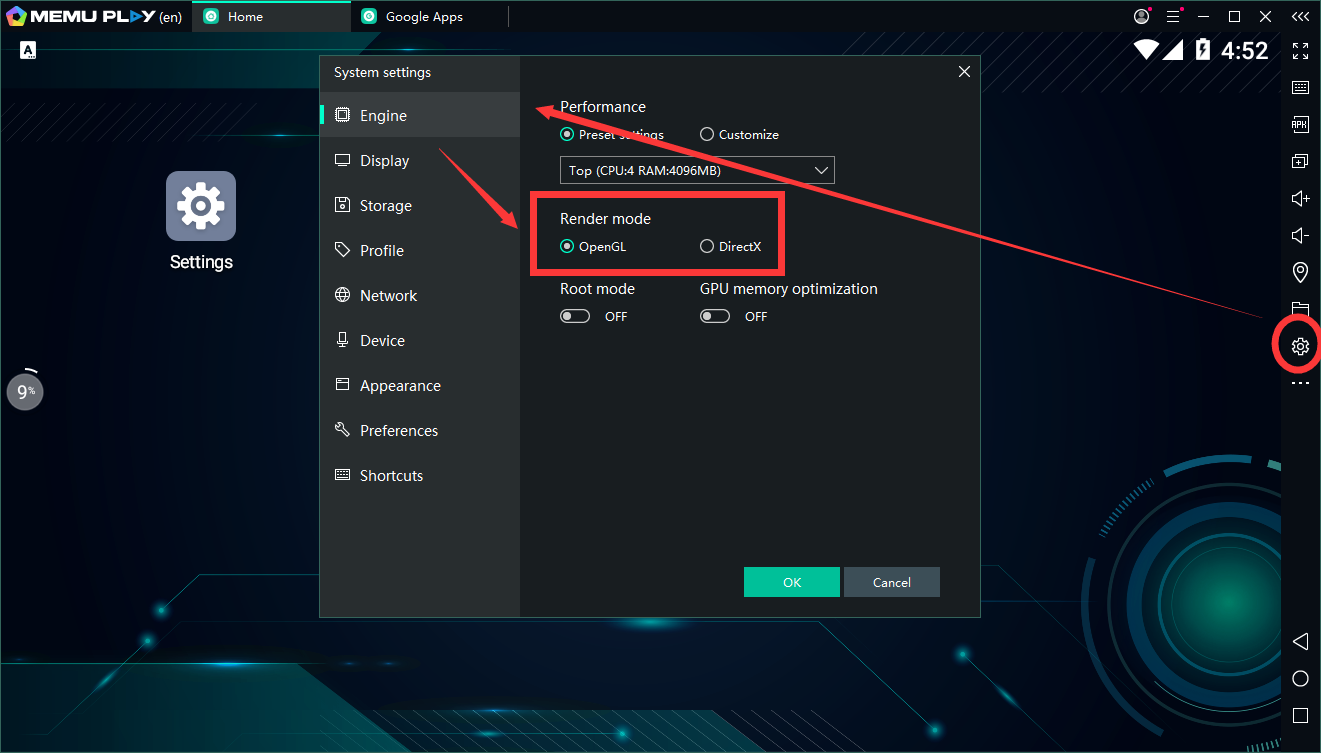
#How to Change the Render Mode#
If you are having a problem when running a game or apps, please try to change the render mode from the system settings of MEmu.
> Back to MEmu 101, everything you need to know about MEmu <<
- Official Website: https://www.memuplay.com
- Official Twitter: https://twitter.com/MicrovirtMEmu
- Facebook Page: https://www.facebook.com/memuplayer
- MEmu User Group: https://www.facebook.com/groups/memuplayer
- Discord: https://discord.gg/gA4GWV9