Bunny Loader
Aktualizováno
Aktuální verze
0.4.0
Od vývojáře

With all your passion for playing Bunny Loader, you hands are not supposed to be limited on a tiny screen of your phone. Play like a pro and get full control of your game with keyboard and mouse. MEmu offers you all the things that you are expecting. Download and play Bunny Loader on PC. Play as long as you want, no more limitations of battery, mobile data and disturbing calls. The brand new MEmu 9 is the best choice of playing Bunny Loader on PC. Prepared with our expertise, the exquisite preset keymapping system makes Bunny Loader a real PC game. MEmu multi-instance manager makes playing 2 or more accounts on the same device possible. And the most important, our exclusive emulation engine can release full potential of your PC, make everything smooth.
Show more
Vychutnejte si vynikající zážitek z přehrávání Bunny Loader na PC s MEMU App Player. Je to silný bezplatný emulátor pro Android, který vám umožní hrát tisíce her v systému Android. Bunny Loader is for Terraria Mobile players who want to customize the game or create their own content on a phone.
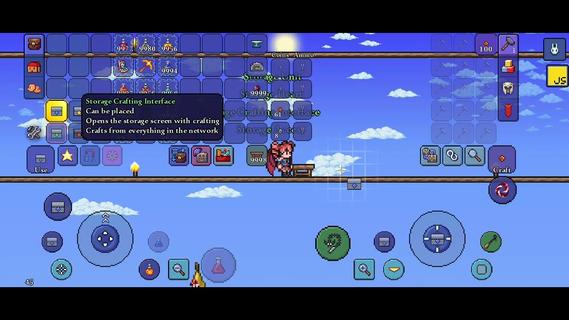
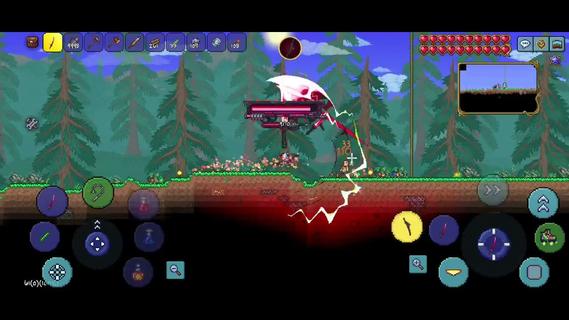
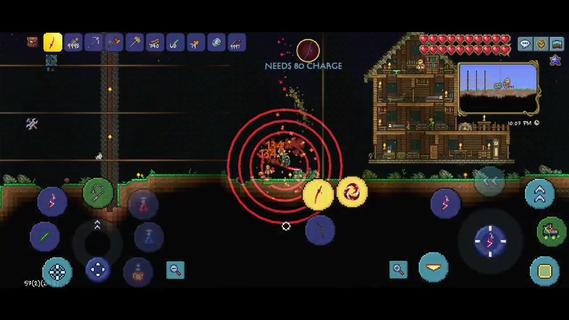
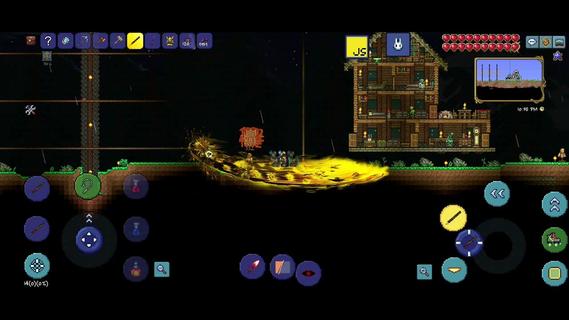
Bunny Loader is for Terraria Mobile players who want to customize the game or create their own content on a phone. It works with an existing copy of Terraria rather than replacing the game. If you are considering a Bunny Loader APK, you will need your own Terraria copy to use the launcher. The app supports both players who want to try mods and creators who want to build them.Bunny Loader featuresExpanded Terraria contentBunny Loader loads selected mods when it opens Terraria Mobile. Depending on the mods you choose, you can add weapons, enemies, bosses, biomes, pets, furniture and town NPCs. This lets you choose content for a play session instead of relying only on what comes with the base game. The available additions depend on the individual mods.Mod Menu during playYou can open the Mod Menu from Terrariaâs pause menu. From there, you can access mod items, NPCs and abilities, as well as options for individual mods. The menu brings these controls into the game, so you can use them while playing rather than returning to the launcher. What you see depends on the mods you have loaded.Texture and font packsBunny Loader also supports visual changes through texture and font packs. You can use supported resource packs made for Terraria to change how the game looks. These packs focus on presentation, so they offer a different way to customize a session from adding gameplay content through mods.Multiplayer with modsYou can play with friends who also use Bunny Loader. When players join a host, they are offered the hostâs mods to download. This helps the group use the same mod content for the session. Each player still needs their own copy of Terraria Mobile and Bunny Loader.Touch controls and mod creationBunny Loader includes on-screen mod buttons and menus designed for touch input. You can also adjust the size of touch controls in the controls editor. For creating content, BL Editor lets you build C# mods on your phone. Mod content is saved alongside characters and worlds, and those characters and worlds can still open without the mod.Bunny Loader compatibility and resourcesBunny Loader follows modding concepts similar to tModLoader, but it does not directly run tModLoader mods. Mods must be built for Bunny Loader. If you already use tModLoader, check whether the mod you want is available for Bunny Loader before planning a Terraria Mobile session around it.The projectâs GitHub wiki provides documentation for both players and creators. Its Discord community also offers help, mods and a place to report bugs. These resources can be useful if you want more detail about using the launcher or creating a mod with BL Editor.How to use Bunny LoaderYou need a copy of Terraria Mobile before using the launcher. After a Bunny Loader download, you can select mods and access their options while playing.Open Bunny Loader on your Android phone and select the mods you want to load.Use the launcher to open your Terraria Mobile copy with those mods.During play, open the pause menu and select the Mod Menu.Use the menu to access available mod items, NPCs, abilities or individual mod options.Get started with Bunny LoaderBunny Loader brings mod loading and creation to Terraria Mobile on Android. You can download Bunny Loader APK from APKPure if you have a Terraria copy and want to use mods built for this launcher.
Show more

1. Stáhněte si instalační program MEmu a dokončete instalaci

2. Spusťte MEmu a poté otevřete Google Play na ploše

3. Vyhledejte Bunny Loader v Google Play
Install
4. Stáhněte a nainstalujte Bunny Loader
5. Po dokončení instalace klikněte na ikonu pro spuštění

6. Užijte si hraní Bunny Loader na PC s MEmu
MEmu je zdarma a ten nejlepší Android emulátor. 50 milionů lidí si užívá jeho nejlepší herní zážitky. Technologie virtualizace MEmu ti dovolí plynule hrát Android hry na PC a to i ty nejnáročnější.
Větší obrazovka s lepší grafikou; Dlouhá výdrž bez omezení baterie nebo mobilních dat.
Plná podpora mapování kláves pro přesné ovládání klávesnice a myši nebo gamepadu.
Více herních účtů nebo úkolů na jednom počítači najednou s Multi-Instance Managerem.
Play Bunny Loader on PC by following steps: