Bunny Loader
Оновлено
Поточна версія
0.4.0
Постачальник

Перестаньте турбуватися про надмірні витрати, використовуючи ххх на своєму мобільному телефоні, звільніться від крихітного екрану і насолоджуйтеся використанням програми на набагато більшому дисплеї. Відтепер отримуйте повний екран свого додатка за допомогою клавіатури та миші. MEmu пропонує вам усі дивовижні функції, які ви очікували: швидка установка та просте налаштування, інтуїтивно зрозумілі елементи керування, більше обмежень від акумулятора, мобільних даних та тривожних дзвінків. Новий MEmu 9 - найкращий вибір використання Bunny Loader на вашому комп’ютері. За допомогою нашого поглинання менеджер із кількома примірниками одночасно дозволяє відкрити 2 або більше рахунків. І найголовніше, наш ексклюзивний емуляційний двигун може вивільнити весь потенціал вашого ПК, зробити все гладким і приємним.
Show more
Насолоджуйтесь чудовим досвідом Bunny Loader гри на ПК за допомогою програми MEMU App Player. Це потужний безкоштовний емулятор Android, який дозволяє вам грати в тисячі ігор Android. Bunny Loader is for Terraria Mobile players who want to customize the game or create their own content on a phone.
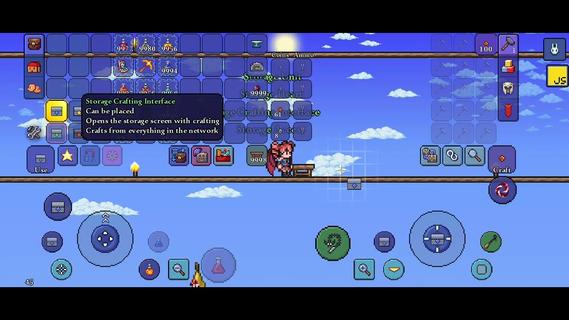
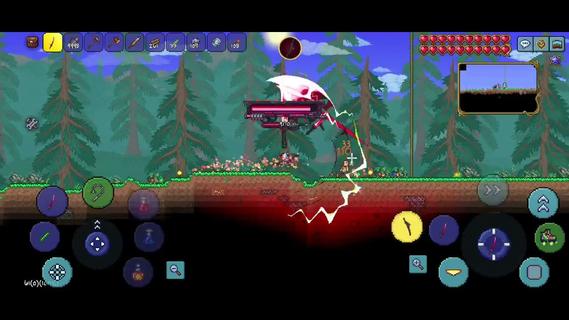
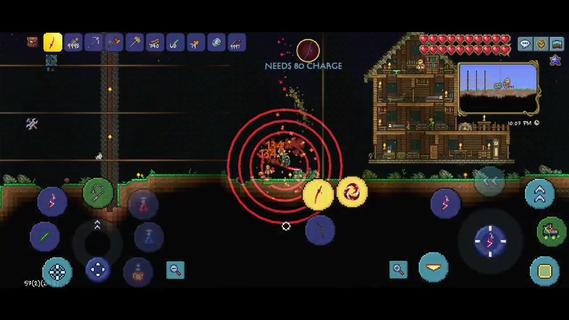
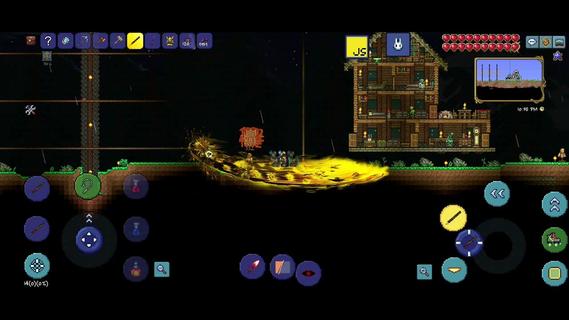
Bunny Loader is for Terraria Mobile players who want to customize the game or create their own content on a phone. It works with an existing copy of Terraria rather than replacing the game. If you are considering a Bunny Loader APK, you will need your own Terraria copy to use the launcher. The app supports both players who want to try mods and creators who want to build them.Bunny Loader featuresExpanded Terraria contentBunny Loader loads selected mods when it opens Terraria Mobile. Depending on the mods you choose, you can add weapons, enemies, bosses, biomes, pets, furniture and town NPCs. This lets you choose content for a play session instead of relying only on what comes with the base game. The available additions depend on the individual mods.Mod Menu during playYou can open the Mod Menu from Terrariaâs pause menu. From there, you can access mod items, NPCs and abilities, as well as options for individual mods. The menu brings these controls into the game, so you can use them while playing rather than returning to the launcher. What you see depends on the mods you have loaded.Texture and font packsBunny Loader also supports visual changes through texture and font packs. You can use supported resource packs made for Terraria to change how the game looks. These packs focus on presentation, so they offer a different way to customize a session from adding gameplay content through mods.Multiplayer with modsYou can play with friends who also use Bunny Loader. When players join a host, they are offered the hostâs mods to download. This helps the group use the same mod content for the session. Each player still needs their own copy of Terraria Mobile and Bunny Loader.Touch controls and mod creationBunny Loader includes on-screen mod buttons and menus designed for touch input. You can also adjust the size of touch controls in the controls editor. For creating content, BL Editor lets you build C# mods on your phone. Mod content is saved alongside characters and worlds, and those characters and worlds can still open without the mod.Bunny Loader compatibility and resourcesBunny Loader follows modding concepts similar to tModLoader, but it does not directly run tModLoader mods. Mods must be built for Bunny Loader. If you already use tModLoader, check whether the mod you want is available for Bunny Loader before planning a Terraria Mobile session around it.The projectâs GitHub wiki provides documentation for both players and creators. Its Discord community also offers help, mods and a place to report bugs. These resources can be useful if you want more detail about using the launcher or creating a mod with BL Editor.How to use Bunny LoaderYou need a copy of Terraria Mobile before using the launcher. After a Bunny Loader download, you can select mods and access their options while playing.Open Bunny Loader on your Android phone and select the mods you want to load.Use the launcher to open your Terraria Mobile copy with those mods.During play, open the pause menu and select the Mod Menu.Use the menu to access available mod items, NPCs, abilities or individual mod options.Get started with Bunny LoaderBunny Loader brings mod loading and creation to Terraria Mobile on Android. You can download Bunny Loader APK from APKPure if you have a Terraria copy and want to use mods built for this launcher.
Show more

1. Download MEmu installer and finish the setup

2. Start MEmu then open Google Play on the desktop

3. Search Bunny Loader in Google Play
Install
4. Download and Install Bunny Loader
5. On install completion click the icon to start

6. Enjoy playing Bunny Loader on PC with MEmu
MEmu App Player є кращим безкоштовним емулятором Android, і 50 мільйонів людей вже користуються його чудовим ігровим досвідом Android. Технологія віртуалізації MEmu дає вам змогу відтворювати тисячі ігор Android на вашому комп'ютері, навіть найбільш насичених графікою.
Bigger screen with better graphics; Long duration, without limitation of battery or mobile data.
Full Keymapping support for precise control of keyboard and mouse or gamepad.
Multiple game accounts or tasks on single PC at one time with Multi-Instance manager.
Play Bunny Loader on PC by following steps: