Bunny Loader
Ενημερώθηκε
Τρέχουσα έκδοση
0.4.0
Προσφέρεται από

Με όλο το πάθος σας για το παιχνίδι Bunny Loader, τα χέρια σας δεν πρέπει να περιορίζονται σε μια μικροσκοπική οθόνη του τηλεφώνου σας. Παίξτε σαν επαγγελματίας και αποκτήστε τον πλήρη έλεγχο του παιχνιδιού σας με πληκτρολόγιο και ποντίκι. Το MEmu σας προσφέρει όλα όσα περιμένετε. Κατεβάστε και παίξτε Bunny Loader σε υπολογιστή. Παίξτε όσο θέλετε, χωρίς άλλους περιορισμούς μπαταρίας, δεδομένων κινητής τηλεφωνίας και ενοχλητικών κλήσεων. Το ολοκαίνουργιο MEmu 9 είναι η καλύτερη επιλογή για να παίξετε Bunny Loader σε υπολογιστή. Ετοιμασμένο με την εμπειρία μας, το εξαιρετικό σύστημα προκαθορισμένης αντιστοίχισης πλήκτρων καθιστά το Bunny Loader ένα πραγματικό παιχνίδι υπολογιστή. Ο διαχειριστής πολλαπλών περιπτώσεων MEmu καθιστά δυνατό το παιχνίδι με 2 ή περισσότερους λογαριασμούς στην ίδια συσκευή. Και το πιο σημαντικό, η αποκλειστική μηχανή εξομοίωσης μας μπορεί να απελευθερώσει πλήρως τις δυνατότητες του υπολογιστή σας, κάνοντας τα πάντα ομαλά.
Show more
Απολαύστε την υπέροχη εμπειρία αναπαραγωγής του Bunny Loader σε υπολογιστή με το MEMU App Player. Πρόκειται για έναν ισχυρό δωρεάν εξομοιωτή Android που σας επιτρέπει να παίζετε χιλιάδες παιχνίδια Android. Bunny Loader is for Terraria Mobile players who want to customize the game or create their own content on a phone.
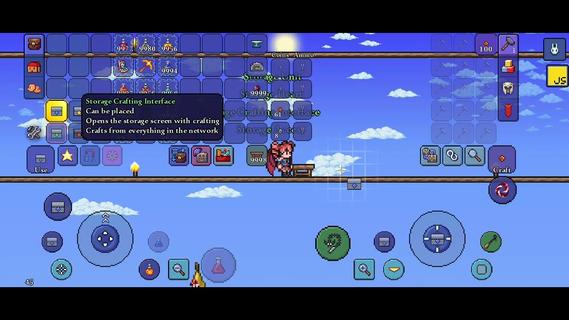
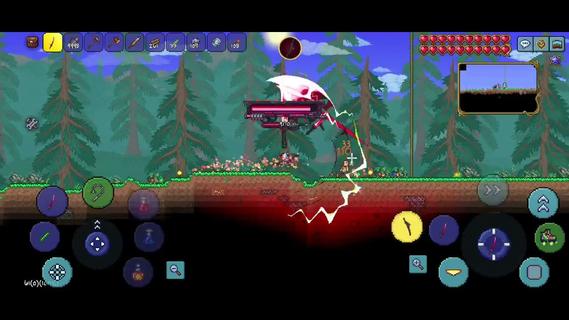
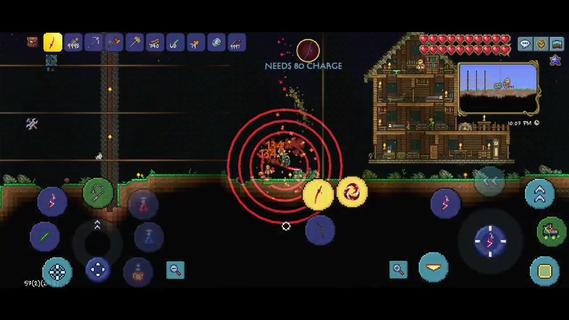
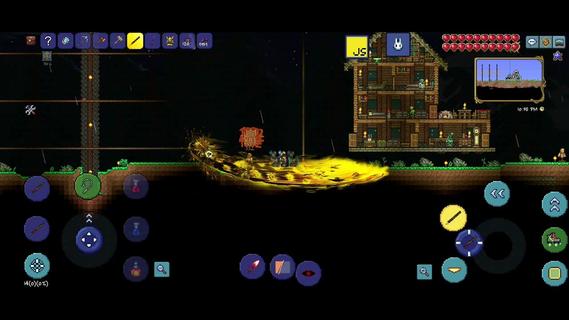
Bunny Loader is for Terraria Mobile players who want to customize the game or create their own content on a phone. It works with an existing copy of Terraria rather than replacing the game. If you are considering a Bunny Loader APK, you will need your own Terraria copy to use the launcher. The app supports both players who want to try mods and creators who want to build them.Bunny Loader featuresExpanded Terraria contentBunny Loader loads selected mods when it opens Terraria Mobile. Depending on the mods you choose, you can add weapons, enemies, bosses, biomes, pets, furniture and town NPCs. This lets you choose content for a play session instead of relying only on what comes with the base game. The available additions depend on the individual mods.Mod Menu during playYou can open the Mod Menu from Terrariaâs pause menu. From there, you can access mod items, NPCs and abilities, as well as options for individual mods. The menu brings these controls into the game, so you can use them while playing rather than returning to the launcher. What you see depends on the mods you have loaded.Texture and font packsBunny Loader also supports visual changes through texture and font packs. You can use supported resource packs made for Terraria to change how the game looks. These packs focus on presentation, so they offer a different way to customize a session from adding gameplay content through mods.Multiplayer with modsYou can play with friends who also use Bunny Loader. When players join a host, they are offered the hostâs mods to download. This helps the group use the same mod content for the session. Each player still needs their own copy of Terraria Mobile and Bunny Loader.Touch controls and mod creationBunny Loader includes on-screen mod buttons and menus designed for touch input. You can also adjust the size of touch controls in the controls editor. For creating content, BL Editor lets you build C# mods on your phone. Mod content is saved alongside characters and worlds, and those characters and worlds can still open without the mod.Bunny Loader compatibility and resourcesBunny Loader follows modding concepts similar to tModLoader, but it does not directly run tModLoader mods. Mods must be built for Bunny Loader. If you already use tModLoader, check whether the mod you want is available for Bunny Loader before planning a Terraria Mobile session around it.The projectâs GitHub wiki provides documentation for both players and creators. Its Discord community also offers help, mods and a place to report bugs. These resources can be useful if you want more detail about using the launcher or creating a mod with BL Editor.How to use Bunny LoaderYou need a copy of Terraria Mobile before using the launcher. After a Bunny Loader download, you can select mods and access their options while playing.Open Bunny Loader on your Android phone and select the mods you want to load.Use the launcher to open your Terraria Mobile copy with those mods.During play, open the pause menu and select the Mod Menu.Use the menu to access available mod items, NPCs, abilities or individual mod options.Get started with Bunny LoaderBunny Loader brings mod loading and creation to Terraria Mobile on Android. You can download Bunny Loader APK from APKPure if you have a Terraria copy and want to use mods built for this launcher.
Show more

1. Κατεβάστε το πρόγραμμα εγκατάστασης MEmu και ολοκληρώστε την εγκατάσταση

2. Ξεκινήστε το MEmu και στη συνέχεια ανοίξτε το Google Play στην επιφάνεια εργασίας

3. Αναζητήστε τον Bunny Loader στο Google Play
Install
4. Λήψη και εγκατάσταση του Bunny Loader
5. Μόλις ολοκληρωθεί η εγκατάσταση, κάντε κλικ στο εικονίδιο για να ξεκινήσετε

6. Enjoy playing Bunny Loader on PC with MEmu
Το MEmu Play, αποτελεί την ιδανικότερη δωρεάν λύση για την εξομοίωση του λειτουργικού Android, και χρησιμοποιείται ήδη από περισσότερους από 50 εκατομμύρια χρήστες, ο οποίοι απολαμβάνουν, την καταπληκτική εμπειρία παιχνιδιού που προσφέρεται μέσω της εφαρμογής. Με τη χρήση του MEmu Virtualization, είναι δυνατή η αναπαραγωγή παιχνιδιών Android στον υπολογιστή, ακόμη και εκείνων που απαιτούν μεγάλη επεξεργαστική ισχύ γραφικών, δίχως συμβιβασμούς στην ποιότητα και στην εμπειρία χρήσης, ακριβώς όπως ένα τελευταίας γενιάς κινητό τηλέφωνο.
Μεγαλύτερη οθόνη με καλύτερα γραφικά. Μεγάλη διάρκεια ζωής, χωρίς περιορισμό μπαταρίας ή δεδομένων κινητής τηλεφωνίας.
Πλήρης υποστήριξη αντιστοίχισης πλήκτρων για ακριβή έλεγχο του πληκτρολογίου και του ποντικιού ή του gamepad.
Πολλαπλοί λογαριασμοί παιχνιδιών ή εργασίες σε έναν υπολογιστή ταυτόχρονα με τον διαχειριστή πολλαπλών περιπτώσεων.
Play Bunny Loader on PC by following steps: