Mad Ducks: Roguelike Defense
Aktualizováno
Aktuální verze
Od vývojáře

With all your passion for playing Mad Ducks: Roguelike Defense, you hands are not supposed to be limited on a tiny screen of your phone. Play like a pro and get full control of your game with keyboard and mouse. MEmu offers you all the things that you are expecting. Download and play Mad Ducks: Roguelike Defense on PC. Play as long as you want, no more limitations of battery, mobile data and disturbing calls. The brand new MEmu 9 is the best choice of playing Mad Ducks: Roguelike Defense on PC. Prepared with our expertise, the exquisite preset keymapping system makes Mad Ducks: Roguelike Defense a real PC game. MEmu multi-instance manager makes playing 2 or more accounts on the same device possible. And the most important, our exclusive emulation engine can release full potential of your PC, make everything smooth.
Show more
Vychutnejte si vynikající zážitek z přehrávání Mad Ducks: Roguelike Defense na PC s MEMU App Player. Je to silný bezplatný emulátor pro Android, který vám umožní hrát tisíce her v systému Android. ■ One duck.
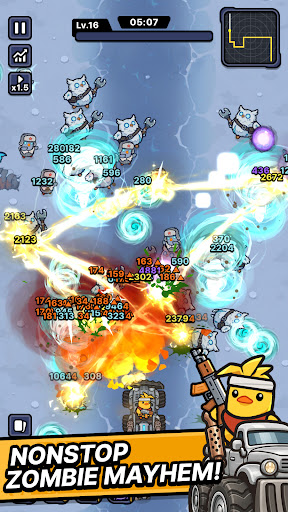
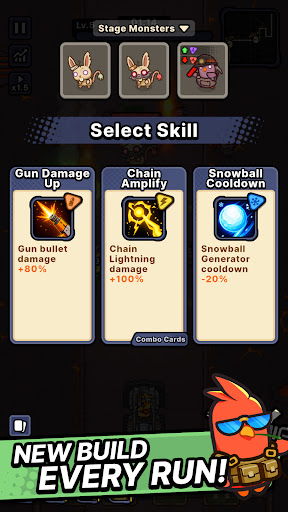
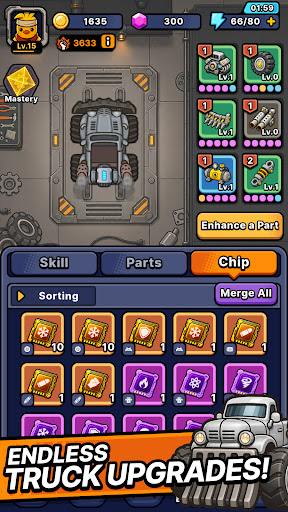
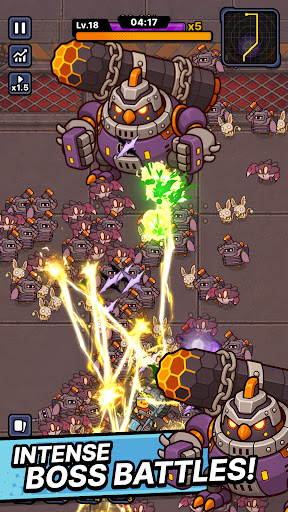
■ One duck. One war truck. A road full of zombies.
The world has fallen and every highway is crawling with the undead.
All that's left is one very angry duck.
Climb into the war truck, hit the gas, and never stop moving.
■ Defense that moves
Push forward through waves of zombies closing in from both sides.
This isn't a game about holding a line — it's about breaking through it.
No idle auto-play. Every second asks for a decision.
■ Roguelike runs, never the same twice
Pick one weapon at a time as you drive.
Torch the horde with a flamethrower. Melt them down with a venom cannon.
Call down lightning strikes. Cut straight through with a laser cannon.
Or erase the whole road with a proton energy cannon.
Every weapon combination builds a different run.
The same stage never plays out the same way.
■ Upgrade the war truck
The further you drive, the heavier you roll.
Reinforce your truck, stack on more firepower, and push deeper every run.
■ From zombie farms to ghost towns
Burning farmland. Sandstorm-swept desert highways. A fog-covered ghost city.
Each region brings its own zombies and bosses.
Read enemy types and bring the right weapon.
■ Endless road mode
How far can you get?
Take on an unending horde and push your distance record as far as it goes.
Start the engine. See you down the road.
Show more

1. Stáhněte si instalační program MEmu a dokončete instalaci

2. Spusťte MEmu a poté otevřete Google Play na ploše

3. Vyhledejte Mad Ducks: Roguelike Defense v Google Play
Install
4. Stáhněte a nainstalujte Mad Ducks: Roguelike Defense
5. Po dokončení instalace klikněte na ikonu pro spuštění

6. Užijte si hraní Mad Ducks: Roguelike Defense na PC s MEmu
MEmu je zdarma a ten nejlepší Android emulátor. 50 milionů lidí si užívá jeho nejlepší herní zážitky. Technologie virtualizace MEmu ti dovolí plynule hrát Android hry na PC a to i ty nejnáročnější.
Větší obrazovka s lepší grafikou; Dlouhá výdrž bez omezení baterie nebo mobilních dat.
Plná podpora mapování kláves pro přesné ovládání klávesnice a myši nebo gamepadu.
Více herních účtů nebo úkolů na jednom počítači najednou s Multi-Instance Managerem.
Play Mad Ducks: Roguelike Defense on PC by following steps: