Mad Ducks: Roguelike Defense
อัปเดตเมื่อ
เวอร์ชันปัจจุบัน
ให้บริการโดย

เวลาคุณเล่น Mad Ducks: Roguelike Defense, คุณอาจรู้สึกว่ามือคุณอาจบังจอแล้วทำให้ไม่ได้เล่นแบบเต็มที่. เล่นแบบไร้ขีดจำกัดด้วยเม้าส์และคีย์บอร์ด. MEmu มีตัวเลือกหลายอย่างให้คุณใช้งานเกมที่คุณเล่นแบบที่คุณต้องการ. ดาวน์โหลดและเล่น Mad Ducks: Roguelike Defense บน PC. เล่นนานแค่ไหนก็ได้, ไม่ต้องชาร์จแบตเตอรี่, หรือเจอคนโทรเข้ามาระหว่างเล่น. MEmu 9 เป็นตัวเลือกสำหรับการเล่น Mad Ducks: Roguelike Defense บน PC. ทางทีมงานเราได้ปรับแต่งเกม, ปรับให้เล่นเกมบางเกมได้เหมือนเล่น Mad Ducks: Roguelike Defense เป็นเกม PC เช่นเล็งด้วยเม้าส์หรือใช้คีย์บอร์ด. ระบบของเรายังทำให้คุณสามารถเปิดเล่นได้มากกว่า 2 เกมพร้อมๆกันในคอมของคุณ. และที่สำคัญที่สุด, ระบบโปรแกรมของเราสามารถทำให้คุณใช้ระบบของ PC ทำให้เกมลื่นเหมือนกับใช้โทรศัพท์รุ่นล่าสุด. เราไม่ได้ดูแลเรื่องการเล่นเกม, แต่เราดูแลถึงความสนุกสนานที่คุณได้จากการเล่นด้วย.
แสดงเพิ่มเติม
ดาวน์โหลด Mad Ducks: Roguelike Defense บน PC ด้วย MEmu Android Emulator สนุกกับการเล่นบนหน้าจอขนาดใหญ่ ■ One duck.
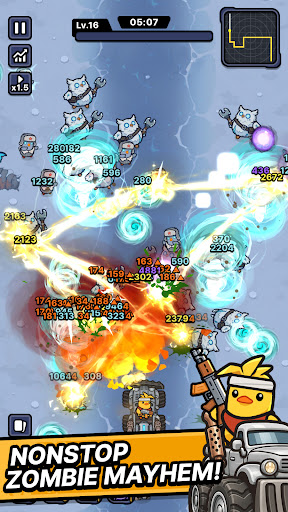
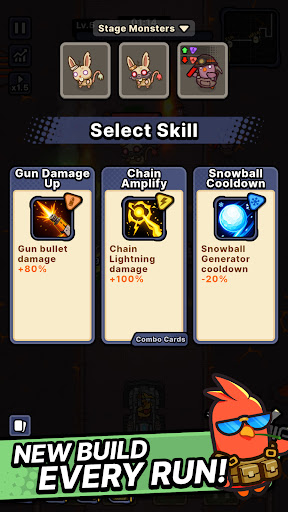
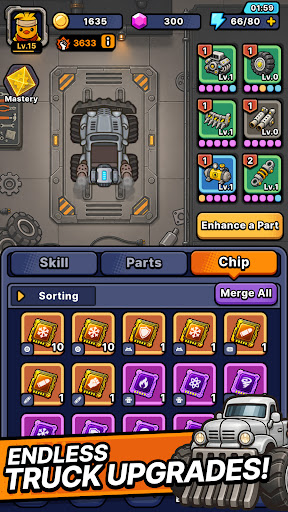
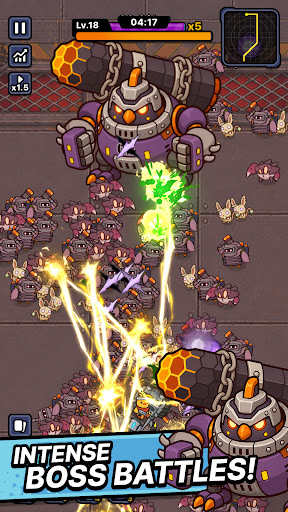
■ One duck. One war truck. A road full of zombies.
The world has fallen and every highway is crawling with the undead.
All that's left is one very angry duck.
Climb into the war truck, hit the gas, and never stop moving.
■ Defense that moves
Push forward through waves of zombies closing in from both sides.
This isn't a game about holding a line — it's about breaking through it.
No idle auto-play. Every second asks for a decision.
■ Roguelike runs, never the same twice
Pick one weapon at a time as you drive.
Torch the horde with a flamethrower. Melt them down with a venom cannon.
Call down lightning strikes. Cut straight through with a laser cannon.
Or erase the whole road with a proton energy cannon.
Every weapon combination builds a different run.
The same stage never plays out the same way.
■ Upgrade the war truck
The further you drive, the heavier you roll.
Reinforce your truck, stack on more firepower, and push deeper every run.
■ From zombie farms to ghost towns
Burning farmland. Sandstorm-swept desert highways. A fog-covered ghost city.
Each region brings its own zombies and bosses.
Read enemy types and bring the right weapon.
■ Endless road mode
How far can you get?
Take on an unending horde and push your distance record as far as it goes.
Start the engine. See you down the road.
แสดงเพิ่มเติม

1. ดาวน์โหลดตัวติดตั้ง MEmu และสิ้นสุดการติดตั้ง

2. เริ่ม MEmu จากนั้นเปิด Google Play บนหน้าแรก

3. ค้นหา Mad Ducks: Roguelike Defense ใน Google Play
Install
4. ดาวน์โหลดและติดตั้ง Mad Ducks: Roguelike Defense
5. เมื่อติดตั้งเสร็จให้คลิกที่ไอคอนเพื่อเริ่มใช้งาน

6. สนุกกับการเล่น Mad Ducks: Roguelike Defense บนพีซีด้วย MEmu
MEmu App Player เป็นอีมูเลเตอร์ Android ที่ดีที่สุดและผู้คนกว่า 50 ล้านคนเพลิดเพลินไปกับประสบการณ์การเล่นเกม Android ที่ยอดเยี่ยม เทคโนโลยีการจำลองเสมือนของ MEmu ช่วยให้คุณเล่นเกม Android หลายพันเกมได้อย่างราบรื่นบนพีซีของคุณแม้แต่เกมที่ต้องใช้กราฟิกมากที่สุด
จอใหญ่และกราฟฟิกสวยกว่า; เล่นได้นาน, ไม่ต้องใช้แบตเตอรี่โทรศัพท์หรือเน็ตโทรศัพท์.
ระบบปรับแต่งปุ่มคีย์บอร์ดและเม้าส์ตามที่คุณเลือก
เล่นมากกว่าหนึ่งเกมบน PC ในเวลาเดียวกันด้วยระบบหลายจอหรือ Multi-Instance manager.
Play Mad Ducks: Roguelike Defense on PC by following steps:




























![[ไกด์เกม] CookieRun Classic แนะนำ 5 คุกกี้น่าปั้น น่าลงทุน ที่มือใหม่ห้ามพลาด! (เล่นบน PC ผ่าน MEmu ให้ลื่นสุด ๆ) PC](https://www.memuplay.com/blog/wp-content/uploads/2026/08/579c01ab-a953-45b3-8115-9b6279b7d6f9.png)