Badminton Clash
Aktualisiert
Aktuelle Version
Angeboten von

Bei all Ihrer Leidenschaft für das Spielen von Badminton Clash sollten Ihre Hände nicht auf einen winzigen Bildschirm Ihres Telefons beschränkt sein. Spielen Sie wie ein Profi und übernehmen Sie die volle Kontrolle über Ihr Spiel mit Tastatur und Maus. MEmu bietet Ihnen all die Dinge, die Sie erwarten. Laden Sie Badminton Clash herunter und spielen Sie es auf dem PC. Spielen Sie so lange, wie Sie wollen, ohne Grenzwerte für Akku, mobile Daten und störende Anrufe. Das brandneue MEmu 9 ist die beste Wahl, um Badminton Clash auf dem PC zu spielen. Das exquisite voreingestellte Tastaturbelegungssystem, das mit unserem Fachwissen vorbereitet wurde, macht Badminton Clash zu einem echten PC-Spiel. Der MEmu Multi-Instanz-Manager ermöglicht das Spielen von 2 oder mehr Konten auf demselben Gerät. Und das Wichtigste: Unsere exklusive Emulations-Engine kann das volle Potenzial Ihres PCs freisetzen und für reibungslose Abläufe sorgen.
Mehr anzeigen
Laden Sie Play Badminton Clash auf dem PC mit MEmu Android Emulator. Viel Spaß beim Spielen auf großmundieren. Badminton Clash is a portrait-mode 3D badminton sports game built for quick, competitive rallies on mobile.
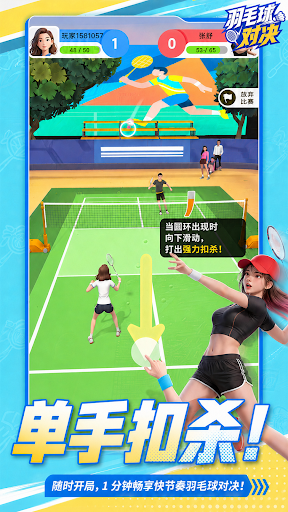

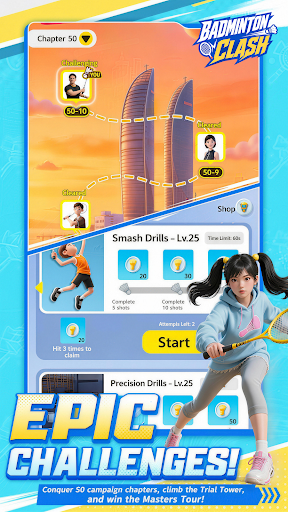
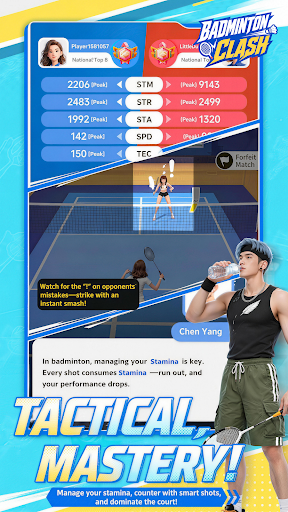
Badminton Clash is a portrait-mode 3D badminton sports game built for quick, competitive rallies on mobile.
Designed for short 1–2 minute matches and one-handed swipe control, Badminton Clash turns badminton into a fast, responsive, and rhythm-driven sports experience. Step onto the court anytime, control the rally, and enjoy a match that is easy to start but rewarding to improve.
Swipe to perform classic badminton shots including clears, drops, and smashes. Each shot has a different trajectory, speed, and tactical purpose. Use clears to push your opponent back, drops to break their rhythm, and smashes to finish the point when the opening appears.
Winning is not only about power. Every rally is shaped by timing, spacing, stamina, and shot selection. Reach the shuttle earlier, control your position, manage your recovery, and build pressure across each exchange.
Challenge AI rivals, earn points, and climb the leaderboard in Master Tournament. Progress through Story Mode to learn the core mechanics, refine your skills in Challenge and Training modes, and unlock rewards as you improve.
Customize your player with outfits, racket skins, and court themes. Build your own badminton style and keep improving through quick matches, training, ranking cycles, and future content updates.
Game Features
- Portrait-mode 3D badminton built for mobile
- Fast 1–2 minute matches for quick sports sessions
- Simple one-handed swipe controls
- Clear, Drop, and Smash shots with distinct trajectories
- Rhythm-based rallies shaped by timing, spacing, and stamina
- AI rival matches with points and leaderboards
- Story Mode, Master Tournament, Challenge, and Training
- Outfits, racket skins, court themes, and progression rewards
- Easy to start, with room to improve through every rally
Step onto the court, control the rhythm, and climb the leaderboard in Badminton Clash.
Mehr anzeigen

1. Laden das MEmu-Installationsprogramm herunter und beenden die Installation

2. MEmu starten und Google Play auf der Homepage öffnen

3. Suchen Badminton Clash in Google Play
Install
4. Herunterladen und Installieren Badminton Clash
5. Klicken nach Abschluss der Installation auf das Symbol, um es zu starten

6. Viel Spaß beim Spielen von Badminton Clash auf dem PC mit MEmu
MEmu App Player ist der beste kostenlose Android-Emulator und 50 Millionen Menschen genießen bereits seine hervorragende Android-Gaming-Erfahrung. Mit der MEmu-Virtualisierungstechnologie können Sie Tausende von Android-Spielen problemlos auf Ihrem PC spielen, selbst bei grafikintensiven Spielen.
BGrößeres Bild mit besserer Grafik; Keine unterbrechungen, keine sorgen um Akku
Komplette Tastenbelegung unterstützt mit Maus und Tastatur oder Controller
Mit dem „Multi-Instance-Manager“ können Sie mehrere Spielkonten oder Spiele gleichzeitig auf einem PC ausführen.
Play Badminton Clash on PC by following steps: