Badminton Clash
อัปเดตเมื่อ
เวอร์ชันปัจจุบัน
ให้บริการโดย

เวลาคุณเล่น Badminton Clash, คุณอาจรู้สึกว่ามือคุณอาจบังจอแล้วทำให้ไม่ได้เล่นแบบเต็มที่. เล่นแบบไร้ขีดจำกัดด้วยเม้าส์และคีย์บอร์ด. MEmu มีตัวเลือกหลายอย่างให้คุณใช้งานเกมที่คุณเล่นแบบที่คุณต้องการ. ดาวน์โหลดและเล่น Badminton Clash บน PC. เล่นนานแค่ไหนก็ได้, ไม่ต้องชาร์จแบตเตอรี่, หรือเจอคนโทรเข้ามาระหว่างเล่น. MEmu 9 เป็นตัวเลือกสำหรับการเล่น Badminton Clash บน PC. ทางทีมงานเราได้ปรับแต่งเกม, ปรับให้เล่นเกมบางเกมได้เหมือนเล่น Badminton Clash เป็นเกม PC เช่นเล็งด้วยเม้าส์หรือใช้คีย์บอร์ด. ระบบของเรายังทำให้คุณสามารถเปิดเล่นได้มากกว่า 2 เกมพร้อมๆกันในคอมของคุณ. และที่สำคัญที่สุด, ระบบโปรแกรมของเราสามารถทำให้คุณใช้ระบบของ PC ทำให้เกมลื่นเหมือนกับใช้โทรศัพท์รุ่นล่าสุด. เราไม่ได้ดูแลเรื่องการเล่นเกม, แต่เราดูแลถึงความสนุกสนานที่คุณได้จากการเล่นด้วย.
แสดงเพิ่มเติม
ดาวน์โหลด Badminton Clash บน PC ด้วย MEmu Android Emulator สนุกกับการเล่นบนหน้าจอขนาดใหญ่ Badminton Clash is a portrait-mode 3D badminton sports game built for quick, competitive rallies on mobile.
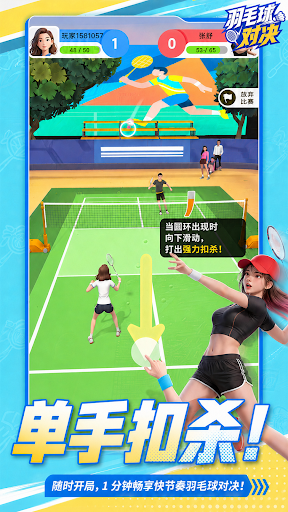

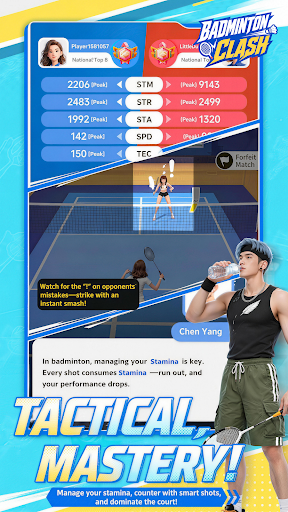
Badminton Clash is a portrait-mode 3D badminton sports game built for quick, competitive rallies on mobile.
Designed for short 1–2 minute matches and one-handed swipe control, Badminton Clash turns badminton into a fast, responsive, and rhythm-driven sports experience. Step onto the court anytime, control the rally, and enjoy a match that is easy to start but rewarding to improve.
Swipe to perform classic badminton shots including clears, drops, and smashes. Each shot has a different trajectory, speed, and tactical purpose. Use clears to push your opponent back, drops to break their rhythm, and smashes to finish the point when the opening appears.
Winning is not only about power. Every rally is shaped by timing, spacing, stamina, and shot selection. Reach the shuttle earlier, control your position, manage your recovery, and build pressure across each exchange.
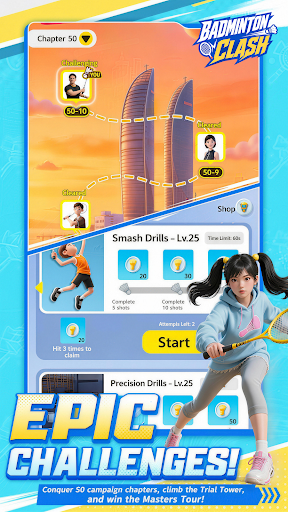
Challenge AI rivals, earn points, and climb the leaderboard in Master Tournament. Progress through Story Mode to learn the core mechanics, refine your skills in Challenge and Training modes, and unlock rewards as you improve.
Customize your player with outfits, racket skins, and court themes. Build your own badminton style and keep improving through quick matches, training, ranking cycles, and future content updates.
Game Features
- Portrait-mode 3D badminton built for mobile
- Fast 1–2 minute matches for quick sports sessions
- Simple one-handed swipe controls
- Clear, Drop, and Smash shots with distinct trajectories
- Rhythm-based rallies shaped by timing, spacing, and stamina
- AI rival matches with points and leaderboards
- Story Mode, Master Tournament, Challenge, and Training
- Outfits, racket skins, court themes, and progression rewards
- Easy to start, with room to improve through every rally
Step onto the court, control the rhythm, and climb the leaderboard in Badminton Clash.
แสดงเพิ่มเติม

1. ดาวน์โหลดตัวติดตั้ง MEmu และสิ้นสุดการติดตั้ง

2. เริ่ม MEmu จากนั้นเปิด Google Play บนหน้าแรก

3. ค้นหา Badminton Clash ใน Google Play
Install
4. ดาวน์โหลดและติดตั้ง Badminton Clash
5. เมื่อติดตั้งเสร็จให้คลิกที่ไอคอนเพื่อเริ่มใช้งาน

6. สนุกกับการเล่น Badminton Clash บนพีซีด้วย MEmu
MEmu App Player เป็นอีมูเลเตอร์ Android ที่ดีที่สุดและผู้คนกว่า 50 ล้านคนเพลิดเพลินไปกับประสบการณ์การเล่นเกม Android ที่ยอดเยี่ยม เทคโนโลยีการจำลองเสมือนของ MEmu ช่วยให้คุณเล่นเกม Android หลายพันเกมได้อย่างราบรื่นบนพีซีของคุณแม้แต่เกมที่ต้องใช้กราฟิกมากที่สุด
จอใหญ่และกราฟฟิกสวยกว่า; เล่นได้นาน, ไม่ต้องใช้แบตเตอรี่โทรศัพท์หรือเน็ตโทรศัพท์.
ระบบปรับแต่งปุ่มคีย์บอร์ดและเม้าส์ตามที่คุณเลือก
เล่นมากกว่าหนึ่งเกมบน PC ในเวลาเดียวกันด้วยระบบหลายจอหรือ Multi-Instance manager.
Play Badminton Clash on PC by following steps: