CloverPit
Aktualisiert
Aktuelle Version
1.4.8
Angeboten von

Bei all Ihrer Leidenschaft für das Spielen von CloverPit sollten Ihre Hände nicht auf einen winzigen Bildschirm Ihres Telefons beschränkt sein. Spielen Sie wie ein Profi und übernehmen Sie die volle Kontrolle über Ihr Spiel mit Tastatur und Maus. MEmu bietet Ihnen all die Dinge, die Sie erwarten. Laden Sie CloverPit herunter und spielen Sie es auf dem PC. Spielen Sie so lange, wie Sie wollen, ohne Grenzwerte für Akku, mobile Daten und störende Anrufe. Das brandneue MEmu 9 ist die beste Wahl, um CloverPit auf dem PC zu spielen. Das exquisite voreingestellte Tastaturbelegungssystem, das mit unserem Fachwissen vorbereitet wurde, macht CloverPit zu einem echten PC-Spiel. Der MEmu Multi-Instanz-Manager ermöglicht das Spielen von 2 oder mehr Konten auf demselben Gerät. Und das Wichtigste: Unsere exklusive Emulations-Engine kann das volle Potenzial Ihres PCs freisetzen und für reibungslose Abläufe sorgen.
Mehr anzeigen
Laden Sie Play CloverPit auf dem PC mit MEmu Android Emulator. Viel Spaß beim Spielen auf großmundieren. CloverPit ist ein Rogue-lite, das dich in der Hölle einsperrt, die du dir selbst geschaffen hast.
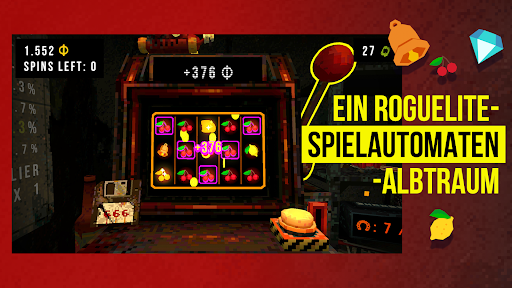
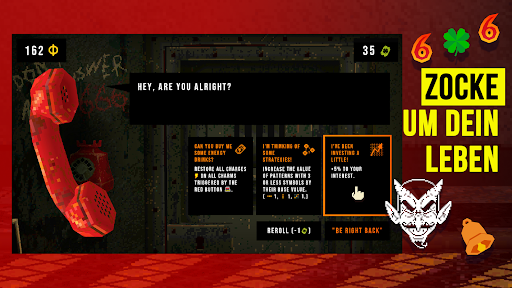
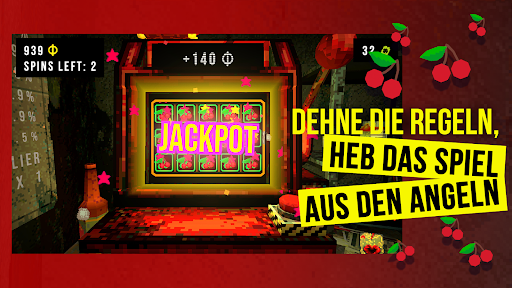
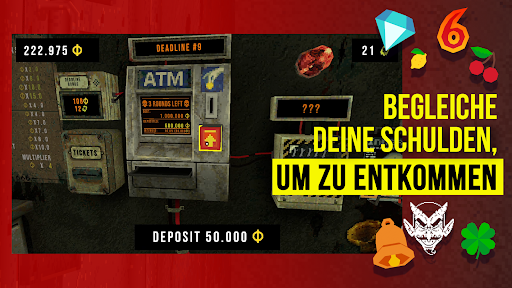
CloverPit ist ein Rogue-lite, das dich in der Hölle einsperrt, die du dir selbst geschaffen hast. Gefangen in einer verrosteten Zelle zwischen Spiel- und Geldautomat musst du bis zum Ende jeder Runde deine Schulden zurückzahlen, um dich vor dem buchstäblichen Absturz ins Bodenlose zu retten!
Manipuliere den Spielautomaten, um Extramünzen zu verdienen. Wende das Blatt zu deinen Gunsten: Diverse Belohnungen und Glücksbringer lösen kolossale Kombos aus und können dir eine atemberaubende Glückssträhne bescheren. Umgehe die Regeln, besiege das Spiel und halte deinen Kerkermeister lange genug hin, um dir eine Chance auf die Freiheit zu verdienen.
Features:
- Ein fesselndes Rogue-lite, in dem jede Runde deine letzte sein kann!
- Fortschritt über mehrere Spieldurchläufe, alternative Enden und freischaltbare Power-ups!
- Erreiche noch höhere Punktzahlen im Endlosmodus!
- Eine höllische Escape-Room-Atmosphäre!
- Über 150 Gegenstände und Synergien, um deinem Glück auf die Sprünge zu helfen!
- Eine düstere Story über Sucht und Befreiung!
Hinweis zum Speichern von Daten: Dieses Spiel speichert den Spielfortschritt derzeit lokal auf deinem Gerät. Bitte beachte, dass durch das Deinstallieren der App (oder das Löschen der App-Daten) deine gespeicherten Daten gelöscht werden. Cloud-Speicherung und geräteübergreifende Synchronisierung sind in der Entwicklung und werden in einem zukünftigen Update zur Verfügung stehen.
PS: IST ES EIN GLÜCKSSPIEL?
Absolut nicht! CloverPit ist ein Rogue-lite-Horrorspiel, keine Spielautomatensimulation. Unser Spielautomat ist darauf ausgelegt, besiegt und am Ende überwunden zu werden, und es geht nie um echtes Geld!
Mehr anzeigen

1. Laden das MEmu-Installationsprogramm herunter und beenden die Installation

2. MEmu starten und Google Play auf der Homepage öffnen

3. Suchen CloverPit in Google Play
Install
4. Herunterladen und Installieren CloverPit
5. Klicken nach Abschluss der Installation auf das Symbol, um es zu starten

6. Viel Spaß beim Spielen von CloverPit auf dem PC mit MEmu
MEmu App Player ist der beste kostenlose Android-Emulator und 50 Millionen Menschen genießen bereits seine hervorragende Android-Gaming-Erfahrung. Mit der MEmu-Virtualisierungstechnologie können Sie Tausende von Android-Spielen problemlos auf Ihrem PC spielen, selbst bei grafikintensiven Spielen.
BGrößeres Bild mit besserer Grafik; Keine unterbrechungen, keine sorgen um Akku
Komplette Tastenbelegung unterstützt mit Maus und Tastatur oder Controller
Mit dem „Multi-Instance-Manager“ können Sie mehrere Spielkonten oder Spiele gleichzeitig auf einem PC ausführen.
Play CloverPit on PC by following steps: