CloverPit
Atualizada
Versão atual
1.4.8
Oferecido por

Com toda a sua paixão por jogar CloverPit, não deixe os polegares te atrapalharem em uma pequena tela do seu celular. Jogue como um profissional e tenha controle total do seu jogo com teclado e mouse. O MEmu oferece todas as coisas que você está esperando. Baixe e jogue CloverPit no PC. Jogue o tempo que quiser, sem mais limitações de bateria, dados móveis e aquelas ligações enquanto estiver jogando. O novíssimo MEmu 9 é a melhor escolha de jogar CloverPit no PC. Com grandes novidades no sistema de mapeamento que faz CloverPit um jogo de PC real. Nossa equipe melhorou o gerenciamento de várias instâncias do Android, reduzindo tempo de reprodução de 2 ou mais contas no mesmo dispositivo. O mais importante, nosso mecanimos de emulação exclusivo pode liberar todo o potencial do seu PC sem travamentos, rodando tudo liso. Nós nos preocupamos não apenas com você joga, mas com todo o processo de desfrutar de 100% do seu jogo favorito.
Mostre mais
Download do CloverPit no PC com MEmu Android Emulador: Divirta-se jogando na tela grande. CloverPit que prende os jogadores num inferno que eles mesmos criaram.
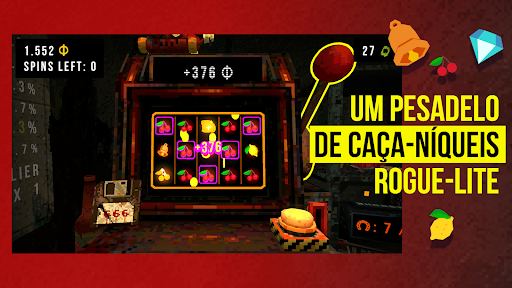

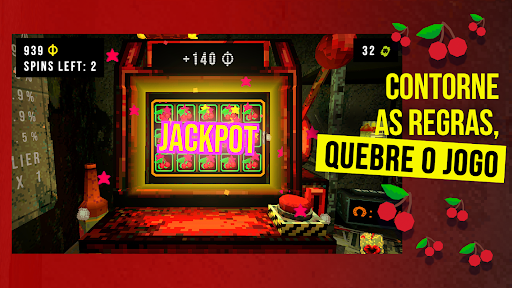
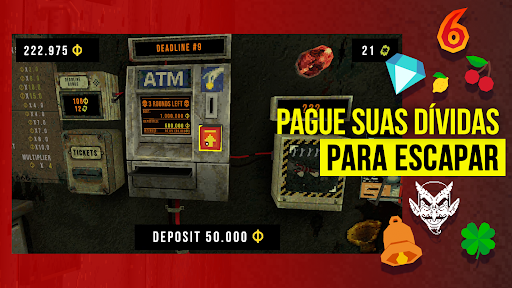
CloverPit que prende os jogadores num inferno que eles mesmos criaram. Trancado numa cela caindo aos pedaços com uma máquina caça-níqueis e um caixa eletrônico, você precisa pagar sua dívida no fim de cada rodada ou, literalmente, desmoronar.
Manipule a máquina caça-níqueis para ganhar moedas extras e faça o possível para se dar bem com vários prêmios e amuletos que desencadeiam combos gigantescos e ainda se acumulam, resultando numa partida de sucesso. Quebre as regras, leve vantagem e pague seu sequestrador pelo máximo de tempo que conseguir para tentar se livrar do cativeiro.
Características do jogo:
- Um roguelite cativante em que cada rodada pode ser a última!
- Rejogabilidade, diversos finais e potencializadores desbloqueáveis!
- Eleve sua pontuação ao infinito e além no Modo Infinito!
- Atmosfera sufocante semelhante a de um escape room!
- Mais de 150 itens e sinergias para aumentar sua sorte!
- Uma história assustadora sobre vício e fuga!
Observação sobre dados salvos: o jogo armazena o progresso localmente no seu dispositivo. Note que desinstalar o aplicativo (ou limpar os dados de aplicativo) vai excluir seu jogo salvo. Salvamentos em nuvem e sincronização entre dispositivos estão em desenvolvimento para uma atualização futura.
DÚVIDA: É UM JOGO DE APOSTAS?
Não mesmo! CloverPit é roguelite de terror, e não um simulador de caça-níqueis. Nossa máquina caça-níqueis é feita para ser quebrada e derrotada e nunca vai pedir dinheiro de verdade!
Mostre mais

1. Faça o download do instalador do MEmu e conclua a instalação

2. Inicie o MEmu e depois abra o Google Play na página inicial

3. Pesquise CloverPit no Google Play
Install
4. Baixe e Instale CloverPit
5. Na conclusão da instalação, clique no ícone para iniciar

6. Divirta-se jogando CloverPit no PC com MEmu
O MEmu App Player é o melhor emulador de Android grátis e 50 milhões de pessoas já desfrutam de sua excelente experiência de jogos no Android. A tecnologia de virtualização do MEmu permite que você jogue milhares de jogos do Android sem problemas no seu PC, mesmo os com gráficos mais intensivos.
Tela maior com gráficos melhores; Longa duração e sem limitação de bateria ou dados móveis.
Suporte completo ao Mapaeamento de Teclas para controle preciso do teclado e mouse ou gamepad.
Várias contas de jogos ou tarefas em um único PC de uma só vez com o Gerenciador de várias instâncias.
Play CloverPit on PC by following steps: