Skull Up
Aktualisiert
Aktuelle Version
1.0.11
Angeboten von

Bei all Ihrer Leidenschaft für das Spielen von Skull Up sollten Ihre Hände nicht auf einen winzigen Bildschirm Ihres Telefons beschränkt sein. Spielen Sie wie ein Profi und übernehmen Sie die volle Kontrolle über Ihr Spiel mit Tastatur und Maus. MEmu bietet Ihnen all die Dinge, die Sie erwarten. Laden Sie Skull Up herunter und spielen Sie es auf dem PC. Spielen Sie so lange, wie Sie wollen, ohne Grenzwerte für Akku, mobile Daten und störende Anrufe. Das brandneue MEmu 9 ist die beste Wahl, um Skull Up auf dem PC zu spielen. Das exquisite voreingestellte Tastaturbelegungssystem, das mit unserem Fachwissen vorbereitet wurde, macht Skull Up zu einem echten PC-Spiel. Der MEmu Multi-Instanz-Manager ermöglicht das Spielen von 2 oder mehr Konten auf demselben Gerät. Und das Wichtigste: Unsere exklusive Emulations-Engine kann das volle Potenzial Ihres PCs freisetzen und für reibungslose Abläufe sorgen.
Mehr anzeigen
Laden Sie Play Skull Up auf dem PC mit MEmu Android Emulator. Viel Spaß beim Spielen auf großmundieren. [Game Features].

[Game Features]
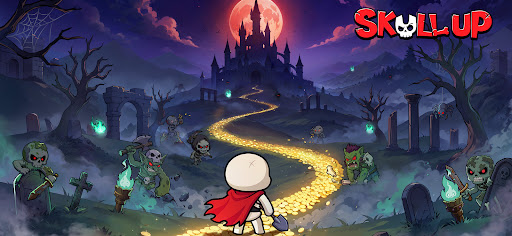
Even a rookie skull can become the Skull King! In Skull Up, you will rise from the bottom to the throne: collect over 60 Skellies to form your unique teams, enjoy idle management with abundant rewards, and unlock multiple adventures. Come and unleash the power of the undead and evolve from a nobody into the Skull King!
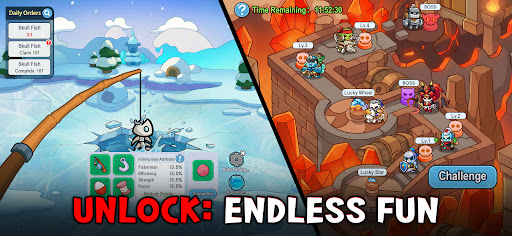
[Endless Fun, Underworld Adventures]
A rookie skull uncovered hidden treasures! In Skull Up, you can amass massive resources through management gameplay, or defeat mighty enemies with smart strategies. Join a guild and fight alongside your bone buddies! More content await—nonstop excitement guaranteed!
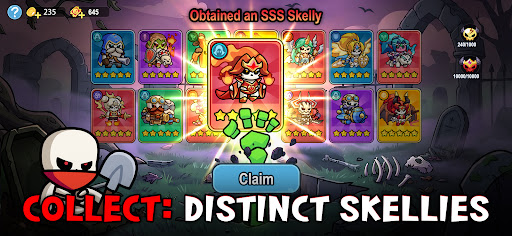
[Diverse Skellies, Boundless Power]
Gather various Skellies during your path to becoming the King! During this adventure, you will encounter over 60 unique Skellies with distinct looks and abilities. With diverse designs, they can be switched between human and skull forms, who are your strongest bone allies!
[Easy Progression, Loss-Free Growth]
Power up your companions without pressure: The loss-free progress system allows you to upgrade any Skelly—the resources can be fully refunded. Experiment freely, optimize your team, and achieve rapid power spikes with no investment wasted.
[Free Combinations, Smart Strategies]
Level up nonstop and show the king’s edge! Unlock your strategic potential and assemble a bone-powered team. Whether breaking defenses or providing support, every Skelly hides unique strengths— deploy them wisely!
[Idle Management, Effortless Rewards]
Future king, this undead castle is yours! Assign skull workers to smelt, log, and mine—gain massive EXP and valuable resources even while offline and level up with ease! With an idle strategy system, victory comes effortlessly!
Mehr anzeigen

1. Laden das MEmu-Installationsprogramm herunter und beenden die Installation

2. MEmu starten und Google Play auf der Homepage öffnen

3. Suchen Skull Up in Google Play
Install
4. Herunterladen und Installieren Skull Up
5. Klicken nach Abschluss der Installation auf das Symbol, um es zu starten

6. Viel Spaß beim Spielen von Skull Up auf dem PC mit MEmu
MEmu App Player ist der beste kostenlose Android-Emulator und 50 Millionen Menschen genießen bereits seine hervorragende Android-Gaming-Erfahrung. Mit der MEmu-Virtualisierungstechnologie können Sie Tausende von Android-Spielen problemlos auf Ihrem PC spielen, selbst bei grafikintensiven Spielen.
BGrößeres Bild mit besserer Grafik; Keine unterbrechungen, keine sorgen um Akku
Komplette Tastenbelegung unterstützt mit Maus und Tastatur oder Controller
Mit dem „Multi-Instance-Manager“ können Sie mehrere Spielkonten oder Spiele gleichzeitig auf einem PC ausführen.
Play Skull Up on PC by following steps: