Skull Up
อัปเดตเมื่อ
เวอร์ชันปัจจุบัน
1.0.11
ให้บริการโดย

เวลาคุณเล่น Skull Up, คุณอาจรู้สึกว่ามือคุณอาจบังจอแล้วทำให้ไม่ได้เล่นแบบเต็มที่. เล่นแบบไร้ขีดจำกัดด้วยเม้าส์และคีย์บอร์ด. MEmu มีตัวเลือกหลายอย่างให้คุณใช้งานเกมที่คุณเล่นแบบที่คุณต้องการ. ดาวน์โหลดและเล่น Skull Up บน PC. เล่นนานแค่ไหนก็ได้, ไม่ต้องชาร์จแบตเตอรี่, หรือเจอคนโทรเข้ามาระหว่างเล่น. MEmu 9 เป็นตัวเลือกสำหรับการเล่น Skull Up บน PC. ทางทีมงานเราได้ปรับแต่งเกม, ปรับให้เล่นเกมบางเกมได้เหมือนเล่น Skull Up เป็นเกม PC เช่นเล็งด้วยเม้าส์หรือใช้คีย์บอร์ด. ระบบของเรายังทำให้คุณสามารถเปิดเล่นได้มากกว่า 2 เกมพร้อมๆกันในคอมของคุณ. และที่สำคัญที่สุด, ระบบโปรแกรมของเราสามารถทำให้คุณใช้ระบบของ PC ทำให้เกมลื่นเหมือนกับใช้โทรศัพท์รุ่นล่าสุด. เราไม่ได้ดูแลเรื่องการเล่นเกม, แต่เราดูแลถึงความสนุกสนานที่คุณได้จากการเล่นด้วย.
แสดงเพิ่มเติม
ดาวน์โหลด Skull Up บน PC ด้วย MEmu Android Emulator สนุกกับการเล่นบนหน้าจอขนาดใหญ่ [Game Features].

[Game Features]
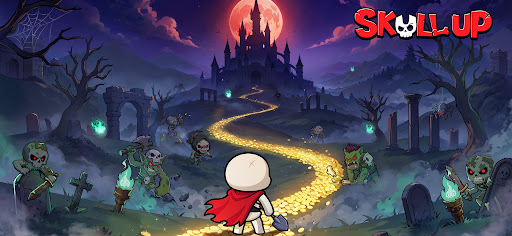
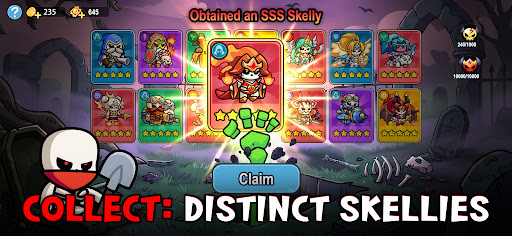
Even a rookie skull can become the Skull King! In Skull Up, you will rise from the bottom to the throne: collect over 60 Skellies to form your unique teams, enjoy idle management with abundant rewards, and unlock multiple adventures. Come and unleash the power of the undead and evolve from a nobody into the Skull King!
[Endless Fun, Underworld Adventures]
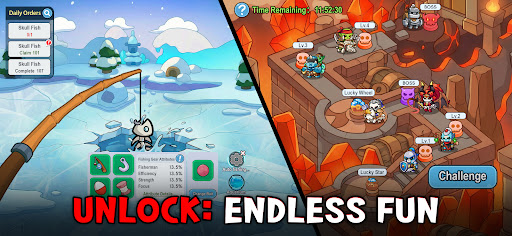
A rookie skull uncovered hidden treasures! In Skull Up, you can amass massive resources through management gameplay, or defeat mighty enemies with smart strategies. Join a guild and fight alongside your bone buddies! More content await—nonstop excitement guaranteed!
[Diverse Skellies, Boundless Power]
Gather various Skellies during your path to becoming the King! During this adventure, you will encounter over 60 unique Skellies with distinct looks and abilities. With diverse designs, they can be switched between human and skull forms, who are your strongest bone allies!
[Easy Progression, Loss-Free Growth]
Power up your companions without pressure: The loss-free progress system allows you to upgrade any Skelly—the resources can be fully refunded. Experiment freely, optimize your team, and achieve rapid power spikes with no investment wasted.
[Free Combinations, Smart Strategies]
Level up nonstop and show the king’s edge! Unlock your strategic potential and assemble a bone-powered team. Whether breaking defenses or providing support, every Skelly hides unique strengths— deploy them wisely!
[Idle Management, Effortless Rewards]
Future king, this undead castle is yours! Assign skull workers to smelt, log, and mine—gain massive EXP and valuable resources even while offline and level up with ease! With an idle strategy system, victory comes effortlessly!
แสดงเพิ่มเติม

1. ดาวน์โหลดตัวติดตั้ง MEmu และสิ้นสุดการติดตั้ง

2. เริ่ม MEmu จากนั้นเปิด Google Play บนหน้าแรก

3. ค้นหา Skull Up ใน Google Play
Install
4. ดาวน์โหลดและติดตั้ง Skull Up
5. เมื่อติดตั้งเสร็จให้คลิกที่ไอคอนเพื่อเริ่มใช้งาน

6. สนุกกับการเล่น Skull Up บนพีซีด้วย MEmu
MEmu App Player เป็นอีมูเลเตอร์ Android ที่ดีที่สุดและผู้คนกว่า 50 ล้านคนเพลิดเพลินไปกับประสบการณ์การเล่นเกม Android ที่ยอดเยี่ยม เทคโนโลยีการจำลองเสมือนของ MEmu ช่วยให้คุณเล่นเกม Android หลายพันเกมได้อย่างราบรื่นบนพีซีของคุณแม้แต่เกมที่ต้องใช้กราฟิกมากที่สุด
จอใหญ่และกราฟฟิกสวยกว่า; เล่นได้นาน, ไม่ต้องใช้แบตเตอรี่โทรศัพท์หรือเน็ตโทรศัพท์.
ระบบปรับแต่งปุ่มคีย์บอร์ดและเม้าส์ตามที่คุณเลือก
เล่นมากกว่าหนึ่งเกมบน PC ในเวลาเดียวกันด้วยระบบหลายจอหรือ Multi-Instance manager.
Play Skull Up on PC by following steps: