Navigraph Charts
Aktualisiert
Aktuelle Version
8.37.1
Angeboten von

Machen Sie sich keine Sorgen mehr über überhöhte Gebühren, wenn Sie Navigraph Charts auf Ihrem Mobiltelefon verwenden, befreien Sie sich von dem winzigen Bildschirm und genießen Sie die Nutzung der App auf einem viel größeren Display. Von nun an können Sie Ihre App mit Tastatur und Maus im Vollbildmodus nutzen. MEmu bietet Ihnen all die überraschenden Funktionen, die Sie erwartet haben: schnelle Installation und einfache Einrichtung, intuitive Steuerung, keine Einschränkungen mehr durch Batterie, mobile Daten und störende Anrufe. Der brandneue MEmu 9 ist die beste Wahl für die Nutzung von Navigraph Charts auf Ihrem Computer. Mit unserer Absorption kodiert, ermöglicht der Multi-Instanz-Manager die Eröffnung von 2 oder mehr Konten zur gleichen Zeit. Und das Wichtigste, unsere exklusive Emulations-Engine kann das volle Potenzial Ihres PCs freisetzen und alles reibungslos und angenehm gestalten.
Mehr anzeigen
Laden Sie Play Navigraph Charts auf dem PC mit MEmu Android Emulator. Viel Spaß beim Spielen auf großmundieren. Looking for the most comprehensive software solution for flight simulation?
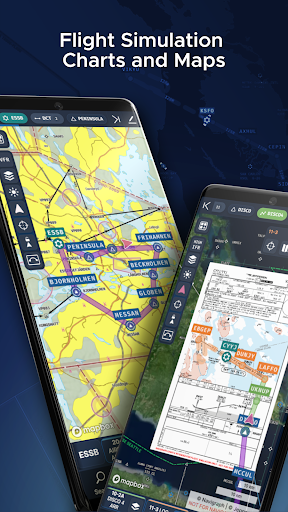
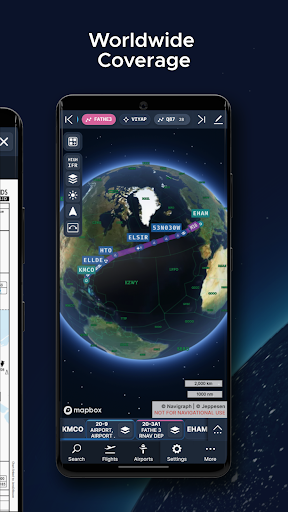
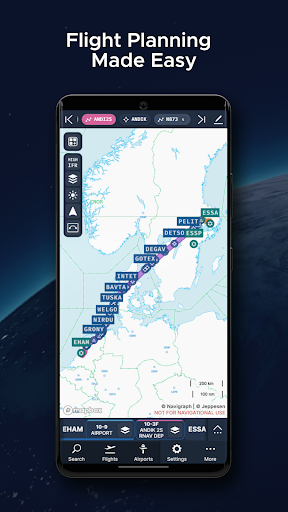
Looking for the most comprehensive software solution for flight simulation? Navigraph Charts is your co-pilot.
Navigraph Charts 8 has been developed with emphasis on delivering a seamless and intuitive experience, reducing the pilot workload in all phases of the simulated flight.
Why you'll always want Navigraph Charts with you in the cockpit:
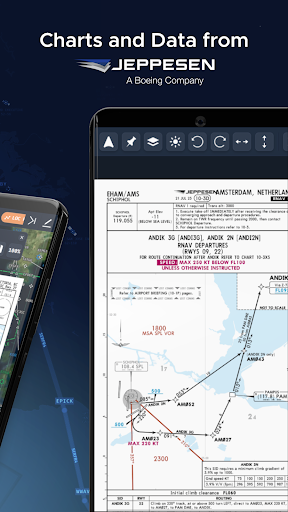
- Only provider of Jeppesen charts and navigation data for flight simulation.
- Access to IFR chart coverage at over 7,000 airport worldwide.
- Charts and data sourced from Jeppesen and updated every 28 days according to the AIRAC calendar.
- Largest dataset of its kind in the world.
- Most up-to-date and modern navigation software for flight simulation.
- Simulator sceneries, flight plans, charts, navigation systems, and addon software are all in sync with data from the same source.
- Great support.
New features in Navigraph Charts 8:
- Worldwide VFR Charts powered by Jeppesen VFR data
- Seamless Zoom
- 3D Globe Projection
- Autopinning of Procedure Charts
- Runway Crosswind and Airport Weather Information
- Vector Charts
Navigraph Unlimited features:
- Moving Maps
- Zoom all the way down to gate level.
- 3D globe projection helps visualize Great Circle distances and polar routes.
- Saves time and effort by automatically organizing relevant airport charts to pinboard.
- Weather information including runway crosswinds updated in real-time.
- No commitment - cancel any time you like.
Moving Maps compatible with Microsoft Flight Simulator, X-Plane and Prepar3d.
For the best user experience, we recommend using a tablet. Support for smaller displays is under development. Navigraph Charts is also available as a stand alone software on desktop computers, and can also be accessed on any web browser via https://charts.navigraph.com.
For complete terms of service, please visit https://navigraph.com/legal/terms-of-service
For privacy policy, please visit https://navigraph.com/legal/privacy-policy
Mehr anzeigen

1. Laden das MEmu-Installationsprogramm herunter und beenden die Installation

2. MEmu starten und Google Play auf der Homepage öffnen

3. Suchen Navigraph Charts in Google Play
Install
4. Herunterladen und Installieren Navigraph Charts
5. Klicken nach Abschluss der Installation auf das Symbol, um es zu starten

6. Verwenden Sie MEmu, um Navigraph Charts auf Ihrem PC zu nutzen
MEmu Play ist aktuell der beste kostenlose Android-Emulator und bietet 50 Millionen Nutzern ein überragendes Android-App-Erlebnis. Dank der Virtualisierungstechnologie von MEmu können Sie Tausende von Android-Apps problemlos auf Ihrem Computer nutzen, selbst solche mit hohen Grafikanforderungen.
BGrößeres Bild mit besserer Grafik; Keine unterbrechungen, keine sorgen um Akku
Komplette Tastenbelegung unterstützt mit Maus und Tastatur oder Controller
Mit dem „Multi-Instance-Manager“ können Sie mehrere Spielkonten oder Spiele gleichzeitig auf einem PC ausführen.
Use Navigraph Charts on PC by following steps: