Tongits Lite
Actualizada
Versión actual
2.2.4
Ofrecida por

Con toda tu pasión para jugar Tongits Lite, no se supone que tus manos estén limitadas en una pequeña pantalla de tu teléfono. Juega como un profesional y obtén el control total de tu juego con el teclado y el mouse. MEmu le ofrece todas las cosas que espera. Descargar y jugar Tongits Lite en PC. Juega todo el tiempo que quieras, sin más limitaciones de batería, datos móviles y llamadas molestas. El nuevo MEmu 9 es la mejor opción para jugar Tongits Lite en PC. Preparado con nuestra experiencia, el exquisito sistema de keymapping preestablecido convierte a Tongits Lite en un verdadero juego de PC. Codificado con nuestra absorción, el administrador de instancias múltiples hace posible jugar 2 o más cuentas en el mismo dispositivo. Y lo más importante, nuestro exclusivo motor de emulación puede liberar todo el potencial de su PC, hacer que todo sea más fluido. Nos importa no solo cómo juegas, sino también todo el proceso de disfrutar de la felicidad de los juegos.
Más detalles
Descargar Tongits Lite en PC con MEmu Android Emulador. Disfruta jugando en la pentalla grande. Tongits Lite is a three-player knock rummy game that has become popular in the northern Philippines in recent years.
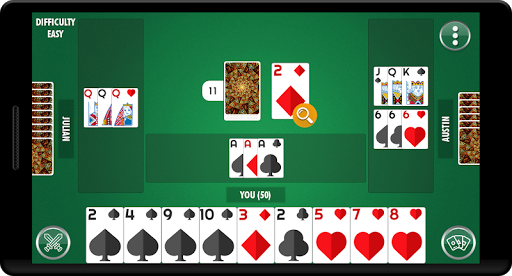
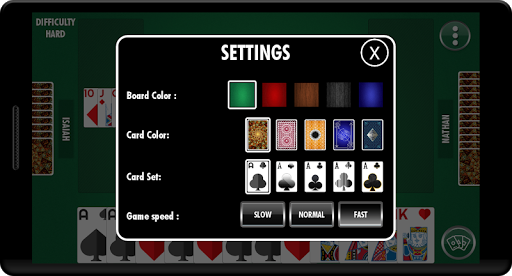
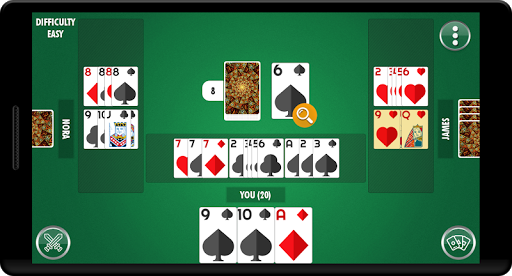
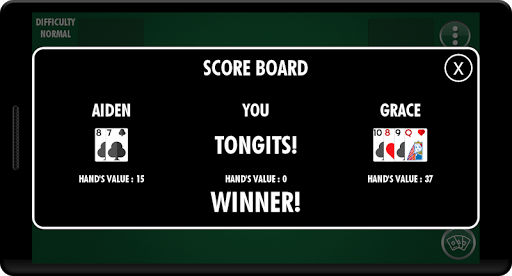
Tongits Lite is a three-player knock rummy game that has become popular in the northern Philippines in recent years.
Players & Cards
Tong-Its is a game for three players only, using one standard Anglo-American deck of 52 cards (without jokers). The cards in each suit rank: Ace 2 3 4 5 6 7 8 9 10 Jack Queen King. An Ace is worth 1 point, Jacks, Queens and Kings are worth 10 points each, and all other cards count their face value.
Objective
The object of the game is, by drawing and discarding, to form sets and runs, and to to minimize the count of unmatched cards remaining in your hand.
A run consists of three or more consecutive cards of the same suit, such as ♥4, ♥5, ♥6 or ♠8, ♠9, ♠10, ♠J. (A-K-Q of a suit is not a run since aces are low in this game).
A set consists of three or four cards of the same rank, such as ♥7, ♣7, ♦7. A card can belong to only one combination at a time - you cannot use the same card as part of both a set and a run.
The Deal
The first dealer is chosen randomly. Thereafter the dealer is the winner of the previous hand. The cards are dealt one at a time counterclockwise, starting with the dealer: thirteen cards to the dealer and twelve cards to each of the other players. The remainder of the deck is placed face down to form the stock.
The Play
Each turn consists of the following:
Draw You must begin by taking one card from either the top of the stock or the top card on the discard pile, and adding it to your hand. You may only take a card from the discard pile if you are able to create a meld (a set or run) with it, and you are then obliged to expose the meld.
Exposing Melds If you have a valid meld or melds (sets or runs) in your hand you can expose any of them on the table in front of you. Melding is optional if a card was taken from the stock; you are not obliged to expose a meld just because you can, and note that melds held in hand do not count against you at the end of the play. A player must lay at least one meld on the table for the hand to be considered opened. In the special case that you can meld a set of four and you have not drawn from the discard pile to complete the meld, you can lay the set of four down face down. By doing this you can "open" your hand without losing the bonus payments for a secret set of 4 and without revealing the cards to the other players.
Laying off (sapaw) This is also optional. If you wish, you may add cards to sets or runs previously melded by yourself or others. There is no limit to the number of cards a player may lay off in one turn. A player need not have opened their hand to lay off. Laying a card off on another player's exposed meld prevents that player from calling Draw on his or her next turn.
Discard At the end of your turn, one card must be discarded from your hand and placed on top of the discard pile face up.
Contact Us
To report any kind of issues with Tongits Lite, share your feedback and tell us how we can improve.
Email: support@emperoracestudios.com
Más detalles

1. Descargar el instalador de MEmu y finalice la instalación

2. Iniciar MEmu y abrir Google Play en la página de inicio

3. Buscar Tongits Lite en Google Play
Install
4. Descargar y instalar Tongits Lite
5. Hacer click al icono para iniciar

6. Disfruta jugando Tongits Lite en PC con MEmu
MEmu App Player es el mejor emulador de Android gratuito y 50 millones de personas ya están disfrutando su magnífica experiencia jugando en Android. La tecnología de virtualización de MEmu te permite jugar a miles de juegos Android suavemente en tu PC, incluso los más intensivos gráficamente.
Pantalla más grande con mejores gráficos; Larga duración, sin limitación de batería o datos móviles.
Soporte completo de keymapping para un control preciso del teclado y el mouse o gamepad.
Múltiples cuentas de juegos o tareas en una sola PC a la vez con el administrador de instancias múltiples.
Play Tongits Lite on PC by following steps: