ToSaVa - Master Color Theory
Actualizada
Versión actual
1.0.4
Ofrecida por

Con toda tu pasión para jugar ToSaVa - Master Color Theory, no se supone que tus manos estén limitadas en una pequeña pantalla de tu teléfono. Juega como un profesional y obtén el control total de tu juego con el teclado y el mouse. MEmu le ofrece todas las cosas que espera. Descargar y jugar ToSaVa - Master Color Theory en PC. Juega todo el tiempo que quieras, sin más limitaciones de batería, datos móviles y llamadas molestas. El nuevo MEmu 9 es la mejor opción para jugar ToSaVa - Master Color Theory en PC. Preparado con nuestra experiencia, el exquisito sistema de keymapping preestablecido convierte a ToSaVa - Master Color Theory en un verdadero juego de PC. Codificado con nuestra absorción, el administrador de instancias múltiples hace posible jugar 2 o más cuentas en el mismo dispositivo. Y lo más importante, nuestro exclusivo motor de emulación puede liberar todo el potencial de su PC, hacer que todo sea más fluido. Nos importa no solo cómo juegas, sino también todo el proceso de disfrutar de la felicidad de los juegos.
Más detalles
Descargar ToSaVa - Master Color Theory en PC con MEmu Android Emulador. Disfruta jugando en la pentalla grande. Master the art of color under pressure.
Master the art of color under pressure
ToSaVa is a fast-paced arcade puzzle designed specifically for digital artists, designers, and visual students. In this game, you don’t just play; you train your eyes and your brain to master the technical foundations of color theory in a high-pressure environment.
The Concept
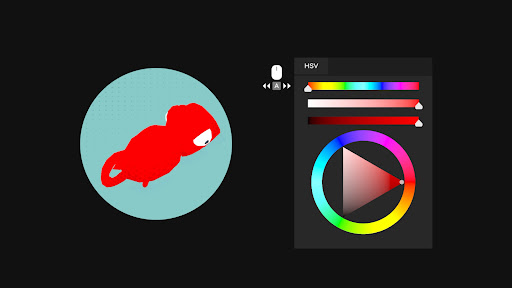
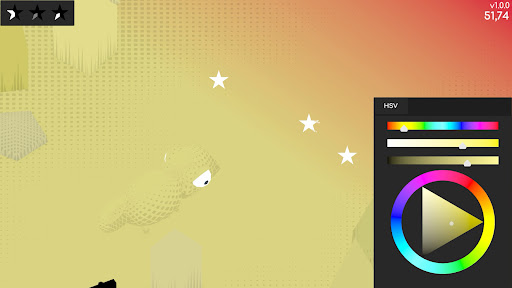
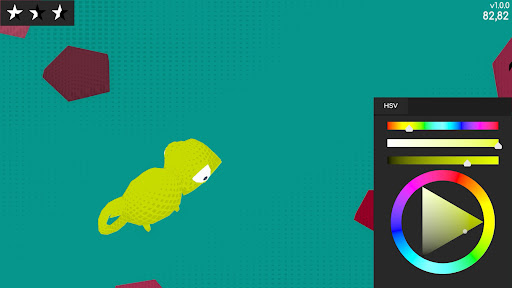
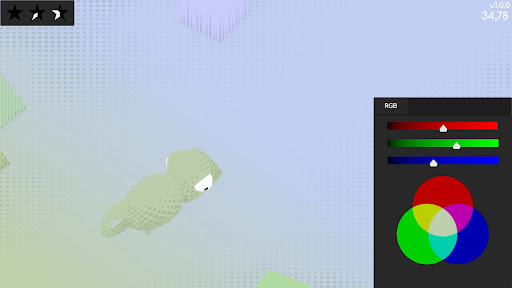
You are a chameleon in a constantly changing digital world. To move forward and stay safe, you must blend in perfectly with the ground. But there’s a catch: you don’t just pick a color from a palette—you must build it manually using professional color models. Achieve a "Perfect Match" to earn stars. Getting 5 stars in a row within the same color mode will allow you to progress and unlock more advanced game modes, from RGB to the challenging Lab space.
The Professional Artist's Training Ground
The entire User Interface (UI) has been meticulously designed to mimic industry-standard software like Adobe Photoshop, Illustrator, and After Effects. This makes the game a perfect bridge between theory and practice, allowing you to sharpen the skills you use every day in your professional workflow.
Key Features
Three Core Mastery Modes:
HSV: Learn to think in terms of Hue, Saturation, and Value.
RGB: Master the additive color model used in every digital screen.
Lab: Challenge yourself with the most advanced, perceptually accurate color space used by high-end professionals (L*a*b).
Arcade Pressure: It’s not just about accuracy; it’s about speed. Can you calculate the correct values before the time runs out?
Educational Foundation: Developed by a 3D Animation and Interactive Environments professor as a practical tool to gamify the learning of complex visual concepts.
Minimalist & Aesthetic Design: A clean, professional look that keeps you focused on the core mechanic: the science of color.
Why play ToSaVa?
Stop guessing hex codes and start understanding how color works. Whether you are a student trying to pass your color theory exam or a senior designer looking to sharpen your "color-picking" reflexes, this game transforms a complex technical skill into an addictive arcade experience.
Think you know color? Prove it.
Fun fact: ToSaVa stands for 'To, Saturació, Valor', which is Catalan for Hue, Saturation, Value. Also, my name is Tomàs Sala, and is my first game as a SoloDev, it could be like " Version Alpha". Both are ToSaVa...
Más detalles

1. Descargar el instalador de MEmu y finalice la instalación

2. Iniciar MEmu y abrir Google Play en la página de inicio

3. Buscar ToSaVa - Master Color Theory en Google Play
Install
4. Descargar y instalar ToSaVa - Master Color Theory
5. Hacer click al icono para iniciar

6. Disfruta jugando ToSaVa - Master Color Theory en PC con MEmu
MEmu App Player es el mejor emulador de Android gratuito y 50 millones de personas ya están disfrutando su magnífica experiencia jugando en Android. La tecnología de virtualización de MEmu te permite jugar a miles de juegos Android suavemente en tu PC, incluso los más intensivos gráficamente.
Pantalla más grande con mejores gráficos; Larga duración, sin limitación de batería o datos móviles.
Soporte completo de keymapping para un control preciso del teclado y el mouse o gamepad.
Múltiples cuentas de juegos o tareas en una sola PC a la vez con el administrador de instancias múltiples.
Play ToSaVa - Master Color Theory on PC by following steps: