PopMaker – Creator AI Tool
Actualizada
Versión actual
2.2.3
Ofrecida por

Deje de preocuparse por los recargos cuando use PopMaker – Creator AI Tool en su teléfono celular, libérese de la pequeña pantalla y disfrute usando la aplicación en una pantalla mucho más grande. A partir de ahora, obtenga una experiencia de pantalla completa de su aplicación con teclado y mouse. MEmu le ofrece todas las características sorprendentes que esperaba: instalación rápida y configuración fácil, controles intuitivos, no más limitaciones de batería, datos móviles y llamadas molestas. El nuevo MEmu 9 es la mejor opción para usar PopMaker – Creator AI Tool en su computadora. Codificado con nuestra absorción, el administrador de instancias múltiples hace posible abrir 2 o más cuentas al mismo tiempo. Y lo más importante, nuestro exclusivo motor de emulación puede liberar todo el potencial de su PC, hacer que todo sea fluido y agradable.
Más detalles
Disfruta de una experiencia increíble usando PopMaker – Creator AI Tool en tu PC con MEmu Play. Es un potente emulador de Android gratuito que te ofrece miles de aplicaciones de Android en su versión de escritorio. ¡Conéctate con tus amigos y optimiza tu trabajo! Popmaker is a content production platform built for social media creators.
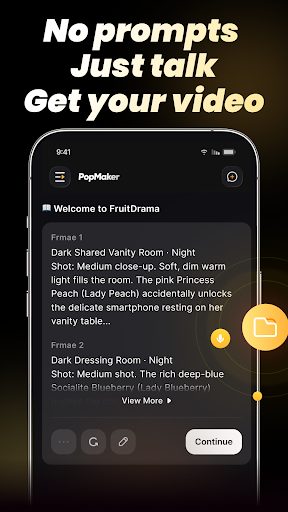
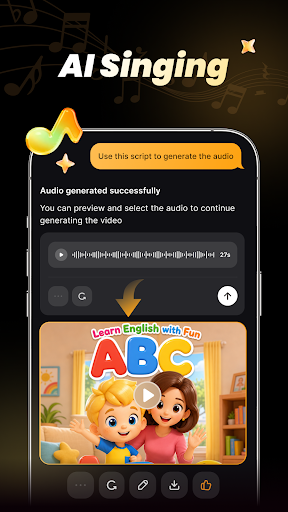
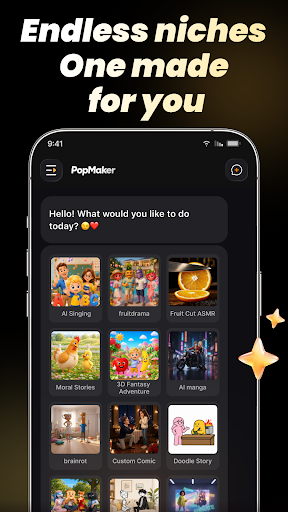
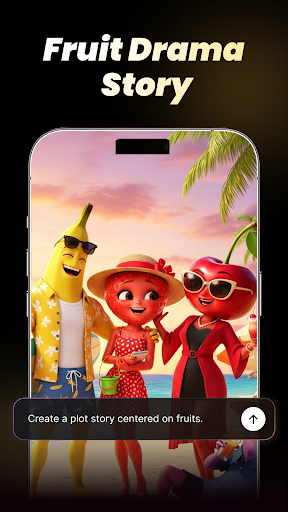
Popmaker is a content production platform built for social media creators. Combining cutting-edge technology with intelligent image generation and seamless video production, it offers a one-stop creative toolkit and a variety of AI models to help influencers effortlessly produce high-quality content.
Whether you're a full-time creator or focusing on niche content in your spare time, Popmaker empowers you to quickly build a vertical social media presence and enhance both audience value and engagement.
Creative Highlights:
[AI Pet Talk Show]Leveraging industry-leading visual understanding and rendering inference algorithms, Popmaker rapidly generates high-definition images and visual content from text or image prompts. Paired with speech synthesis and emotional tone matching, it enables pet characters to deliver dialogues that are not only contextually accurate but also humorous and clever. Simply upload a conversation script, choose a pet character and background scene, and AI will generate a lifelike pet dialogue video—making it easy to create engaging pet podcast content.
[Endless Possibilities with Pets]Harnessing the latest AI video generation technology, Popmaker can generate a wide variety of human-like behaviors—from cats doing nails and dogs scrolling on phones to animals practicing yoga. Every motion is rendered naturally and smoothly, offering creators a highly customizable content experience.
[AI Text-to-Vlog]Make narration and performance more authentic and natural. Turn any script into a vlog video in no time. Creators simply upload a script, select a virtual character and voice, and AI will generate vlog content—with facial expressions and gestures shifting dynamically based on the content—helping you break through traditional content creation barriers and achieve efficient, precise creation.
[Why Choose Us?]
Popmaker continuously evolves with the latest advancements in AI, offering cutting-edge creative tools and AI models. Every feature is tailored to meet the demands of industry trends and vertical account needs, ensuring you always have access to the newest tools that enhance your creative output, streamline your workflow, and elevate the professionalism of your content.
Join Popmaker to harness advanced AI creation support, break through technical barriers, rapidly expand your creative horizons, build a dedicated vertical channel, connect with your core audience, and unlock new opportunities in content creation.
Más detalles

1. Descargar el instalador de MEmu y finalice la instalación

2. Iniciar MEmu y abrir Google Play en la página de inicio

3. Buscar PopMaker – Creator AI Tool en Google Play
Install
4. Descargar y instalar PopMaker – Creator AI Tool
5. Hacer click al icono para iniciar

6. Experiencia PopMaker – Creator AI Tool en PC con MEmu
MEmu App Player es el mejor emulador de Android gratuito y 50 millones de personas ya están disfrutando su magnífica experiencia de aplicación en Android. La tecnología de virtualización de MEmu te permite jugar a miles de aplicaciones Android suavemente en tu PC, incluso los más intensivos gráficamente.
Pantalla más grande con mejores gráficos; Larga duración, sin limitación de batería o datos móviles.
Soporte completo de keymapping para un control preciso del teclado y el mouse o gamepad.
Múltiples cuentas de juegos o tareas en una sola PC a la vez con el administrador de instancias múltiples.
Use PopMaker – Creator AI Tool on PC by following steps: