Moonlighter 2: The Endless Vault
Mise à jour
Version actuelle
Proposée par

Avec toute la passion que vous avez à jouer Moonlighter 2: The Endless Vault, vos mains ne sont pas sensées se limiter à l’infime écran de votre téléphone. Jouez comme un pro et ayez le contrôle total de votre jeu à l’aide du clavier et de la souris. MEmu satisfait toutes vos attentes. Téléchargez et jouez Moonlighter 2: The Endless Vault sur PC. Jouez aussi longtemps que vous souhaitez sans aucune limitation de batterie, de données mobiles et d’appels embêtants. La toute nouvelle version de MEmu 9 est la meilleure option de jouer Moonlighter 2: The Endless Vault sur PC. Réalisé par nos experts, l’e magnifique système d’affectation de touches prédéfini fait de Moonlighter 2: The Endless Vault un jeu réaliste sur PC. Le gestionnaire multi-instances de MEmu permet 2 ou plusieurs comptes de jeu sur le même appareil. Et le plus important, le moteur d’émulation exclusif peut libérer le plein potentiel de votre PC, ce qui facilite tout.
Afficher plus
Téléchargez Moonlighter 2: The Endless Vault avec le simulateur d’Android MEmu sur votre PC. Profitez de jouer sur un grand écran. Moonlighter 2: The Endless Vault is the eagerly awaited sequel to the indie hit that masterfully blends dungeon crawling with shopkeeping.
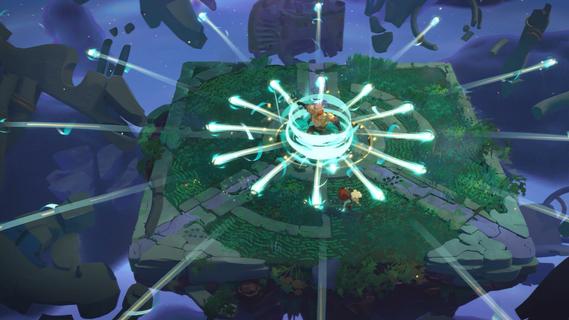

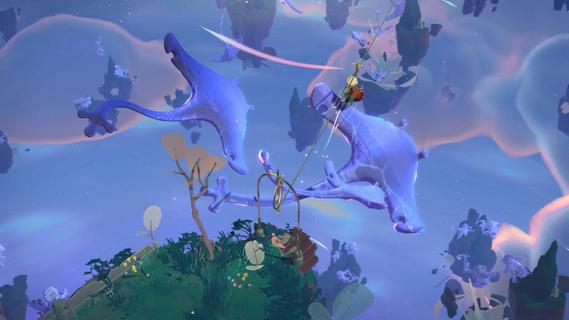
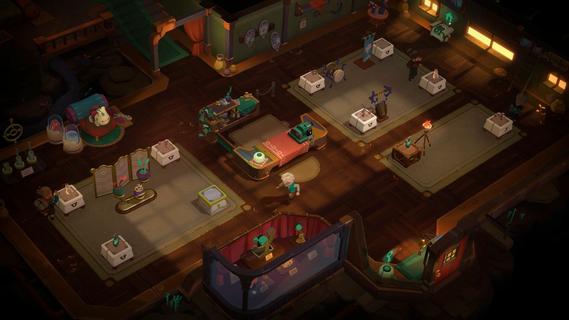
Moonlighter 2: The Endless Vault is the eagerly awaited sequel to the indie hit that masterfully blends dungeon crawling with shopkeeping. This new installment elevates the original’s core concept by transitioning from 2D pixel art to fully realized 3D graphics, offering a fresh, modern look while maintaining the charm that fans loved. Players once again step into the shoes of Will, a fearless adventurer and clever merchant, who finds himself stranded in the mysterious village of Tresna after losing his home dimension. In Moonlighter 2, players explore vibrant, procedurally generated dungeons filled with dynamic challenges, new enemies, and rare treasures. The roguelike elements have been deepened significantly, ensuring that no two runs are the same. This unpredictability demands that players constantly adapt their strategies, making each expedition thrilling and unique. Combat is more varied with a wider arsenal of weapons including swords, gauntlets, and even unconventional tools like brooms, each offering distinct playstyles to tackle the diverse foes encountered. Back in Tresna, the focus on shopkeeping is more dynamic and strategic than ever. Players must manage and grow their shop by carefully arranging relics in their inventory to maximize profits, haggling with customers, and investing earnings to upgrade both their store and equipment. The village itself is a living hub where players can support local businesses and unlock new opportunities, contributing to Tresna’s revival and their own commercial success. The game’s design encourages balancing the dual life of adventurer and merchant: venturing into dangerous realms to gather loot, then returning home to turn that loot into profit. This loop is enriched by a variety of upgrades, customization options, and temporary perks that keep gameplay engaging. The soundtrack, composed by Christopher Larkin of Hollow Knight fame, adds a memorable atmospheric layer that enhances both exploration and shopkeeping moments. Moonlighter 2: The Endless Vault is planned for release on PlayStation 5, Xbox Series X|S, and PC via Steam in 2025. With its expanded scope, refined mechanics, and captivating story, it promises to deliver a deep, rewarding experience for fans of action RPGs and roguelikes alike. Players will find themselves drawn into a world where every decision matters, every run is fresh, and the balance between blade and barter defines their fate.
Afficher plus

1. Téléchargez l'installateur MEmu et terminez l'installation

2. Démarrez MEmu puis ouvrez Google Play sur la page d'accueil

3. Recherchez Moonlighter 2: The Endless Vault dans Google Play
Install
4. Téléchargez et installez Moonlighter 2: The Endless Vault
5. Une fois l'installation terminée, cliquez sur l'icône pour démarrer

6. Profitez de jouer Moonlighter 2: The Endless Vault sur PC avec MEmu
Le lecteur d'application MEmu est le meilleur émulateur Android gratuit, et 50 millions de personnes profitent déjà de sa fantastique expérience de jeu Android. La technologie de virtualisation MEmu vous donne la possibilité de jouer à des milliers de jeux Android sur votre PC sans aucune difficulté, même aux plus gourmands.
L’écran plus grand avec de meilleurs graphismes; Une longue durée, sans limitation de batterie ou de données mobiles.
Soutien du Keymapping pour un contrôle précis du clavier et de la souris ou de la manette de jeu
Plusieurs comptes de jeu ou tâches sur un seul PC en même temps avec le gestionnaire de multi-instance.
Play Moonlighter 2: The Endless Vault on PC by following steps: