Moonlighter 2: The Endless Vault
อัปเดตเมื่อ
เวอร์ชันปัจจุบัน
ให้บริการโดย

เวลาคุณเล่น Moonlighter 2: The Endless Vault, คุณอาจรู้สึกว่ามือคุณอาจบังจอแล้วทำให้ไม่ได้เล่นแบบเต็มที่. เล่นแบบไร้ขีดจำกัดด้วยเม้าส์และคีย์บอร์ด. MEmu มีตัวเลือกหลายอย่างให้คุณใช้งานเกมที่คุณเล่นแบบที่คุณต้องการ. ดาวน์โหลดและเล่น Moonlighter 2: The Endless Vault บน PC. เล่นนานแค่ไหนก็ได้, ไม่ต้องชาร์จแบตเตอรี่, หรือเจอคนโทรเข้ามาระหว่างเล่น. MEmu 9 เป็นตัวเลือกสำหรับการเล่น Moonlighter 2: The Endless Vault บน PC. ทางทีมงานเราได้ปรับแต่งเกม, ปรับให้เล่นเกมบางเกมได้เหมือนเล่น Moonlighter 2: The Endless Vault เป็นเกม PC เช่นเล็งด้วยเม้าส์หรือใช้คีย์บอร์ด. ระบบของเรายังทำให้คุณสามารถเปิดเล่นได้มากกว่า 2 เกมพร้อมๆกันในคอมของคุณ. และที่สำคัญที่สุด, ระบบโปรแกรมของเราสามารถทำให้คุณใช้ระบบของ PC ทำให้เกมลื่นเหมือนกับใช้โทรศัพท์รุ่นล่าสุด. เราไม่ได้ดูแลเรื่องการเล่นเกม, แต่เราดูแลถึงความสนุกสนานที่คุณได้จากการเล่นด้วย.
แสดงเพิ่มเติม
ดาวน์โหลด Moonlighter 2: The Endless Vault บน PC ด้วย MEmu Android Emulator สนุกกับการเล่นบนหน้าจอขนาดใหญ่ Moonlighter 2: The Endless Vault is the eagerly awaited sequel to the indie hit that masterfully blends dungeon crawling with shopkeeping.
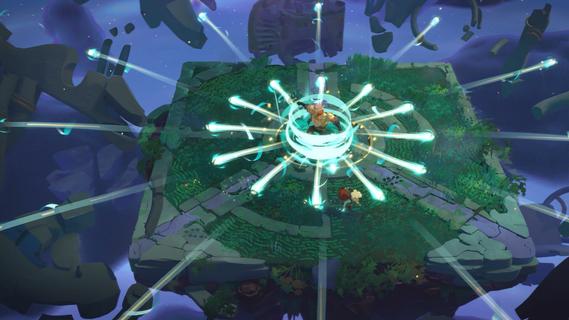
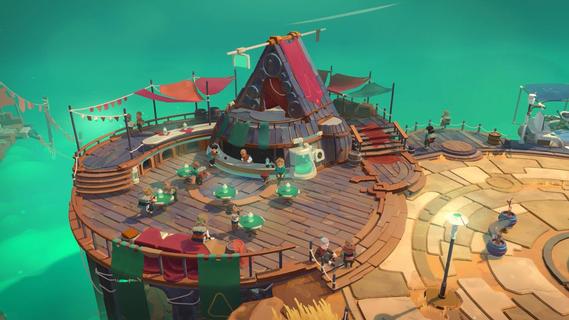
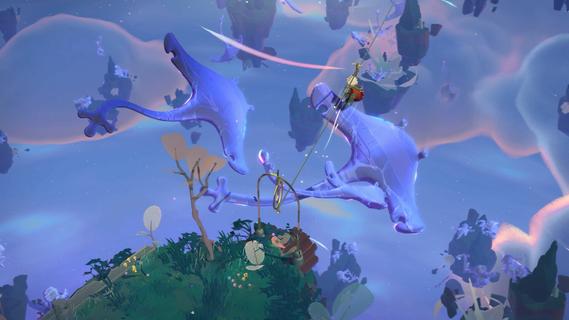
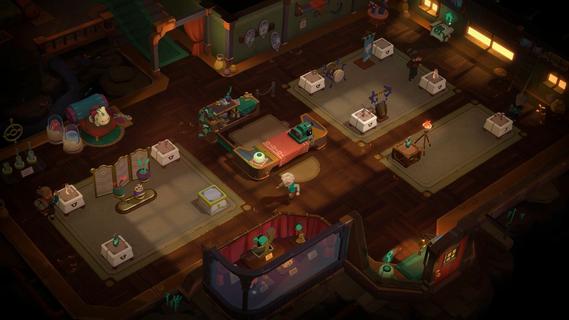
Moonlighter 2: The Endless Vault is the eagerly awaited sequel to the indie hit that masterfully blends dungeon crawling with shopkeeping. This new installment elevates the original’s core concept by transitioning from 2D pixel art to fully realized 3D graphics, offering a fresh, modern look while maintaining the charm that fans loved. Players once again step into the shoes of Will, a fearless adventurer and clever merchant, who finds himself stranded in the mysterious village of Tresna after losing his home dimension. In Moonlighter 2, players explore vibrant, procedurally generated dungeons filled with dynamic challenges, new enemies, and rare treasures. The roguelike elements have been deepened significantly, ensuring that no two runs are the same. This unpredictability demands that players constantly adapt their strategies, making each expedition thrilling and unique. Combat is more varied with a wider arsenal of weapons including swords, gauntlets, and even unconventional tools like brooms, each offering distinct playstyles to tackle the diverse foes encountered. Back in Tresna, the focus on shopkeeping is more dynamic and strategic than ever. Players must manage and grow their shop by carefully arranging relics in their inventory to maximize profits, haggling with customers, and investing earnings to upgrade both their store and equipment. The village itself is a living hub where players can support local businesses and unlock new opportunities, contributing to Tresna’s revival and their own commercial success. The game’s design encourages balancing the dual life of adventurer and merchant: venturing into dangerous realms to gather loot, then returning home to turn that loot into profit. This loop is enriched by a variety of upgrades, customization options, and temporary perks that keep gameplay engaging. The soundtrack, composed by Christopher Larkin of Hollow Knight fame, adds a memorable atmospheric layer that enhances both exploration and shopkeeping moments. Moonlighter 2: The Endless Vault is planned for release on PlayStation 5, Xbox Series X|S, and PC via Steam in 2025. With its expanded scope, refined mechanics, and captivating story, it promises to deliver a deep, rewarding experience for fans of action RPGs and roguelikes alike. Players will find themselves drawn into a world where every decision matters, every run is fresh, and the balance between blade and barter defines their fate.
แสดงเพิ่มเติม

1. ดาวน์โหลดตัวติดตั้ง MEmu และสิ้นสุดการติดตั้ง

2. เริ่ม MEmu จากนั้นเปิด Google Play บนหน้าแรก

3. ค้นหา Moonlighter 2: The Endless Vault ใน Google Play
Install
4. ดาวน์โหลดและติดตั้ง Moonlighter 2: The Endless Vault
5. เมื่อติดตั้งเสร็จให้คลิกที่ไอคอนเพื่อเริ่มใช้งาน

6. สนุกกับการเล่น Moonlighter 2: The Endless Vault บนพีซีด้วย MEmu
MEmu App Player เป็นอีมูเลเตอร์ Android ที่ดีที่สุดและผู้คนกว่า 50 ล้านคนเพลิดเพลินไปกับประสบการณ์การเล่นเกม Android ที่ยอดเยี่ยม เทคโนโลยีการจำลองเสมือนของ MEmu ช่วยให้คุณเล่นเกม Android หลายพันเกมได้อย่างราบรื่นบนพีซีของคุณแม้แต่เกมที่ต้องใช้กราฟิกมากที่สุด
จอใหญ่และกราฟฟิกสวยกว่า; เล่นได้นาน, ไม่ต้องใช้แบตเตอรี่โทรศัพท์หรือเน็ตโทรศัพท์.
ระบบปรับแต่งปุ่มคีย์บอร์ดและเม้าส์ตามที่คุณเลือก
เล่นมากกว่าหนึ่งเกมบน PC ในเวลาเดียวกันด้วยระบบหลายจอหรือ Multi-Instance manager.
Play Moonlighter 2: The Endless Vault on PC by following steps:
























![[ไกด์เกม] CookieRun Classic แนะนำ 5 คุกกี้น่าปั้น น่าลงทุน ที่มือใหม่ห้ามพลาด! (เล่นบน PC ผ่าน MEmu ให้ลื่นสุด ๆ) PC](https://www.memuplay.com/blog/wp-content/uploads/2026/08/579c01ab-a953-45b3-8115-9b6279b7d6f9.png)