PANDOLAND
Mise à jour
Version actuelle
3.3.0
Proposée par

Avec toute la passion que vous avez à jouer PANDOLAND, vos mains ne sont pas sensées se limiter à l’infime écran de votre téléphone. Jouez comme un pro et ayez le contrôle total de votre jeu à l’aide du clavier et de la souris. MEmu satisfait toutes vos attentes. Téléchargez et jouez PANDOLAND sur PC. Jouez aussi longtemps que vous souhaitez sans aucune limitation de batterie, de données mobiles et d’appels embêtants. La toute nouvelle version de MEmu 9 est la meilleure option de jouer PANDOLAND sur PC. Réalisé par nos experts, l’e magnifique système d’affectation de touches prédéfini fait de PANDOLAND un jeu réaliste sur PC. Le gestionnaire multi-instances de MEmu permet 2 ou plusieurs comptes de jeu sur le même appareil. Et le plus important, le moteur d’émulation exclusif peut libérer le plein potentiel de votre PC, ce qui facilite tout.
Afficher plus
Téléchargez PANDOLAND avec le simulateur d’Android MEmu sur votre PC. Profitez de jouer sur un grand écran. Launch Celebration Now & Unlock the Adventure!
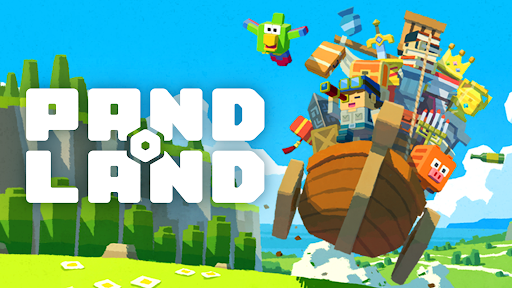

Launch Celebration Now & Unlock the Adventure!
Explore a vast open world your way—let the treasure hunt begin!
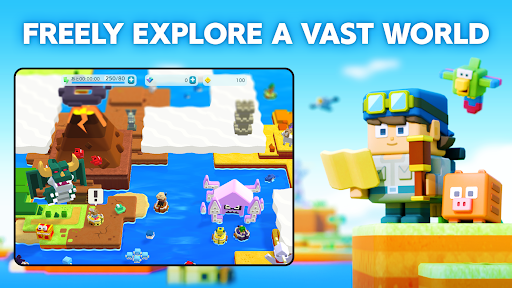
▼FREELY EXPLORE A VAST WORLD
Step into the uncharted lands of PANDOLAND, where you choose your own path!
Clear the clouds to reveal new territories, uncover hidden secrets, and set off on a journey filled with thrilling discoveries and unforgettable encounters!
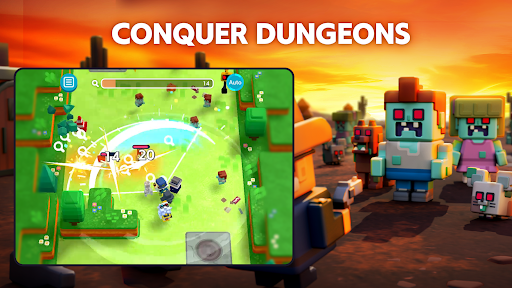
▼COLLECT, POWER-UP & CONQUER
Challenge dungeons to recruit unique companions and claim legendary treasures!
Keep collecting, filling up your Dex, and strengthening your team to take on greater challenges.
With over 500 companions and valuable treasures, create the ultimate team to explore new frontiers!
▼TEAM-UP FOR GREATER REWARDS
Adventure is better with friends! Invite your allies and connect with fellow explorers.
Track their Adventure Records to uncover rare quests and hidden treasures waiting to be found!
The world of PANDOLAND is yours to discover. Are you ready to embark on the journey?
▼Who Should Play PANDOLAND?
This adventure is perfect for:
✔ Fans of RPGs, adventure, action, casual, and open-world games
✔ Players who love collecting characters and leveling them up
✔ Gamers looking for an easy-to-pick-up, beginner-friendly experience
✔ Solo adventurers and multiplayer enthusiasts alike
✔ Those who enjoy teaming up with friends and family for epic quests
✔ Explorers who want a vast open world with player support
✔ Players seeking cooperative challenges and intense battles
✔ Fans of action RPGs with multiplayer co-op to take down powerful enemies
✔ Anyone who loves Action RPGs and collection games that are easy to play on the go
✔ Players who want both action-packed combat and deep character progression
✔ Gamers looking for a one-handed RPG/action/open-world experience
✔ Those who enjoy relaxing exploration with thrilling boss fights
▼Log-In Bonus Rewards
Start your journey with amazing in-game rewards!
- 15,000 Diamonds (Earned over 30 days of consecutive login)
- SR Character: Charlotte x1 (Highest Rarity!)
- SR Item: Meat on the Bone x1 (Boost Your Strength!)
- 500 Coins to kickstart your adventure!
The world of PANDOLAND is waiting. Launch celebration now and begin your adventure!
Official Website
Official YouTube
Official Facebook
Afficher plus

1. Téléchargez l'installateur MEmu et terminez l'installation

2. Démarrez MEmu puis ouvrez Google Play sur la page d'accueil

3. Recherchez PANDOLAND dans Google Play
Install
4. Téléchargez et installez PANDOLAND
5. Une fois l'installation terminée, cliquez sur l'icône pour démarrer

6. Profitez de jouer PANDOLAND sur PC avec MEmu
Le lecteur d'application MEmu est le meilleur émulateur Android gratuit, et 50 millions de personnes profitent déjà de sa fantastique expérience de jeu Android. La technologie de virtualisation MEmu vous donne la possibilité de jouer à des milliers de jeux Android sur votre PC sans aucune difficulté, même aux plus gourmands.
L’écran plus grand avec de meilleurs graphismes; Une longue durée, sans limitation de batterie ou de données mobiles.
Soutien du Keymapping pour un contrôle précis du clavier et de la souris ou de la manette de jeu
Plusieurs comptes de jeu ou tâches sur un seul PC en même temps avec le gestionnaire de multi-instance.
Play PANDOLAND on PC by following steps: