
PANDOLAND
อัปเดตเมื่อ
เวอร์ชันปัจจุบัน
3.2.0
ให้บริการโดย

เวลาคุณเล่น PANDOLAND, คุณอาจรู้สึกว่ามือคุณอาจบังจอแล้วทำให้ไม่ได้เล่นแบบเต็มที่. เล่นแบบไร้ขีดจำกัดด้วยเม้าส์และคีย์บอร์ด. MEmu มีตัวเลือกหลายอย่างให้คุณใช้งานเกมที่คุณเล่นแบบที่คุณต้องการ. ดาวน์โหลดและเล่น PANDOLAND บน PC. เล่นนานแค่ไหนก็ได้, ไม่ต้องชาร์จแบตเตอรี่, หรือเจอคนโทรเข้ามาระหว่างเล่น. MEmu 9 เป็นตัวเลือกสำหรับการเล่น PANDOLAND บน PC. ทางทีมงานเราได้ปรับแต่งเกม, ปรับให้เล่นเกมบางเกมได้เหมือนเล่น PANDOLAND เป็นเกม PC เช่นเล็งด้วยเม้าส์หรือใช้คีย์บอร์ด. ระบบของเรายังทำให้คุณสามารถเปิดเล่นได้มากกว่า 2 เกมพร้อมๆกันในคอมของคุณ. และที่สำคัญที่สุด, ระบบโปรแกรมของเราสามารถทำให้คุณใช้ระบบของ PC ทำให้เกมลื่นเหมือนกับใช้โทรศัพท์รุ่นล่าสุด. เราไม่ได้ดูแลเรื่องการเล่นเกม, แต่เราดูแลถึงความสนุกสนานที่คุณได้จากการเล่นด้วย.
แสดงเพิ่มเติม
ดาวน์โหลด PANDOLAND บน PC ด้วย MEmu Android Emulator สนุกกับการเล่นบนหน้าจอขนาดใหญ่ Pre-order Now & Unlock the Adventure!
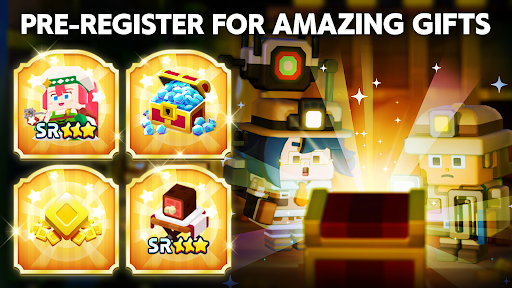
Pre-order Now & Unlock the Adventure!
Explore a vast open world your way—let the treasure hunt begin!
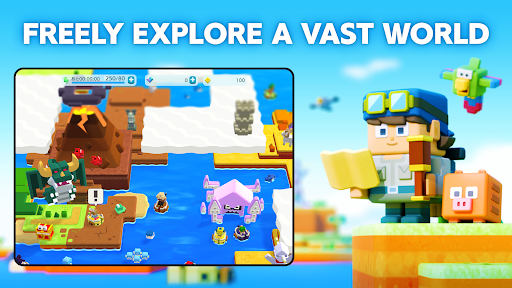
▼FREELY EXPLORE A VAST WORLD
Step into the uncharted lands of PANDOLAND, where you choose your own path!
Clear the clouds to reveal new territories, uncover hidden secrets, and set off on a journey filled with thrilling discoveries and unforgettable encounters!
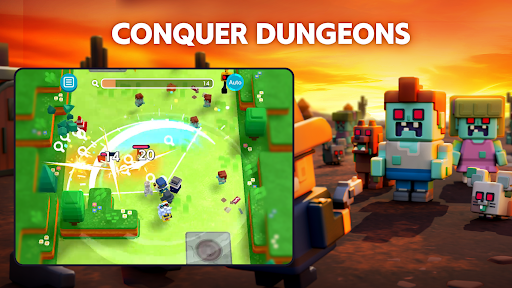
▼COLLECT, POWER-UP & CONQUER
Challenge dungeons to recruit unique companions and claim legendary treasures!
Keep collecting, filling up your Dex, and strengthening your team to take on greater challenges.
With over 500 companions and valuable treasures, create the ultimate team to explore new frontiers!
▼TEAM-UP FOR GREATER REWARDS
Adventure is better with friends! Invite your allies and connect with fellow explorers.
Track their Adventure Records to uncover rare quests and hidden treasures waiting to be found!
The world of PANDOLAND is yours to discover. Are you ready to embark on the journey?
▼Who Should Play PANDOLAND?
This adventure is perfect for:
✔ Fans of RPGs, adventure, action, casual, and open-world games
✔ Players who love collecting characters and leveling them up
✔ Gamers looking for an easy-to-pick-up, beginner-friendly experience
✔ Solo adventurers and multiplayer enthusiasts alike
✔ Those who enjoy teaming up with friends and family for epic quests
✔ Explorers who want a vast open world with player support
✔ Players seeking cooperative challenges and intense battles
✔ Fans of action RPGs with multiplayer co-op to take down powerful enemies
✔ Anyone who loves Action RPGs and collection games that are easy to play on the go
✔ Players who want both action-packed combat and deep character progression
✔ Gamers looking for a one-handed RPG/action/open-world experience
✔ Those who enjoy relaxing exploration with thrilling boss fights
▼Pre-order Bonus Rewards
Start your journey with amazing in-game rewards!
- 15,000 Diamonds (Earned over 30 days of consecutive login)
- SR Character: Charlotte x1 (Highest Rarity!)
- SR Item: Meat on the Bone x1 (Boost Your Strength!)
- 500 Coins to kickstart your adventure!
The world of PANDOLAND is waiting. Pre-order now and begin your adventure!
Official Website
Official YouTube
Official Facebook
แสดงเพิ่มเติม

1. ดาวน์โหลดตัวติดตั้ง MEmu และสิ้นสุดการติดตั้ง

2. เริ่ม MEmu จากนั้นเปิด Google Play บนหน้าแรก

3. ค้นหา PANDOLAND ใน Google Play
Install
4. ดาวน์โหลดและติดตั้ง PANDOLAND
5. เมื่อติดตั้งเสร็จให้คลิกที่ไอคอนเพื่อเริ่มใช้งาน

6. สนุกกับการเล่น PANDOLAND บนพีซีด้วย MEmu
MEmu App Player เป็นอีมูเลเตอร์ Android ที่ดีที่สุดและผู้คนกว่า 50 ล้านคนเพลิดเพลินไปกับประสบการณ์การเล่นเกม Android ที่ยอดเยี่ยม เทคโนโลยีการจำลองเสมือนของ MEmu ช่วยให้คุณเล่นเกม Android หลายพันเกมได้อย่างราบรื่นบนพีซีของคุณแม้แต่เกมที่ต้องใช้กราฟิกมากที่สุด
จอใหญ่และกราฟฟิกสวยกว่า; เล่นได้นาน, ไม่ต้องใช้แบตเตอรี่โทรศัพท์หรือเน็ตโทรศัพท์.
ระบบปรับแต่งปุ่มคีย์บอร์ดและเม้าส์ตามที่คุณเลือก
เล่นมากกว่าหนึ่งเกมบน PC ในเวลาเดียวกันด้วยระบบหลายจอหรือ Multi-Instance manager.
Play PANDOLAND on PC by following steps: