PANDOLAND
Aktualisiert
Aktuelle Version
3.3.0
Angeboten von

Bei all Ihrer Leidenschaft für das Spielen von PANDOLAND sollten Ihre Hände nicht auf einen winzigen Bildschirm Ihres Telefons beschränkt sein. Spielen Sie wie ein Profi und übernehmen Sie die volle Kontrolle über Ihr Spiel mit Tastatur und Maus. MEmu bietet Ihnen all die Dinge, die Sie erwarten. Laden Sie PANDOLAND herunter und spielen Sie es auf dem PC. Spielen Sie so lange, wie Sie wollen, ohne Grenzwerte für Akku, mobile Daten und störende Anrufe. Das brandneue MEmu 9 ist die beste Wahl, um PANDOLAND auf dem PC zu spielen. Das exquisite voreingestellte Tastaturbelegungssystem, das mit unserem Fachwissen vorbereitet wurde, macht PANDOLAND zu einem echten PC-Spiel. Der MEmu Multi-Instanz-Manager ermöglicht das Spielen von 2 oder mehr Konten auf demselben Gerät. Und das Wichtigste: Unsere exklusive Emulations-Engine kann das volle Potenzial Ihres PCs freisetzen und für reibungslose Abläufe sorgen.
Mehr anzeigen
Laden Sie Play PANDOLAND auf dem PC mit MEmu Android Emulator. Viel Spaß beim Spielen auf großmundieren. Launch Celebration Now & Unlock the Adventure!
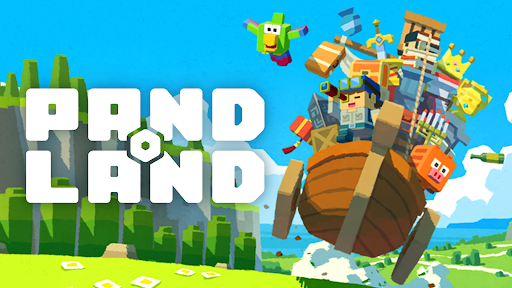

Launch Celebration Now & Unlock the Adventure!
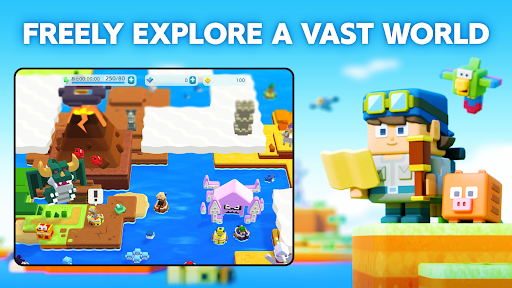
Explore a vast open world your way—let the treasure hunt begin!
▼FREELY EXPLORE A VAST WORLD
Step into the uncharted lands of PANDOLAND, where you choose your own path!
Clear the clouds to reveal new territories, uncover hidden secrets, and set off on a journey filled with thrilling discoveries and unforgettable encounters!
▼COLLECT, POWER-UP & CONQUER
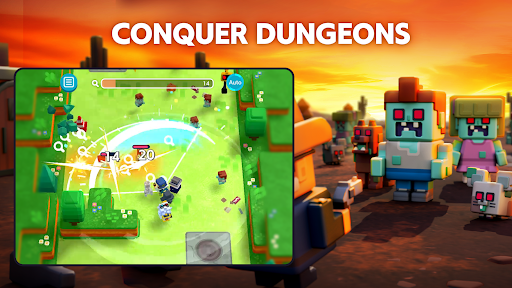
Challenge dungeons to recruit unique companions and claim legendary treasures!
Keep collecting, filling up your Dex, and strengthening your team to take on greater challenges.
With over 500 companions and valuable treasures, create the ultimate team to explore new frontiers!
▼TEAM-UP FOR GREATER REWARDS
Adventure is better with friends! Invite your allies and connect with fellow explorers.
Track their Adventure Records to uncover rare quests and hidden treasures waiting to be found!
The world of PANDOLAND is yours to discover. Are you ready to embark on the journey?
▼Who Should Play PANDOLAND?
This adventure is perfect for:
✔ Fans of RPGs, adventure, action, casual, and open-world games
✔ Players who love collecting characters and leveling them up
✔ Gamers looking for an easy-to-pick-up, beginner-friendly experience
✔ Solo adventurers and multiplayer enthusiasts alike
✔ Those who enjoy teaming up with friends and family for epic quests
✔ Explorers who want a vast open world with player support
✔ Players seeking cooperative challenges and intense battles
✔ Fans of action RPGs with multiplayer co-op to take down powerful enemies
✔ Anyone who loves Action RPGs and collection games that are easy to play on the go
✔ Players who want both action-packed combat and deep character progression
✔ Gamers looking for a one-handed RPG/action/open-world experience
✔ Those who enjoy relaxing exploration with thrilling boss fights
▼Log-In Bonus Rewards
Start your journey with amazing in-game rewards!
- 15,000 Diamonds (Earned over 30 days of consecutive login)
- SR Character: Charlotte x1 (Highest Rarity!)
- SR Item: Meat on the Bone x1 (Boost Your Strength!)
- 500 Coins to kickstart your adventure!
The world of PANDOLAND is waiting. Launch celebration now and begin your adventure!
Official Website
Official YouTube
Official Facebook
Mehr anzeigen

1. Laden das MEmu-Installationsprogramm herunter und beenden die Installation

2. MEmu starten und Google Play auf der Homepage öffnen

3. Suchen PANDOLAND in Google Play
Install
4. Herunterladen und Installieren PANDOLAND
5. Klicken nach Abschluss der Installation auf das Symbol, um es zu starten

6. Viel Spaß beim Spielen von PANDOLAND auf dem PC mit MEmu
MEmu App Player ist der beste kostenlose Android-Emulator und 50 Millionen Menschen genießen bereits seine hervorragende Android-Gaming-Erfahrung. Mit der MEmu-Virtualisierungstechnologie können Sie Tausende von Android-Spielen problemlos auf Ihrem PC spielen, selbst bei grafikintensiven Spielen.
BGrößeres Bild mit besserer Grafik; Keine unterbrechungen, keine sorgen um Akku
Komplette Tastenbelegung unterstützt mit Maus und Tastatur oder Controller
Mit dem „Multi-Instance-Manager“ können Sie mehrere Spielkonten oder Spiele gleichzeitig auf einem PC ausführen.
Play PANDOLAND on PC by following steps: