PANDOLAND
Actualizada
Versión actual
3.3.0
Ofrecida por

Con toda tu pasión para jugar PANDOLAND, no se supone que tus manos estén limitadas en una pequeña pantalla de tu teléfono. Juega como un profesional y obtén el control total de tu juego con el teclado y el mouse. MEmu le ofrece todas las cosas que espera. Descargar y jugar PANDOLAND en PC. Juega todo el tiempo que quieras, sin más limitaciones de batería, datos móviles y llamadas molestas. El nuevo MEmu 9 es la mejor opción para jugar PANDOLAND en PC. Preparado con nuestra experiencia, el exquisito sistema de keymapping preestablecido convierte a PANDOLAND en un verdadero juego de PC. Codificado con nuestra absorción, el administrador de instancias múltiples hace posible jugar 2 o más cuentas en el mismo dispositivo. Y lo más importante, nuestro exclusivo motor de emulación puede liberar todo el potencial de su PC, hacer que todo sea más fluido. Nos importa no solo cómo juegas, sino también todo el proceso de disfrutar de la felicidad de los juegos.
Más detalles
Descargar PANDOLAND en PC con MEmu Android Emulador. Disfruta jugando en la pentalla grande. Launch Celebration Now & Unlock the Adventure!
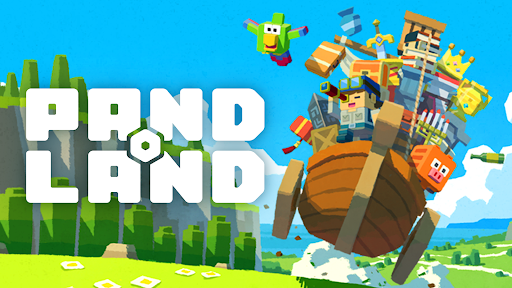

Launch Celebration Now & Unlock the Adventure!
Explore a vast open world your way—let the treasure hunt begin!
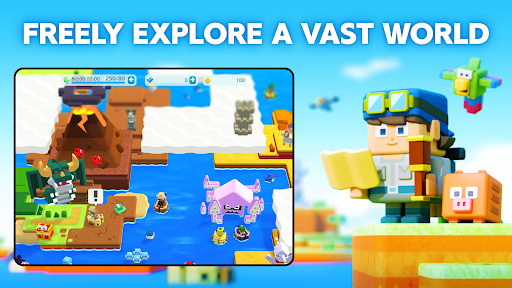
▼FREELY EXPLORE A VAST WORLD
Step into the uncharted lands of PANDOLAND, where you choose your own path!
Clear the clouds to reveal new territories, uncover hidden secrets, and set off on a journey filled with thrilling discoveries and unforgettable encounters!
▼COLLECT, POWER-UP & CONQUER
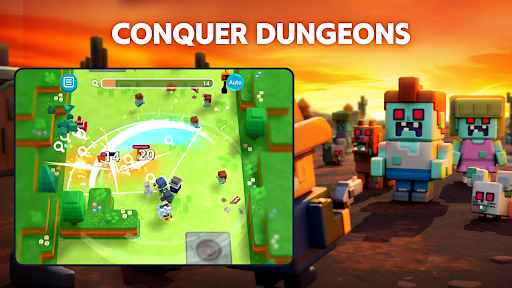
Challenge dungeons to recruit unique companions and claim legendary treasures!
Keep collecting, filling up your Dex, and strengthening your team to take on greater challenges.
With over 500 companions and valuable treasures, create the ultimate team to explore new frontiers!
▼TEAM-UP FOR GREATER REWARDS
Adventure is better with friends! Invite your allies and connect with fellow explorers.
Track their Adventure Records to uncover rare quests and hidden treasures waiting to be found!
The world of PANDOLAND is yours to discover. Are you ready to embark on the journey?
▼Who Should Play PANDOLAND?
This adventure is perfect for:
✔ Fans of RPGs, adventure, action, casual, and open-world games
✔ Players who love collecting characters and leveling them up
✔ Gamers looking for an easy-to-pick-up, beginner-friendly experience
✔ Solo adventurers and multiplayer enthusiasts alike
✔ Those who enjoy teaming up with friends and family for epic quests
✔ Explorers who want a vast open world with player support
✔ Players seeking cooperative challenges and intense battles
✔ Fans of action RPGs with multiplayer co-op to take down powerful enemies
✔ Anyone who loves Action RPGs and collection games that are easy to play on the go
✔ Players who want both action-packed combat and deep character progression
✔ Gamers looking for a one-handed RPG/action/open-world experience
✔ Those who enjoy relaxing exploration with thrilling boss fights
▼Log-In Bonus Rewards
Start your journey with amazing in-game rewards!
- 15,000 Diamonds (Earned over 30 days of consecutive login)
- SR Character: Charlotte x1 (Highest Rarity!)
- SR Item: Meat on the Bone x1 (Boost Your Strength!)
- 500 Coins to kickstart your adventure!
The world of PANDOLAND is waiting. Launch celebration now and begin your adventure!
Official Website
Official YouTube
Official Facebook
Más detalles

1. Descargar el instalador de MEmu y finalice la instalación

2. Iniciar MEmu y abrir Google Play en la página de inicio

3. Buscar PANDOLAND en Google Play
Install
4. Descargar y instalar PANDOLAND
5. Hacer click al icono para iniciar

6. Disfruta jugando PANDOLAND en PC con MEmu
MEmu App Player es el mejor emulador de Android gratuito y 50 millones de personas ya están disfrutando su magnífica experiencia jugando en Android. La tecnología de virtualización de MEmu te permite jugar a miles de juegos Android suavemente en tu PC, incluso los más intensivos gráficamente.
Pantalla más grande con mejores gráficos; Larga duración, sin limitación de batería o datos móviles.
Soporte completo de keymapping para un control preciso del teclado y el mouse o gamepad.
Múltiples cuentas de juegos o tareas en una sola PC a la vez con el administrador de instancias múltiples.
Play PANDOLAND on PC by following steps: