Panophobia
Mise à jour
Version actuelle
Proposée par

Avec toute la passion que vous avez à jouer Panophobia, vos mains ne sont pas sensées se limiter à l’infime écran de votre téléphone. Jouez comme un pro et ayez le contrôle total de votre jeu à l’aide du clavier et de la souris. MEmu satisfait toutes vos attentes. Téléchargez et jouez Panophobia sur PC. Jouez aussi longtemps que vous souhaitez sans aucune limitation de batterie, de données mobiles et d’appels embêtants. La toute nouvelle version de MEmu 9 est la meilleure option de jouer Panophobia sur PC. Réalisé par nos experts, l’e magnifique système d’affectation de touches prédéfini fait de Panophobia un jeu réaliste sur PC. Le gestionnaire multi-instances de MEmu permet 2 ou plusieurs comptes de jeu sur le même appareil. Et le plus important, le moteur d’émulation exclusif peut libérer le plein potentiel de votre PC, ce qui facilite tout.
Afficher plus
Téléchargez Panophobia avec le simulateur d’Android MEmu sur votre PC. Profitez de jouer sur un grand écran. Panophobia Game is a horror-themed mobile game built for Android, mixing psychological suspense with story-driven chaos.
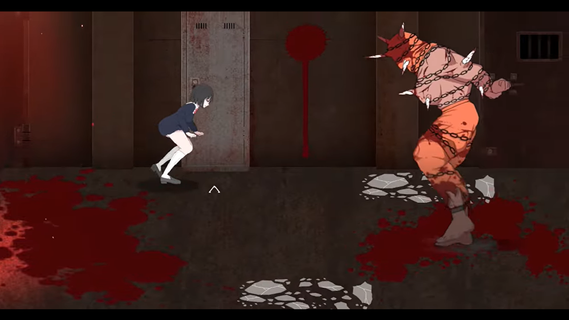
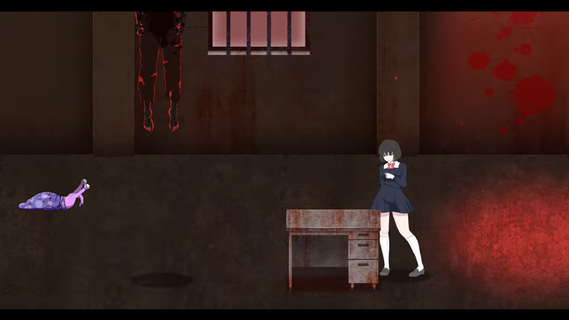
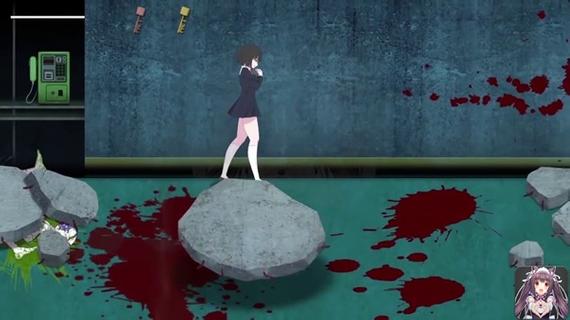

Panophobia Game is a horror-themed mobile game built for Android, mixing psychological suspense with story-driven chaos. It's not your typical casual tap-and-swipe kind of app â this one dives deep into a twisted narrative filled with fear triggers, jump scares, and survival puzzles. With intense storytelling and choice-based mechanics, it blends atmospheric tension with eerie visuals that keep your nerves on edge.Panophobia thrives on unpredictability. You're thrown into a nightmarish world where fear isnât just an emotion â itâs the main mechanic. Each level is packed with clues, creepy visuals, and decision-making moments that can shift the entire flow of the game. Itâs less about flashy action and more about the pressure cooker feeling of being trapped in your own dread.The artwork is where it really pops. The developers put in serious work crafting a visual language that messes with your head. Shadows stretch a little too far, and figures in the corner of your eye feel just real enough to make you question everything. Itâs designed to keep you unsteady, right from the first tap.Youâll also find yourself making decisions that ripple through the story. Your actions matter â which makes every choice you make kinda stressful, in the best way possible. Youâre not just surviving monsters or dodging traps; youâre unraveling a web of phobias and psychological horror that plays out differently depending on how bold (or reckless) you are.Even though the mechanics are simple to grasp â mostly touch, drag, or swipe â the intensity ramps up quickly. You wonât spend time learning a bunch of controls. Instead, the focus is on your reaction speed, instincts, and how well you handle pressure in the dark.The multiplayer mode is a plot twist on its own. Connecting with friends or strangers adds a layer of unpredictable chaos. Sometimes it helps. Sometimes it makes the fear worse. But thatâs what makes it so fun â or terrifying â depending on your vibe.
Afficher plus

1. Téléchargez l'installateur MEmu et terminez l'installation

2. Démarrez MEmu puis ouvrez Google Play sur la page d'accueil

3. Recherchez Panophobia dans Google Play
Install
4. Téléchargez et installez Panophobia
5. Une fois l'installation terminée, cliquez sur l'icône pour démarrer

6. Profitez de jouer Panophobia sur PC avec MEmu
Le lecteur d'application MEmu est le meilleur émulateur Android gratuit, et 50 millions de personnes profitent déjà de sa fantastique expérience de jeu Android. La technologie de virtualisation MEmu vous donne la possibilité de jouer à des milliers de jeux Android sur votre PC sans aucune difficulté, même aux plus gourmands.
L’écran plus grand avec de meilleurs graphismes; Une longue durée, sans limitation de batterie ou de données mobiles.
Soutien du Keymapping pour un contrôle précis du clavier et de la souris ou de la manette de jeu
Plusieurs comptes de jeu ou tâches sur un seul PC en même temps avec le gestionnaire de multi-instance.
Play Panophobia on PC by following steps: